

Driver: Driving & Dash Cam App
Driver Technologies Inc. Navigation iPhoneiPadiPod touch
Driver: Driving & Dash Cam App is a free Navigation app for iPhone and iPad by Driver Technologies Inc. Rated 4.6/5 from 12,833 ratings. Requires iOS 18.0.
- Rating
- 4.6
- 12.8K ratings
- Price
- Free
- on the App Store
- Size
- 84 MB
- Age 4+
- Updated
- Sep 19
- 2026 · v7.1.1
Screenshots
About Driver: Driving & Dash Cam App
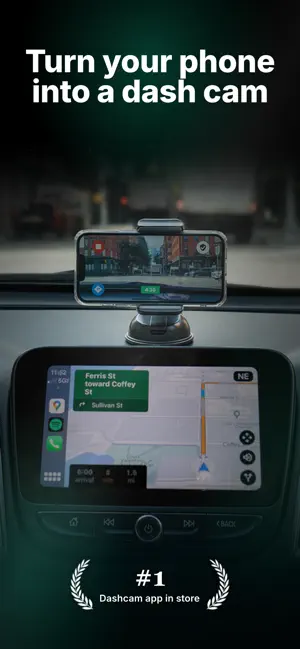
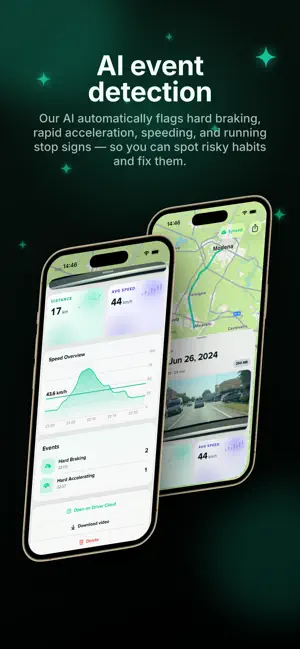
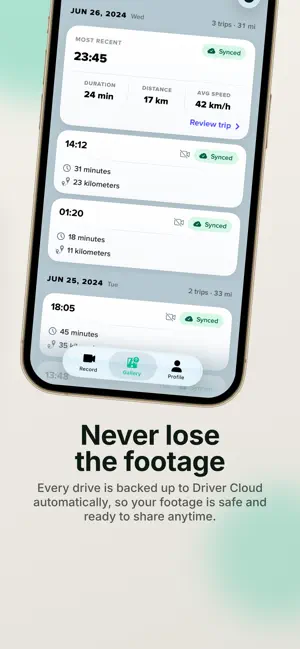
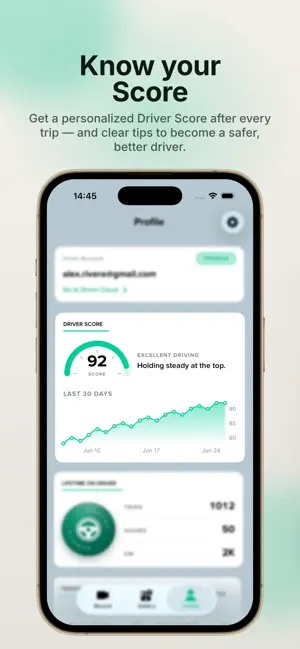
Driver is here to ensure you’re taken care of on the road. Driver offers a fully connected driving experience through our Cloud + App platform, covering liability protection, roadside services, claims assistance, speedometer, driver education, legal and vehicle support, partner deals, and more. The Driver App has two primary modes for liability protection: 1) Dash Cam 2) Pocket Drives. In both modes, your trips are fully enriched with location, speed, G-force, weather, and telematic events and are automatically uploaded to the Driver Cloud after the end of your drive. Sharing a trip with your insurance, boss, or family is as easy as sending a URL link to your trip on the Driver Cloud. DASH CAM MODE with Apple CarPlay: Driver Cloud Historical View Backup full length HD videos of all your trips to the Driver Cloud with a 90-day lookback Clip Capture Bookmark a 1-minute segment of your trip for easy access Dual Camera Record external & internal video simultaneously on iPhone XS or newer. Automatic Storage Management Driver App automatically deletes all trips successfully uploaded to the Cloud after 2 days to save space on your phone. POCKET DRIVES MODE: All the data you need to share your story minus video. The perfect companion for outdated hardware dash cams or for days when your phone is left in your pocket. DRIVER PREMIUM: Gain peace of mind knowing you’ve got your back covered. - Store HD versions of your trips on the cloud by uploading over Wi-Fi - Get roadside assistance 24/7 throughout the U.S. within 15-30 minutes (U.S. only) - A tree planted every month - Camera and video customization options - Free Driver Cooler to use Driver in Dash Cam mode (Limited time offer, available only on annual plans, U.S. only) DRIVER AI: Driver uses machine learning algorithms to automatically capture hard braking, hard accelerations, speeding, near accidents, unsafe following events, and more. Data is knowledge and can be used by anyone to become a safer driver. TIPS: - Connect your phone to Apple CarPlay to use Driver in Dash Cam Mode alongside your preferred navigation and music apps - Use a dash mount that allows Dash Cam mode to record in landscape - For longer trips, keep your phones plugged into your charger (USB cable) - During hot summer days, avoid prolonged exposure to direct sunlight ABOUT DRIVER: At Driver, our mission is to make driving safer and smarter for everyone. The non-paid version of the App is ad-free and absolutely free. Please check out https://www.drivertechnologies.com to learn more about Driver’s product offerings. We will charge your iTunes account when you purchase a Premium subscription plan. Your account will automatically be charged for renewal within 24-hours prior to the end of the current subscription period unless you disable auto-renew. You can turn off auto-renewal at any time by going to your Account Settings on the App Store after purchase. Privacy Policy: https://www.drivertechnologies.com/how-we-protect-your-privacy Terms and Conditions: https://www.drivertechnologies.com/terms-and-conditions ============ Note: GPS is required. Like other GPS-based apps, continued use of GPS running in the background can hurt your device’s battery life. Other factors, such as temperature, battery health, and other apps running in the background can also affect battery performance. Terms of Use (EULA): https://www.apple.com/legal/internet-services/itunes/dev/stdeula/
Ratings & reviews
4.6
12.8K ratings
What’s new
Version 7.1.1 · Updated September 19, 2026
Your whole drive history, in one place. • Cloud Gallery: every drive you've uploaded now appears in the app. Tap any of them to watch, even if you recorded it on a phone you no longer have. • Sharper alerts: running a stop sign and near-misses now show up alongside your other events. • Recorded on: each trip shows the device that captured it, so you can tell your drives apart at a glance.
App privacy
The developer, Driver Technologies Inc., reported these privacy practices to Apple.
Data Used to Track You
The following data may be used to track you across apps and websites owned by other companies:
- Usage Data: Other Usage Data
Data Linked to You
The following data, which may be collected and linked to your identity, may be used for the following purposes:
- Identifiers: User ID
- Usage Data: Product Interaction, Other Usage Data
- Contact Info: Email Address
- Location: Coarse Location, Precise Location
- Diagnostics: Crash Data
- Other Data: Other Data Types
Used for: Third-Party Advertising, Developer’s Advertising or Marketing, Analytics, Product Personalization, App Functionality, Other Purposes
Data Not Linked to You
The following data, which may be collected but is not linked to your identity, may be used for the following purposes:
- Diagnostics: Other Diagnostic Data
Used for: Analytics
Alternatives to Driver: Driving & Dash Cam App
Looking for apps like Driver: Driving & Dash Cam App? Here are 6 similar apps on the App Store. The highest rated is DashCam Recorder (4.5/5), and all 6 are free to download.
-
 DashCam Recorder
4.5
DashCam Recorder
4.5
-
 Nexar Classic
4.4
Nexar Classic
4.4
-
 EarthLive: GPS Map Camera
4.4
EarthLive: GPS Map Camera
4.4
-
 Kintra - GPS Location Share
4.2
Kintra - GPS Location Share
4.2
-
 GlobeScope: GPS Map Camera
3.6
GlobeScope: GPS Map Camera
3.6
-
 Car Camera DVR-Dashcam
4.4
Car Camera DVR-Dashcam
4.4
| App | Rating | Price | Last updated | Compare |
|---|---|---|---|---|
| Driver: Driving & Dash Cam App | 4.6 / 5 (12,833 ratings) | Free | September 19, 2026 | |
| DashCam Recorder | 4.5 / 5 (241) | Free | Jun 9, 2026 | Compare |
| Nexar Classic | 4.4 / 5 (12,398) | Free | May 14, 2026 | Compare |
| EarthLive: GPS Map Camera | 4.4 / 5 (2,034) | Free | Aug 10, 2026 | Compare |
| Kintra - GPS Location Share | 4.2 / 5 (786) | Free | Aug 12, 2026 | Compare |
| GlobeScope: GPS Map Camera | 3.6 / 5 (643) | Free | Sep 8, 2026 | Compare |
| Car Camera DVR-Dashcam | 4.4 / 5 (379) | Free | Jul 21, 2026 | Compare |