

FrameWork - Screenshot Tool
乐彬 梅 Utilities iPhoneiPadiPod touch
FrameWork - Screenshot Tool is a paid Utilities app for iPhone and iPad by 乐彬 梅. Rated 3.0/5 from 1 ratings. Requires iOS 14.0. Updated September 16, 2026.
- Rating
- 3.0
- 1 ratings
- Price
- 0.99 USD
- on the App Store
- Size
- 28 MB
- Age 4+
- Updated
- Sep 16
- 2026 · v1.11.0
Screenshots
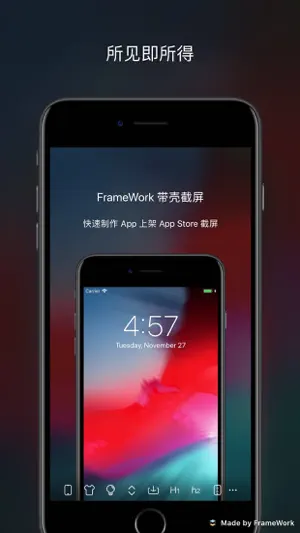

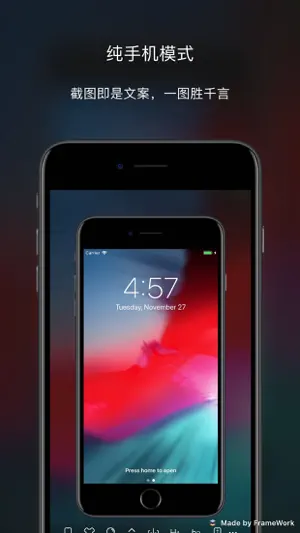

About FrameWork - Screenshot Tool
A pure screenshot with mockup utilities app, specialized create screenshot for app on App Store. WYSIWYG (What You See Is What You Get). Each part can be customized to create an screenshot that fit your requirements. iPhone 5 and later devices is currently supported, color is basically synchronized with the official, if there is any missing, you can contact me, I will try my best to complete it. Email: [email protected]. Although it is designed to make screenshots for App Store, it can also be used for illustrated, promotion, sharing and other purposes. Devices that before iPhone 5 will be supported on demand. Simple user interface, the toolbar at the bottom can be scroll. To get started quickly, please click the “More (three dots)” button at the bottom, then click “Tips” to see how to use each function. If you have any questions, you can send me an email, and I will listen to any comments, suggestions and criticisms. If you feel that this app is helpful or you like it, please give a five-star rating~ 中文介绍: 一款纯粹的带壳截屏工具,专为 App 上架快速制作截屏。 所见即所得。各部分元素均可定制,制作符合您自己要求的介绍图片。 目前已支持 iPhone 5 及以后的设备的手机壳,颜色基本跟官方同步,如有缺失的,可以联系我,我会尽力补充完整。邮箱:[email protected] 虽然说是专为上架制作截屏的 App,但是也是可以用于配图、推广、分享等用途。 iPhone 5 以前的手机壳会按需支持。 界面简洁,底部的工具栏可以滑动,一屏显示不下所有的功能按钮。 如想要快速上手,请点击底部 “更多(三个点)” 按钮,然后点击里面的 “小技巧” 来查看如何使用各个功能。 如果有任何问题,都可以发送邮件到上方的邮箱,我会悉心听取任何意见、建议和批评。 如果觉得这个 App 对您有帮助或者喜欢的话,请给予五星好评哟~
What’s new
Version 1.11.0 · Updated September 16, 2026
- Support ALL models of iPhone 18 Pro, iPhone 18 Pro Max (Black, Silver, Glacier, Burgundy). - Bug fixes
App privacy
The developer, 乐彬 梅, reported these privacy practices to Apple.
Data Not Linked to You
The following data, which may be collected but is not linked to your identity, may be used for the following purposes:
- Identifiers: Device ID
- Usage Data: Product Interaction
- Diagnostics: Crash Data
- User Content: Photos or Videos
Used for: Analytics, App Functionality
Alternatives to FrameWork - Screenshot Tool
Looking for apps like FrameWork - Screenshot Tool? Here are 6 similar apps on the App Store. The highest rated is Open Port Scanner (5.0/5), and 4 of the 6 are free to download.
-
 Server Monitor tool
-
 Open Port Scanner
5.0
Open Port Scanner
5.0
-
 Gazette: RSS News Reader
5.0
Gazette: RSS News Reader
5.0
-
 Cue Killer
5.0
Cue Killer
5.0
-
 GoalCraft - Goal Manager
-
 Artist 3D Viewer
3.8
Artist 3D Viewer
3.8
| App | Rating | Price | Last updated | Compare |
|---|---|---|---|---|
| FrameWork - Screenshot Tool | 3.0 / 5 (1 rating) | 0.99 USD | September 16, 2026 | |
| Server Monitor tool | – | Free | Oct 9, 2026 | Compare |
| Open Port Scanner | 5.0 / 5 (1) | 0.99 USD | Feb 29, 2024 | Compare |
| Gazette: RSS News Reader | 5.0 / 5 (1) | Free | Mar 19, 2026 | Compare |
| Cue Killer | 5.0 / 5 (1) | Free | Oct 15, 2026 | Compare |
| GoalCraft - Goal Manager | – | Free | May 23, 2025 | Compare |
| Artist 3D Viewer | 3.8 / 5 (12) | 1.99 USD | Mar 28, 2026 | Compare |