

Countdown Widget with Emoji
Lasmit TLB Ltd Productivity iPhoneiPadiPod touchApple Watch
Countdown Widget with Emoji is a free Productivity app for iPhone and iPad by Lasmit TLB Ltd. Rated 4.5/5 from 339 ratings. Requires iOS 26.0.
- Rating
- 4.5
- 339 ratings
- Price
- Free
- on the App Store
- Size
- 26 MB
- Age 4+
- Updated
- Oct 19
- 2026 · v2026.9
Screenshots
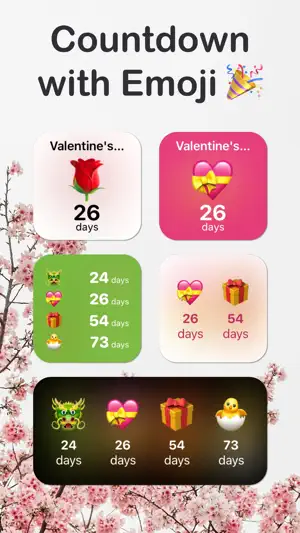


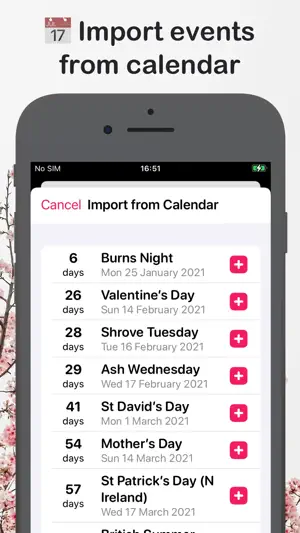
About Countdown Widget with Emoji
Count down to the moments that matter, with the emoji that captures them perfectly. Pick a date. Set an emoji. Watch your countdown on your iPhone Duo, Home Screen, Lock Screen, StandBy display, and Apple Watch. No other countdown app lets you express every event with emoji. From birthdays to vacations to weddings, every countdown looks like the moment it represents. A COUNTDOWN FOR EVERY OCCASION Events & Birthdays Track days until birthdays, anniversaries, graduations, baby showers, and the personal milestones that matter most. Set a birthday once and it reschedules automatically every year. Holidays & Seasons Count down to Christmas, Halloween, Thanksgiving, Easter, New Year’s, and every seasonal moment in between. Holiday countdowns roll over automatically year after year. Weddings & Anniversaries From save the date to the big day, watch your wedding countdown tick down day by day. Couples use Emoji Countdown to share progress, plan ahead, and savor the anticipation. Vacations & Trips Counting days until your next holiday, whether it’s a beach trip, a summer break, or a long weekend? Pair the trip with an emoji and feel the excitement build every time you glance at your phone. Retirement & Life Milestones Counting down to retirement, your last day of work, a house move, or a new chapter? Big life changes deserve their own widget. Pin them to your Home Screen and reclaim a little anticipation. Daily Reminders Use Emoji Countdown as a visual reminder for deadlines, fitness goals, exam dates, and weekly recurring events. Your countdown list works like a calendar, only easier to glance at and harder to forget. FEATURES • Free Home Screen, Lock Screen, and StandBy widgets so you can see every countdown at a glance, no subscription required • Apple Watch app for checking countdowns from your wrist • Calendar import: one tap pulls birthdays, holidays, and deadlines straight from your iOS Calendar • Any emoji, any color, so every countdown matches the moment it represents • Widget customization with colors, gradients, blur effects, borders, and themes so every widget looks exactly the way you want • Repeating events: set a birthday or holiday once and it rolls over automatically each year • Dark Mode support • iCloud sync across iPhone, iPad, and Apple Watch • No ads, no clutter, just your countdowns FAQ Is Emoji Countdown free? Yes. Free to download, and the Home Screen, Lock Screen, and StandBy widgets are included. Can I make a wedding, birthday, or holiday countdown? Yes. Emoji Countdown works for weddings, birthdays, anniversaries, graduations, Christmas, Halloween, vacations, retirement, and anything else worth waiting for. Does it work on Apple Watch? Yes. The native Apple Watch app lets you check every countdown from your wrist. Can I add countdowns to my Home Screen and Lock Screen? Yes. Add a widget to your Home Screen, Lock Screen, or StandBy display and your countdown stays visible at a glance. Can I import events from my calendar? Yes. One tap pulls birthdays, holidays, and deadlines straight from your iOS Calendar. Will my countdowns sync across my devices? Yes. iCloud keeps everything in sync across iPhone, iPad, and Apple Watch. Can I customize how the widget looks? Yes. Pick any emoji and any color, then choose from gradients, blur effects, borders, and themes to make every widget look exactly the way you want. Do birthdays and holidays repeat every year? Yes. Set a recurring event once and Emoji Countdown rolls it over automatically each year. Privacy policy: https://www.iubenda.com/privacy-policy/42970297
Ratings & reviews
4.5
339 ratings
What’s new
Version 2026.9 · Updated October 19, 2026
Ready for iPhone Duo We've been through the whole app to get it ready for iPhone Duo. Open it up and your countdowns spread out to fill the big screen: three columns when it's lying flat, and two in book mode, one either side of the fold. Fold, unfold and turn it round as much as you like. The cards glide into their new places, the line joining them stays with them all the way, and you never lose your place. Everything else is at home on the bigger screen too. Onboarding and the Pro screen sit in a neat column instead of stretching across it, and the sheet for adding or editing a countdown now stays open until you tap Done or Cancel, so a stray tap beside it, or a swipe down, can't lose your changes. On iPad, your countdowns glide between a single timeline and columns as you resize the window. Also in this update: - The app icon now works with every Home Screen style. Choose Dark, Clear or Tinted and the party popper changes to match, instead of sitting on a white square. - Fixed a crash that could stop widgets showing your countdowns after your iPhone restarts. Thanks as always, Lewis
App privacy
The developer, Lasmit TLB Ltd, reported these privacy practices to Apple.
Data Not Linked to You
The following data, which may be collected but is not linked to your identity, may be used for the following purposes:
- Purchases: Purchase History
- Identifiers: User ID, Device ID
- Usage Data: Product Interaction
Used for: Analytics, App Functionality
Alternatives to Countdown Widget with Emoji
Looking for apps like Countdown Widget with Emoji? Here are 6 similar apps on the App Store. The highest rated is Be Present: Daily Routine (4.7/5), and 5 of the 6 are free to download.
-
 Weekly Planner & To Do: DoIt!
4.6
Weekly Planner & To Do: DoIt!
4.6
-
 OnSite Checklists - Auditing
3.8
OnSite Checklists - Auditing
3.8
-
 Pomodoro Focus Timer - YouCan
4.6
Pomodoro Focus Timer - YouCan
4.6
-
 Be Present: Daily Routine
4.7
Be Present: Daily Routine
4.7
-
 Habit Tracker - Haby
4.1
Habit Tracker - Haby
4.1
-
 Paste Keyboard | MagicBoard AI
4.6
Paste Keyboard | MagicBoard AI
4.6
| App | Rating | Price | Last updated | Compare |
|---|---|---|---|---|
| Countdown Widget with Emoji | 4.5 / 5 (339 ratings) | Free | October 19, 2026 | |
| Weekly Planner & To Do: DoIt! | 4.6 / 5 (231) | Free | Oct 11, 2025 | Compare |
| OnSite Checklists - Auditing | 3.8 / 5 (12) | 9.99 USD | Jun 4, 2026 | Compare |
| Pomodoro Focus Timer - YouCan | 4.6 / 5 (74) | Free | Sep 4, 2024 | Compare |
| Be Present: Daily Routine | 4.7 / 5 (102) | Free | Apr 18, 2026 | Compare |
| Habit Tracker - Haby | 4.1 / 5 (37) | Free | Dec 7, 2024 | Compare |
| Paste Keyboard | MagicBoard AI | 4.6 / 5 (252) | Free | Sep 12, 2026 | Compare |