

Archive Utility
RootRise Technologies Pvt. Ltd. Utilities iPhoneiPadiPod touch
Archive Utility is a paid Utilities app for iPhone and iPad by RootRise Technologies Pvt. Ltd. Rated 3.9/5 from 8 ratings. Requires iOS 15.6.
- Rating
- 3.9
- 8 ratings
- Price
- 2.99 USD
- on the App Store
- Size
- 3 MB
- Age 4+
- Updated
- Jan 10
- 2026 · v2.0
Screenshots


About Archive Utility
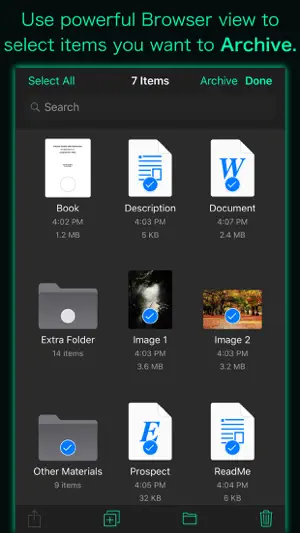
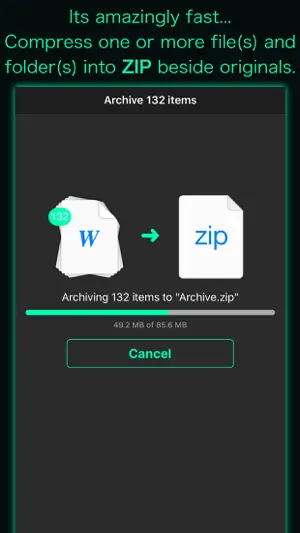
“Archive Utility” is a small and intuitive application to create .zip file and decompress many different kinds of archive files on iPhone and iPad. It supports to unarchive or expand common formats like Zip, RAR, 7-zip, CAB, Tar, Gzip and Bzip2, as well as older formats like StuffIt, Cpio, LZH, ARJ, ARC, DiskDoubler and LBR. It can also expand unusual formats like ISO, BIN, MDF, NRG and CDI, Windows self-extracting EXE files, and can even extract media from Flash SWF files and images from PDF files. Many more archive formats are supported, tap Developer Website to visit product page for the complete list. Your long time wait for computer like compress-uncompress tool on iPhone and iPad is over with "Archive Utility". It integrates Archive and Expand features with Document Browser View to make easy-to-use yet powerful Archive Utility. * How to create a ZIP file? - Use powerful Browser view to select file(s) and folder(s) you want to compress and tap Archive button to create ZIP file beside original items. * How to expand/unarchive/uncompress/extract an archive file? - Navigate to archive file you want to uncompress in Browser view and tap on it to expand. Decompressed file or folder saved in the same folder as the original archive file. - Use "Copy to Archive Utility" to open archive file received as email attachment, downloaded from the the web or contained in another app. You can even add files in the app's Documents folder from your computer through iTunes file sharing. - It lets you preview files and archives that iOS can support. DOCUMENT MANAGEMENT - "Archive Utility" built upon Document Browser view which allows to access files no matter where they’re located — on your device or in the cloud with Archive Utility. Handles access to iCloud Drive and third-party cloud storage services such as Dropbox and Box within the app. - Browse view to navigate folders, organise your files with tags, move files between folders, search and sort. - Share files using the Share button or a drag-and-drop action. - You can move, delete, duplicate and rename a document and folder. - Drag and drop to select files and organise them into folders. - Inherit tagged and favourite items from Files app and allow to create and change within the app. Note: “Archive Utility” is standalone application running natively to archive files and expand archives securely right on your iOS device. You can refer User Manual for any assistance Or Contact Support.
Ratings & reviews
3.9
8 ratings
What’s new
Version 2.0 · Updated January 10, 2026
- Updated user interface to streamline with latest iOS. - Other minor bug fixes and improvements. If Archive Utility useful to you, we would appreciate an App Store review. It will help other people find the app and make them delighted. Thank you all users for your feedback :)
App privacy
The developer, RootRise Technologies Pvt. Ltd., reported these privacy practices to Apple.
Data Not Collected
The developer does not collect any data from this app.
Alternatives to Archive Utility
Looking for apps like Archive Utility? Here are 6 similar apps on the App Store. The highest rated is iZip – Zip Unzip Unrar (4.8/5), and all 6 are free to download.
-
 ZIP Extractor - Unzip, Unrar
4.4
ZIP Extractor - Unzip, Unrar
4.4
-
 WinZip: #1 zip & unzip tool
4.3
WinZip: #1 zip & unzip tool
4.3
-
 The Document Converter
4.7
The Document Converter
4.7
-
 UnRAR - zip,rar,7z file opener
4.6
UnRAR - zip,rar,7z file opener
4.6
-
 iZip – Zip Unzip Unrar
4.8
iZip – Zip Unzip Unrar
4.8
-
 The Audio Converter
4.6
The Audio Converter
4.6
| App | Rating | Price | Last updated | Compare |
|---|---|---|---|---|
| Archive Utility | 3.9 / 5 (8 ratings) | 2.99 USD | January 10, 2026 | |
| ZIP Extractor - Unzip, Unrar | 4.4 / 5 (3,711) | Free | Oct 13, 2026 | Compare |
| WinZip: #1 zip & unzip tool | 4.3 / 5 (2,396) | Free | Oct 9, 2024 | Compare |
| The Document Converter | 4.7 / 5 (5,964) | Free | Apr 6, 2026 | Compare |
| UnRAR - zip,rar,7z file opener | 4.6 / 5 (1,931) | Free | Sep 10, 2026 | Compare |
| iZip – Zip Unzip Unrar | 4.8 / 5 (63,240) | Free | Oct 7, 2026 | Compare |
| The Audio Converter | 4.6 / 5 (13,686) | Free | Apr 5, 2026 | Compare |
Compare Archive Utility with the top alternatives: ratings, updates, ASO score and keyword gaps →