

Fresh KDS | #1 Kitchen Display
Fresh Technology, Inc Business iPad
Fresh KDS | #1 Kitchen Display is a free Business app for iPad by Fresh Technology, Inc. Rated 4.0/5 from 16 ratings. Requires iOS 15.0.
- Rating
- 4.0
- 16 ratings
- Price
- Free
- on the App Store
- Size
- 74 MB
- Age 4+
- Updated
- Oct 13
- 2026 · v3.85.0
Screenshots

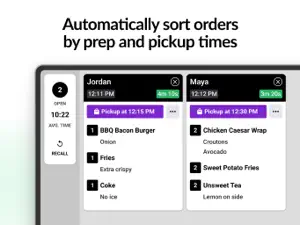
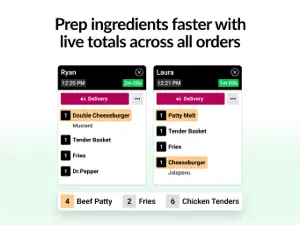
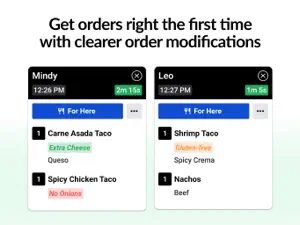
About Fresh KDS | #1 Kitchen Display
Manage your restaurant's customer orders efficiently with Fresh KDS — the #1 tablet-based Kitchen Display System (KDS) trusted by the best in hospitality. JOIN THOUSANDS OF RESTAURANT KITCHENS USING FRESH KDS TO: • Eliminate errors and reduce waste by digitizing their restaurant’s kitchen / • Prepare food & beverage orders accurately & in the correct order / • Enhance communication between front & back of house / • Analyze detailed kitchen performance analytics / • Display orders on up to 10 digital screens / • Improve kitchen efficiency / • Minimize mistakes / • Decrease costs / ▶ DIGITIZE YOUR KITCHEN TO ELIMINATE ERRORS ◀ With Fresh KDS, all of your menu items, modifiers, and order types are shown on one screen so your kitchen can get orders out, accurately. No more errors caused by handwritten paper tickets, frustrated staff or guests, and lost money. ▶ IMPROVE GUEST EXPERIENCE ◀ Send orders to specific screens, print labels, hold or prioritize tickets and even send your guests custom SMS text messages - all from within the Fresh KDS app. ▶ DECREASE COSTS AT EVERY LOCATION ◀ Fresh KDS enables restaurant operators to optimize their kitchen production, facilitate in-store and e-commerce hand-offs, and introduce communication to all areas of the restaurant. ▶ GET DETAILED ANALYTICS WITH ACTIONABLE RESULTS ◀ Create operational reports to help your restaurant improve its efficiency. You can see information like the time it takes to prepare specific dishes and whether performance suffers on certain days or other time periods. ▶ EFFORTLESSLY INTEGRATE WITH A POS ◀ Fresh KDS integrates with some of the best point-of-sale systems in the industry. Set up your Fresh KDS tablet as a printer in your POS or directly from the cloud via the internet with Square, Clover, and more. Or connect your Fresh KDS tablet to the internet to get orders with Crowd Engage, Invu, and plenty of others. ▶ EXTEND KDS FUNCTIONALITY ◀ Connect to any other system with multiple ways to get your data in or out or extend the system's functionality to meet your operational requirements. The only limitation is your imagination. [ API ] Access the Fresh KDS API to build a cloud-based integration and send orders to Fresh KDS from any other open system. [ SDK ] Build a network integration and send orders to Fresh KDS from a device on the local network. [ WEBHOOKS ] Automate the information you send to another system based on a specific action - such as clearing orders from the screen. ▶ HOW FRESH KDS WORKS ◀ Fresh KDS provides a single source of information for everyone to access real-time updates on what needs to be prepared, allowing cooks and other staff to see what orders need to be filled. 1. Open the app on your iPad and wirelessly connect to your POS. 2. Orders appear on the screen as the sale is completed. 3. Orders change color from green to red based on time. 4. Simply tap an order, and *poof* it’s gone. ▶ AFFORDABLE PRICING PLANS ◀ The flexible, easy-to-use platform is exactly what you need to grow your restaurant, bar, cafe, kiosk, or food truck, with premium plans starting at just USD $19/mo. ▶ GET STARTED IN 5 MINUTES ◀ You can begin using Fresh KDS with our risk-free trial. There are no installation costs. It takes less than 5 minutes to get started by completing these simple steps: [ INSTALL APP ] Fresh KDS has you covered! [ SIGN UP ] Create a Fresh account in a few easy steps. It's free to try - any restaurant, any size. Cancel anytime. [ CONNECT POS ] Follow a few easy setup steps, and start seeing orders! ------------ Download Fresh KDS to upgrade your restaurant’s kitchen today. Questions or feedback? Get responsive support at https://www.fresh.technology/support.
Ratings & reviews
4.0
16 ratings
What’s new
Version 3.85.0 · Updated October 13, 2026
New Features - Hold Order automation: A new automation action holds an incoming order for a set number of minutes. You can choose which orders it holds by order type, item count, or any other condition. - Expo screen setting: Any screen can now be marked as an Expo screen in general settings. This works on every plan and on more than one screen at a location. It replaces the old coordinating screen option in Item Times. - Settings locks per tab: You can now lock or unlock each settings tab on its own. For example, staff can change Filtering while all other settings stay locked. Improvements - The automation detail screen now shows every setting of an action, such as the timeout and sound, not just the title and message. - Built-in automation alerts, such as Large Order and Long Cook Time, now appear in the tablet’s language. Fixes - Move Ready Orders to Front now keeps ready orders in front of orders that are not ready, and keeps them in order. - On Single Line Per Item screens, splitting a bumped Square check no longer brings back the original order with an item crossed out.
App privacy
The developer, Fresh Technology, Inc, reported these privacy practices to Apple.
Data Not Collected
The developer does not collect any data from this app.
Alternatives to Fresh KDS | #1 Kitchen Display
Looking for apps like Fresh KDS | #1 Kitchen Display? Here are 6 similar apps on the App Store. The highest rated is Figure KDS (5.0/5), and all 6 are free to download.
-
 Square - Restaurants POS
4.3
-
 Figure KDS
5.0
-
 KioskBuddy
4.7
-
 Loyverse KDS - Kitchen Display
3.2
-
 Lightspeed Restaurant POS (K)
2.7
-
 Mobi POS - Kitchen Display
5.0
| App | Rating | Price | Last updated | Compare |
|---|---|---|---|---|
| Fresh KDS | #1 Kitchen Display | 4.0 / 5 (16 ratings) | Free | October 13, 2026 | |
| Square - Restaurants POS | 4.3 / 5 (4,193) | Free | Oct 13, 2026 | Compare |
| Figure KDS | 5.0 / 5 (29) | Free | Aug 12, 2026 | Compare |
| KioskBuddy | 4.7 / 5 (15) | Free | Sep 28, 2026 | Compare |
| Loyverse KDS - Kitchen Display | 3.3 / 5 (4) | Free | Mar 13, 2026 | Compare |
| Lightspeed Restaurant POS (K) | 2.7 / 5 (16) | Free | Oct 9, 2026 | Compare |
| Mobi POS - Kitchen Display | 5.0 / 5 (3) | Free | Oct 12, 2026 | Compare |