

ColorMixer Mix Unmix & Convert
Xuan Li Productivity iPhoneiPadiPod touch
ColorMixer Mix Unmix & Convert is a free Productivity app for iPhone and iPad by Xuan Li. Rated 3.5/5 from 27 ratings. Requires iOS 15.6.
- Rating
- 3.5
- 27 ratings
- Price
- Free
- on the App Store
- Size
- 8 MB
- Age 4+
- Updated
- Jul 3
- 2026 · v3.3.1
Screenshots


About ColorMixer Mix Unmix & Convert
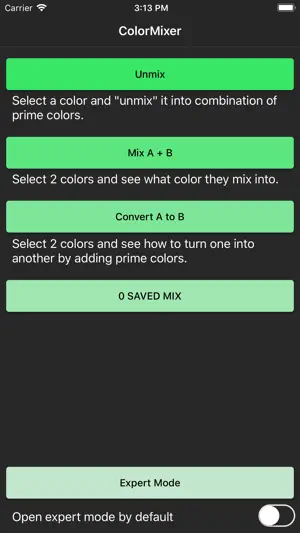
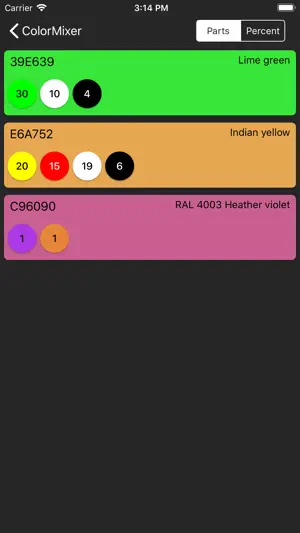
Color mixing in the real world is often counter-intuitive and is completely different from the RGB model used in the digital world. In the RGB model, to mix orange you need red and green but in the real world, you actually need the red and yellow paint to get the color. ColorMixer is here to help to solve the real world color mixing problems using its unique subtractive color model. It is able to simulate real-world color mixing and more importantly, it can "unmix" any given color into a combination of mixing colors. The app also features a custom made color picker that allows you to pick colors from variable sources including a color wheel, color values in RGB, CMYK or HSL model, an image from your gallery or camera and your custom color table. There are 3 basic modes in this app, "Unmix", "Mix A + B" and "Convert A to B". With "Unmix", you select a color from the color picker and the app will resolve it into a combination of prime colors. With "Mix A + B", you select 2 colors and the app shows the result of mixing them together. With "Convert A to B", the app gives you a list of color you need to add to convert one color into another. There is also an expert mode where you can complete all of the above functions in one single UI. In the mix composition screen, you can change the mixing ratios by tapping on the left or right side of the color card. You can also add new colors to the mix with the + button on the bottom. Any change to the mix will update the mixing result in real-time.
Ratings & reviews
3.5
27 ratings
What’s new
Version 3.3.1 · Updated July 3, 2026
More hobby paint libraries, always up to date: browse a growing set of model & hobby paint color libraries — Tamiya, Mr. Color (Gunze), Humbrol, Testors, Vallejo, AK, and more. Libraries are now loaded from our online source, so new colors and updates arrive automatically without an app update. Find Color: a new search screen that looks across every color library at once — search by name or code, see matches grouped by brand, and send any result straight to Mix, Unmix, or Convert. My Colors – Sort & Group: sort your saved colors by date added, hue, brightness, or name, and group them by paint type or brand. Precise editing: edit or delete an individual saved color without affecting other colors that share the same RGB value. Polish: the interface now extends edge-to-edge for a cleaner, more consistent look.
App privacy
The developer, Xuan Li, reported these privacy practices to Apple.
Data Not Collected
The developer does not collect any data from this app.
Alternatives to ColorMixer Mix Unmix & Convert
Looking for apps like ColorMixer Mix Unmix & Convert? Here are 6 similar apps on the App Store. The highest rated is Miniature Painter Pro (4.4/5), and all 6 are free to download.
-
 Real Color Mixer
3.9
Real Color Mixer
3.9
-
 Drop - A Color Palette Picker
4.2
Drop - A Color Palette Picker
4.2
-
 Sift - Find Your Flow
3.7
Sift - Find Your Flow
3.7
-
 CutterVault
3.7
CutterVault
3.7
-
 What Color Is This?
4.1
What Color Is This?
4.1
-
 Miniature Painter Pro
4.4
Miniature Painter Pro
4.4
| App | Rating | Price | Last updated | Compare |
|---|---|---|---|---|
| ColorMixer Mix Unmix & Convert | 3.5 / 5 (27 ratings) | Free | July 3, 2026 | |
| Real Color Mixer | 3.9 / 5 (37) | Free | Mar 14, 2026 | Compare |
| Drop - A Color Palette Picker | 4.2 / 5 (83) | Free | May 13, 2026 | Compare |
| Sift - Find Your Flow | 3.7 / 5 (15) | Free | Apr 1, 2026 | Compare |
| CutterVault | 3.7 / 5 (3) | Free | Sep 7, 2026 | Compare |
| What Color Is This? | 4.1 / 5 (41) | Free | Sep 18, 2025 | Compare |
| Miniature Painter Pro | 4.4 / 5 (79) | Free | Jul 11, 2026 | Compare |