

WinGo Plan: projects & goals
Alphyn Apps Productivity iPhoneiPadiPod touch
WinGo Plan: projects & goals is a free Productivity app for iPhone and iPad by Alphyn Apps. Rated 4.3/5 from 9 ratings. Requires iOS 16.6.
- Rating
- 4.3
- 9 ratings
- Price
- Free
- on the App Store
- Size
- 66 MB
- Age 17+
- Updated
- Sep 7
- 2026 · v7.7.0
Screenshots
About WinGo Plan: projects & goals
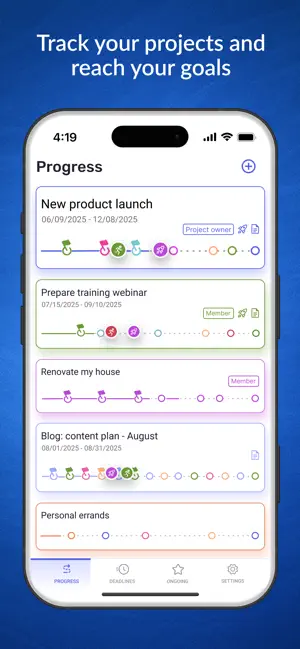
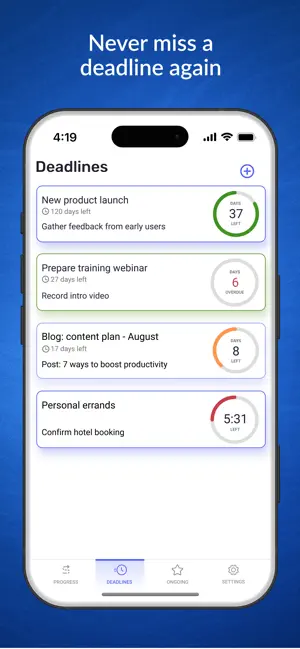
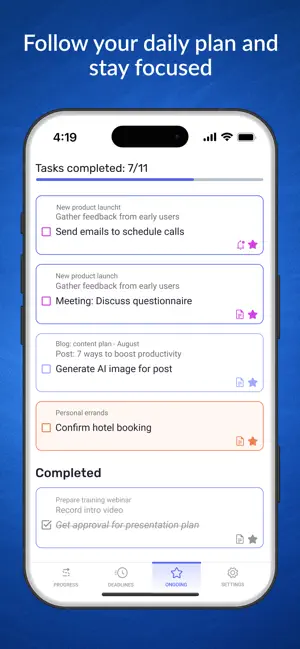
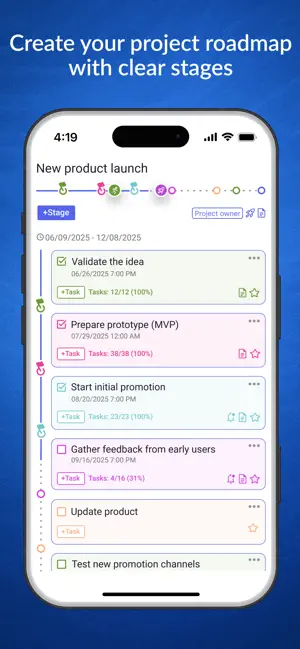
WinGo Plan — Visual Project & Goal Tracker. Are simple to-do lists not enough to see the whole picture, but corporate project trackers too complex? WinGo Plan is made just for you! We combine project management with goal achievement. Our planner helps you not just complete tasks, but focus on what truly moves you forward: - Track current status, task progress, and goals for every project. - Focus on what matters most. - Organize your routine. - Plan your day and create a schedule based on priorities. _____ With WinGo Plan, you don't just complete tasks - you accomplish what brings you closer to your goals. _____ SIMPLE AND LOGICAL PROJECT STRUCTURE Turn an idea into a project. Break it down into stages, outline tasks, and set deadlines. Add notes, descriptions, document links, images, and reminders - all in one place. PROJECT PROGRESS: CONNECT TASKS, DEADLINES, AND GOALS The Project Path — a modernized Gantt chart — clearly shows your progress, deadlines, and results (goal achievement). You will always know the current situation for every project: - How much time has elapsed and how much remains until the end of the project or stage. - The percentage of tasks completed — your progress. - Whether you are meeting deadlines, and if there are any risks. - Whether completed tasks are delivering expected results, or if you need to adjust your plan. _____ All project and goal progress charts appear on one screen, so you can grasp your overall status at a glance. _____ DEADLINES All important due dates: project end dates and the deadlines for upcoming stages — are gathered on one screen. Track the countdown and never miss a deadline! TASK LIST FOR TODAY AND DAILY SCHEDULE Select tasks from any project or schedule them for a specific date and time to create your daily or weekly task list. PLAN AND REPLAN WITH EASE Plan a project completely upfront or refine it as you go: add tasks, clarify deadlines, drag and drop tasks from one stage to another, or move them between projects. Everything is simple, intuitive, and easy to pick up. COLLABORATIVE WORK Share specific projects with clients, partners, or colleagues. Each participant sees only the projects they have access to. All on one screen, without switching workspaces. MOTIVATION AND GAMIFICATION Even the most serious projects become easier when you add a game element. Wingoman, counting time, helps you stay committed, and a competition with a rocket, counting down your progress toward your goal, adds motivation to move forward. CROSS-PLATFORM Work in the app on your phone or use the web version on your computer. Use the planner even offline - all data automatically syncs when you reconnect. _____ Powerful, smart, yet easy-to-learn tool. Get structure, control, and motivation in one app. Download WinGo Plan! _____ PREMIUM subscription allows you to use Wingo Plan with unlimited number of projects, milestones, and task and customise individual notifications and other premium features. For the first subscription you may get 7 days as a free trial period. If you do not cancel Premium subscription before free period ends, your iTunes account will be charged annually. Subscription automatically renews unless auto-renew is turned off at least 24 hours before the end of current period. You can manage your subscription and turn off auto-renew from your iTunes Account settings. Any unused portion of a free trial period, will be forfeited if you purchase the subscription. Subscription means that you agree with Terms of Service: https://www.apple.com/legal/internet-services/itunes/dev/stdeula/ Privacy Policy - https://wingo.io/en/terms/
Ratings & reviews
4.3
9 ratings
What’s new
Version 7.7.0 · Updated September 7, 2026
Now you can use WinGo Plan not just for projects and goals, but for everyday to-do lists too. Need a quick grocery list or a simple list of things to do today? No need to switch to another app — to-do lists are now built right into WinGo Plan. We also went through the whole app and polished a bunch of small details to make WinGo Plan even easier to use.
App privacy
The developer, Alphyn Apps, reported these privacy practices to Apple.
Data Used to Track You
The following data may be used to track you across apps and websites owned by other companies:
- Identifiers: Device ID
- Usage Data: Other Usage Data
Data Not Linked to You
The following data, which may be collected but is not linked to your identity, may be used for the following purposes:
- User Content: Customer Support, Emails or Text Messages
- Identifiers: Device ID, User ID
- Usage Data: Other Usage Data, Product Interaction
- Contact Info: Email Address
- Diagnostics: Crash Data, Performance Data
Used for: Analytics, App Functionality, Other Purposes
Alternatives to WinGo Plan: projects & goals
Looking for apps like WinGo Plan: projects & goals? Here are 6 similar apps on the App Store. The highest rated is Tain: OKR Goal & Habit Tracker (5.0/5), and all 6 are free to download.
-
 Plime: Goal Setting & Tracker
-
 Deadliner – Time Management
3.0
Deadliner – Time Management
3.0
-
 Tain: OKR Goal & Habit Tracker
5.0
Tain: OKR Goal & Habit Tracker
5.0
-
 BeBetter - Goals and Planner
-
 Tasks Wizard
3.8
Tasks Wizard
3.8
-
 Bússola de Metas
| App | Rating | Price | Last updated | Compare |
|---|---|---|---|---|
| WinGo Plan: projects & goals | 4.3 / 5 (9 ratings) | Free | September 7, 2026 | |
| Plime: Goal Setting & Tracker | – | Free | Oct 13, 2026 | Compare |
| Deadliner – Time Management | 3.0 / 5 (2) | Free | Jun 26, 2026 | Compare |
| Tain: OKR Goal & Habit Tracker | 5.0 / 5 (4) | Free | Oct 8, 2026 | Compare |
| BeBetter - Goals and Planner | – | Free | Apr 30, 2024 | Compare |
| Tasks Wizard | 3.8 / 5 (38) | Free | May 30, 2024 | Compare |
| Bússola de Metas | – | Free | Sep 1, 2026 | Compare |