

QuickVideo - Cam & Edit
KAZUHIRO KAKIMOTO Photo & Video iPhoneiPadiPod touchMac
QuickVideo - Cam & Edit is a free Photo & Video app for iPhone and iPad by KAZUHIRO KAKIMOTO. Rated 3.0/5 from 2 ratings. Requires iOS 15.5.
- Rating
- 3.0
- 2 ratings
- Price
- Free
- on the App Store
- Size
- 143 MB
- Age 4+
- Updated
- Aug 25
- 2026 · v5.3.13
Screenshots
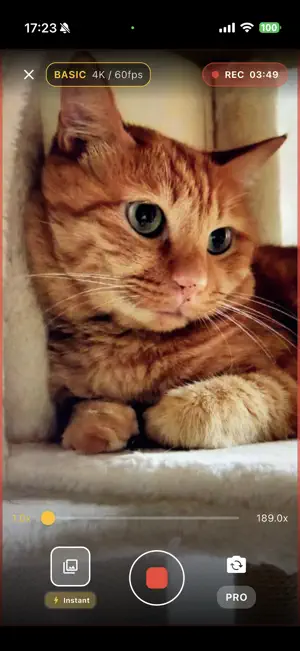
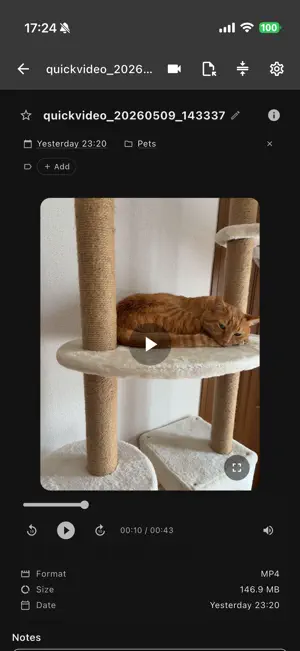
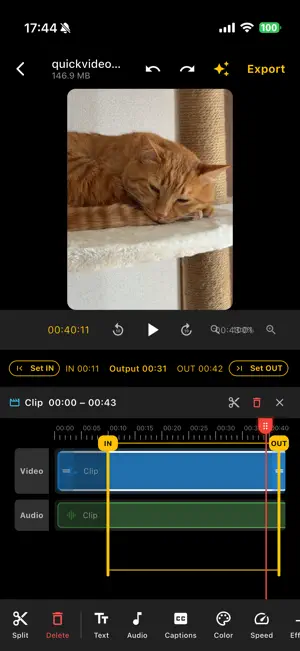

About QuickVideo - Cam & Edit
QuickVideo is a powerful, all-in-one video recorder and editor designed for modern creators on iOS and macOS. Whether you're producing YouTube vlogs, TikTok Shorts, Instagram Reels, or professional presentations, QuickVideo combines pro camera controls, AI-powered automatic captions, and non-destructive editing workflows to speed up your creative process. RECORDING & PRO CAMERA: - Quality presets: Cinematic (4K/60fps), Story (1080p/30fps), Quick Share (720p/30fps). - Pro manual controls (Pro): Adjust ISO (50–6400), shutter speed, white balance, and exposure compensation (EV -2.0 to +2.0). - Live histogram, zebra overlay, and grid for perfect composition. - Real-time face detection, subject segmentation, and dual camera support with fast switching. - Zoom control with level indicators, countdown, and instant start modes. POWERFUL NON-DESTRUCTIVE EDITING: - Auto-saved edit drafts: Return later and keep your text, labels, captions, music, trim, and color work perfectly intact. - Frame-by-frame trimming with a visual timeline and multi-segment clip editing. - Color Correction & Looks: Apply global or selected-clip color correction and subtle creative looks such as Warm, Cool, Rose, Blue, and Sepia, alongside brightness, contrast, and saturation adjustments. - Text stamp overlays with opacity and color control. - Transitions: Crossfade and dip-to-black. - 100-level undo/redo history and reusable edit presets. ADVANCED AUDIO & MUSIC: - Multi-track audio: Add multiple Music and SFX clips to your timeline. - Adjust individual clip ranges and volume levels with ease. - Voice-priority ducking: Automatically lower background music volume for clearer voice narration. AI CAPTIONS & SMART EDIT: - 100% Local Auto Captions: On-device Whisper AI (Base, Small, Medium, Large models) ensures your data never leaves your device. - SRT file import and comprehensive caption track with timing controls. - AI Smart Edit (Pro): Automatic scene detection, highlight extraction, and voice/audio activity analysis with one-tap smart application to your timeline. EXPORT & YOUTUBE PUBLISHING: - YouTube Studio handoff: Instantly opens the YouTube upload page and reveals the exported video in your file manager for fast drag-and-drop publishing. - Multi-format Export: MP4 (H.264), HEVC (H.265), GIF, or MP3 (audio only). - Quality presets: Master, Balanced, Fast Social. - 9:16 vertical framing optimized for Stories and Reels. - Real-time export progress with cancel option. LIBRARY & WORKFLOW: - Traceable lineage: Original, Draft, and Exported views make it easy to trace each video back to its source and continue editing. - Folder browsing with video thumbnails, favorites, tags, and per-video notes. - Broad format support: MP4, MOV, M4V, MKV, AVI, WebM. CLOUD & CUSTOMIZATION: - Seamless integration with Dropbox, Google Drive, OneDrive, and SMB/NAS. - Remote streaming with local caching (configurable 256–8192 MB). - 20+ theme colors, dark/light mode, floating preview panel, and customizable keyboard shortcuts. - Responsive layout designed for mobile, tablet, and desktop environments. QUICKVIDEO PRO UNLOCKS: - Pro camera manual controls - AI Smart Edit and highlight extraction - All export formats and quality presets - Ad-free experience - Priority customer support Terms of Use: https://kakitiro.com/quickapps/quickvideo/terms/
What’s new
Version 5.3.13 · Updated August 25, 2026
• Fixed Google Drive sign-in after upgrading from an earlier version. • Improved Dropbox upload verification. • Improved cloud storage reliability and status messages. • Added camera menu options for the after-recording action and Instant, Countdown, or Manual start.
App privacy
The developer, KAZUHIRO KAKIMOTO, reported these privacy practices to Apple.
Data Linked to You
The following data, which may be collected and linked to your identity, may be used for the following purposes:
- Location: Coarse Location
- Identifiers: Device ID
- Usage Data: Product Interaction, Advertising Data
Used for: Third-Party Advertising, Developer’s Advertising or Marketing, Analytics, App Functionality
Data Not Linked to You
The following data, which may be collected but is not linked to your identity, may be used for the following purposes:
- Diagnostics: Performance Data, Other Diagnostic Data, Crash Data
Used for: Third-Party Advertising, Developer’s Advertising or Marketing, Analytics, App Functionality
Alternatives to QuickVideo - Cam & Edit
Looking for apps like QuickVideo - Cam & Edit? Here are 6 similar apps on the App Store. The highest rated is Low Camera - Low Quality Cam (4.7/5), and all 6 are free to download.
-
 Quick Shot Camera
4.3
Quick Shot Camera
4.3
-
 QuickCam Camera
4.2
QuickCam Camera
4.2
-
 LockCam - Lock Secret Albums
4.1
LockCam - Lock Secret Albums
4.1
-
 InviCam: Black Screen Camera
4.5
InviCam: Black Screen Camera
4.5
-
 Low Camera - Low Quality Cam
4.7
Low Camera - Low Quality Cam
4.7
-
 Discreet - Black screen camera
4.4
Discreet - Black screen camera
4.4
| App | Rating | Price | Last updated | Compare |
|---|---|---|---|---|
| QuickVideo - Cam & Edit | 3.0 / 5 (2 ratings) | Free | August 25, 2026 | |
| Quick Shot Camera | 4.3 / 5 (13) | Free | Jun 11, 2026 | Compare |
| QuickCam Camera | 4.2 / 5 (5) | Free | Sep 1, 2026 | Compare |
| LockCam - Lock Secret Albums | 4.1 / 5 (751) | Free | Mar 18, 2024 | Compare |
| InviCam: Black Screen Camera | 4.5 / 5 (262) | Free | May 13, 2026 | Compare |
| Low Camera - Low Quality Cam | 4.7 / 5 (130) | Free | Sep 22, 2026 | Compare |
| Discreet - Black screen camera | 4.4 / 5 (2,123) | Free | Sep 23, 2026 | Compare |