

PacificTime
Pacific Timesheet Business iPhoneiPadiPod touch
PacificTime is a free Business app for iPhone and iPad by Pacific Timesheet. Rated 4.0/5 from 1 ratings. Requires iOS 13.0. Updated January 31, 2024.
- Rating
- 4.0
- 1 ratings
- Price
- Free
- on the App Store
- Size
- 6 MB
- Age 4+
- Updated
- Jan 31
- 2024 · v3.0
Screenshots

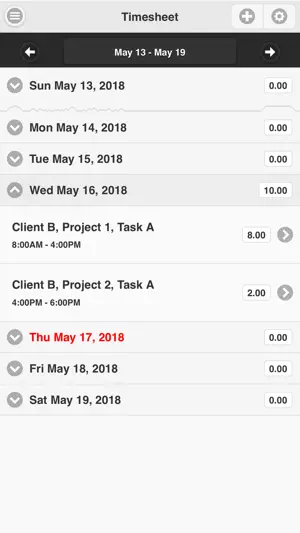
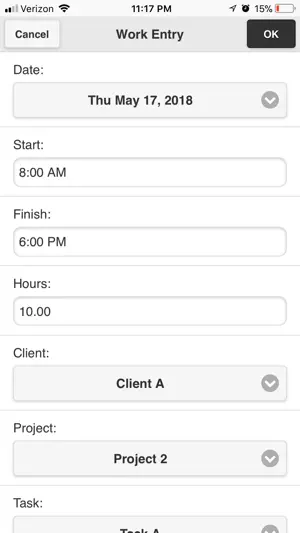
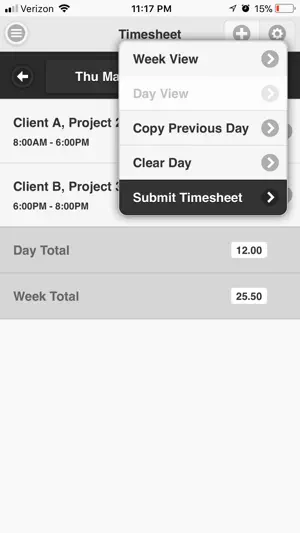
About PacificTime
Manage and track your individual time, expenses, assets and logs. For users in any industry where you need to track information on the go. Whether it's project time and expenses, or tracking of work or service orders in the field, enter, submit and get approved any time, expense and tracking sheets. A product of Pacific Timesheet, Pacific Time runs on any iPhone or iPad. Enter and Submit Timesheets: - Use Day or Week Views of Timesheet - Search and select projects/jobs, tasks, & other work items - Enter project/job hours - Track attendance (optional) - Enter leave manually - Scheduled leave displays automatically - Scheduled holidays display automatically - Enter detailed time entry notes or other field values - Enter per diem amounts - Copy previous day’s entries - Receive automated timesheet reminders and late notices - Submit timesheet - Monitor approvals/rejections - Receive timesheet rejections with correction instructions Create and Submit Expense Sheets: - Create expense sheets with date ranges and descriptions - Create expense entries by expense type - Enter per diem amounts - Code entries by client, project & other work items - Track expense item in local currency - Enter detailed expense descriptions (required) and notes - Attach receipt image using iPhone/iPad camera or gallery - Track payment method, personal or billable expense - Track meeting attendees. - View reimbursement amount in your currency - Submit expense sheet - Monitor approvals/rejections - Receive expense sheet rejection notices with correction instructions Request Leave: - Create and submit leave requests like vacation or PTO - Leave request balance forecast shows negative balances - Errors for leave requests exceeding available balance - Monitor leave approvals/rejections - Receive leave approval notices with approval instructions - Receive leave rejection notices with rejection reasons - Approved leave automatically pushes onto future timesheets Holiday Schedules: - Scheduled holidays automatically push onto timesheets - Holidays appear automatically on schedule of upcoming leave Leave Balance History: - View current balance for all leave types - View leave balance history of all leave types - Detailed audit log of all leave balance changes - View detailed log of accruals, dates, rules & years of service - View leave approvals/rejections Asset and Production Tracking: - Materials tracking by asset name, ID, class, costs, billings - Vehicle/equipment tracking by name, ID, odometer readings - Production tracking by asset, project/job cost code, task Documentation and Logs: - Incident and accident logs - Daily activity logs - Safety meeting logs - Daily work plans Learn more at www.pacifictimesheet.com. Must be an existing Pacific Timesheet basic or enterprise user.
What’s new
Version 3.0 · Updated January 31, 2024
Minor bug fixes and speed improvements.
App privacy
The developer, Pacific Timesheet, reported these privacy practices to Apple.
Data Not Collected
The developer does not collect any data from this app.
Alternatives to PacificTime
Looking for apps like PacificTime? Here are 6 similar apps on the App Store. The highest rated is Appgate SDP Client (5.0/5), and all 6 are free to download.
-
 ExpenseWire
2.2
-
 Retail360®
3.2
-
 Appgate SDP Client
5.0
-
 Employer Flexible - myMobile
4.2
-
 WorkPlan by Verizon Connect
1.7
-
 TdxMobile Drive
2.3
| App | Rating | Price | Last updated | Compare |
|---|---|---|---|---|
| PacificTime | 4.0 / 5 (1 rating) | Free | January 31, 2024 | |
| ExpenseWire | 2.2 / 5 (31) | Free | Jun 18, 2026 | Compare |
| Retail360® | 3.2 / 5 (17) | Free | Oct 17, 2026 | Compare |
| Appgate SDP Client | 5.0 / 5 (20) | Free | Sep 16, 2026 | Compare |
| Employer Flexible - myMobile | 4.2 / 5 (25) | Free | Oct 6, 2026 | Compare |
| WorkPlan by Verizon Connect | 1.7 / 5 (146) | Free | Oct 28, 2026 | Compare |
| TdxMobile Drive | 2.3 / 5 (64) | Free | Aug 20, 2026 | Compare |
Compare PacificTime with the top alternatives: ratings, updates, ASO score and keyword gaps →