

My Hashtag
Oceano Inc. Utilities iPhoneiPadiPod touch
My Hashtag is a free Utilities app for iPhone and iPad by Oceano Inc. Rated 2.5/5 from 2 ratings. Requires iOS 18.6. Updated August 29, 2026.
- Rating
- 2.5
- 2 ratings
- Price
- Free
- on the App Store
- Size
- 44 MB
- Age 4+
- Updated
- Aug 29
- 2026 · v1.4.0
Screenshots
About My Hashtag
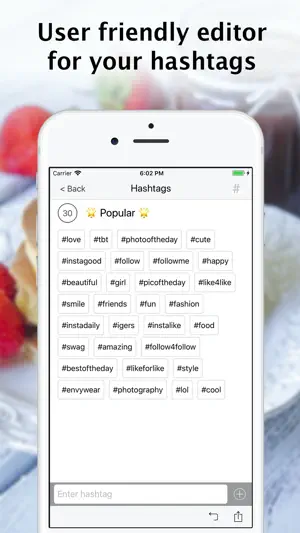
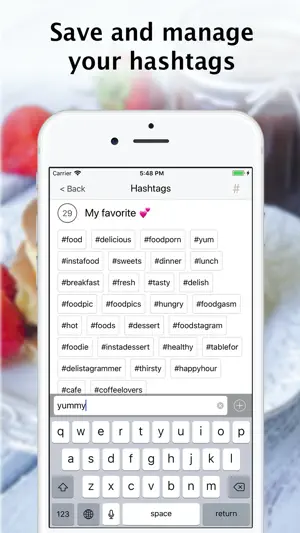
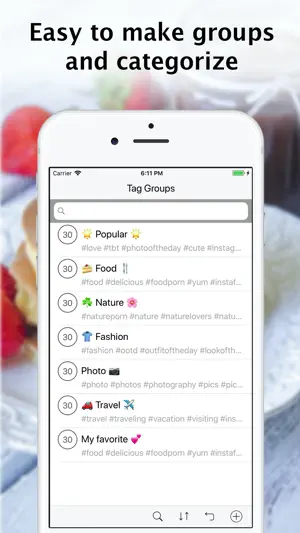
User friendly editor for your hashtags. Tired using memo app to save your favorite hashtags? Say good bye to exhaustive operations like scroll, select, cut, copy and paste. This app helps you to keep and manage your set of favorite hashtags you really want to use with your post! Features: Customizable hashtags with easy to use operations. Add, duplicate, edit, re-order, delete, undo delete hashtags. Detect duplicates of hashtags within a group. Copy set of hashtags and paste on your post. Paste multiple words at once to automatically save as hashtags. Appending ‘#’ is not necessary. This app will do it for you. It removes delimiters and spaces automatically which is not usually allowed as hashtag. Group of hashtags can be copied to clipboard. Text format options can be chosen for your preference: - Append #, or do not append # in front of hashtag - Use comma, or do not use comma between hashtags - Use space, break (new line), or nothing for delimiter - Use Return Emoji as break (replaces automatically), or as Emoji as usual (don't replace). Customizable groups of hashtags for your interest. Add, duplicate, edit, re-order, delete, undo delete grouping of hashtags. Shows number of hashtags in a group. Preset with popular hashtags to boost likes for your post. Switching hashtag to text "mode" allows you to have delimiters and spaces. Hashtag and text can be mixed in one group, by changing mode. Group "mode" either hashtag or text can be set. It decides base mode behavior within the group. Group mode can be switched by double tap on counter at hashtag screen. You can select hashtag to copy, or deselect not to copy, using filter feature. If you have filtered hashtags, action menu will show "Copy filtered items" button. Using "Copy filtered items" button, filtered and greyed items are not included for copy. URL is detected automatically. Double tap on URL shows "Open with browser" menu. Return Emoji can be used as break (line feed). It can be used in within hashtag or text to insert breaks. Multiple breaks can be inserted.
What’s new
Version 1.4.0 · Updated August 29, 2026
Improvements for stability.
App privacy
The developer, Oceano Inc., reported these privacy practices to Apple.
Data Used to Track You
The following data may be used to track you across apps and websites owned by other companies:
- Location: Coarse Location
- Identifiers: Device ID
- Usage Data: Product Interaction, Advertising Data
- Diagnostics: Crash Data, Performance Data
Data Not Linked to You
The following data, which may be collected but is not linked to your identity, may be used for the following purposes:
- Location: Coarse Location
- Identifiers: Device ID
- Usage Data: Product Interaction, Advertising Data
- Diagnostics: Crash Data, Performance Data
Used for: Third-Party Advertising
Alternatives to My Hashtag
Looking for apps like My Hashtag? Here are 6 similar apps on the App Store. The highest rated is Tagged Notes App - Tag Pad (5.0/5), and all 6 are free to download.
-
 Hashtag Generator - AI Tags
3.3
Hashtag Generator - AI Tags
3.3
-
 Hashtag: AI Tag Generator
4.7
Hashtag: AI Tag Generator
4.7
-
 MyHashtags: Hashtags for Post
-
 Find My Hashtags
-
 Tagged Notes App - Tag Pad
5.0
Tagged Notes App - Tag Pad
5.0
-
 Fancy: Story Viewer & Saver
5.0
Fancy: Story Viewer & Saver
5.0
| App | Rating | Price | Last updated | Compare |
|---|---|---|---|---|
| My Hashtag | 2.5 / 5 (2 ratings) | Free | August 29, 2026 | |
| Hashtag Generator - AI Tags | 3.3 / 5 (3) | Free | May 15, 2026 | Compare |
| Hashtag: AI Tag Generator | 4.7 / 5 (523) | Free | Oct 5, 2025 | Compare |
| MyHashtags: Hashtags for Post | – | Free | Jul 31, 2026 | Compare |
| Find My Hashtags | – | Free | Jan 31, 2024 | Compare |
| Tagged Notes App - Tag Pad | 5.0 / 5 (1) | Free | Nov 2, 2024 | Compare |
| Fancy: Story Viewer & Saver | 5.0 / 5 (4) | Free | Mar 5, 2024 | Compare |
Compare My Hashtag with the top alternatives: ratings, updates, ASO score and keyword gaps →