

Star Doodle AR
Tadanori Okada Graphics & Design iPhoneiPadiPod touch
Star Doodle AR is a free Graphics & Design app for iPhone and iPad by Tadanori Okada. Rated 4.1/5 from 13 ratings. Requires iOS 13.0.
- Rating
- 4.1
- 13 ratings
- Price
- Free
- on the App Store
- Size
- 249 MB
- Age 4+
- Updated
- Jan 21
- 2026 · v3.21
Screenshots

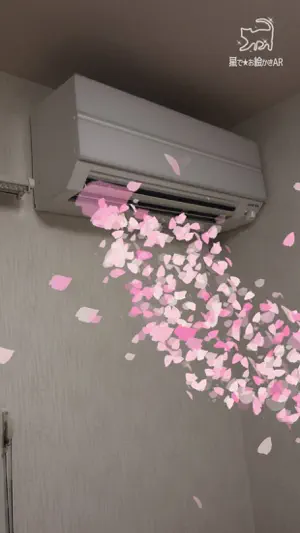


About Star Doodle AR
Draw magical, sparkling doodles in midair or on walls! Your drawings will appear and disappear with 12 kinds of animations. Use 16 different pens—stars, flames, hearts, gems, cherry blossoms, clovers, electricity, bubbles, smoke, “blood text,” and more—to create fantastical artworks. Save your creations as videos or photos and share them with friends. How to Use: 1. Draw on the Screen: Touch the screen to start drawing. Use the buttons below to customize your artwork. - Paint Icon: Change the color. - Star Icon: Adjust the size of the stars. - Box Icon / Plane Icon: Switch between drawing in the air or on surfaces. - Undo Icon: Undo the last action. - Erase Icon: Clear all drawings. - Dot Icon: Switch to "Viewing Mode". 2. Animate and Record Your Drawings: After you finish drawing, animate it or record a video! Switch to viewing mode with the dot icon on the right. - Play Icon: Animate your drawing. You can also record the animation. - Sun Icon: Adjust the brightness. - Video Icon: Record a video. Tap again to stop recording. - Photo Icon: Take a photo. - Tools Icon: Access settings or purchase additional features. - Dot Icon: Switch back to "Drawing Mode". Unlock Extra Features: Yellow Lock Buttons: Unlock by watching ads. Blue Lock Buttons: Available for purchase. Paid Options: Access additional features by purchasing options through the cart icon in the tools menu. Paid features include: 1. Unlock all locked features. 2. Remove all ads. 3. Enable the option to hide the logo at the top right of the screen. About the use of created images/videos: Images and videos created with this app may be freely used for both personal and commercial purposes, including creative works, social media posting, video streaming, printed materials, and more. - If your content includes materials that may infringe third-party rights (e.g., other people or copyrighted characters appearing in the background), please obtain permission from the rights holder before use. - If possible, I would greatly appreciate it if you could mention or introduce that this app was used in your work, stream, description, etc. Download now and let your creativity sparkle!
Ratings & reviews
4.1
13 ratings
What’s new
Version 3.21 · Updated January 21, 2026
- Added 1 new animation (Milky Way) - Added 4 new pens (Bubbles, Smoke, Electricity, Clover) - Improved the guidance display for plane detection - Adjusted the sparkle effects
App privacy
The developer, Tadanori Okada, reported these privacy practices to Apple.
Data Used to Track You
The following data may be used to track you across apps and websites owned by other companies:
- Location: Coarse Location
- Identifiers: Device ID
- Usage Data: Product Interaction, Advertising Data
- Diagnostics: Crash Data, Performance Data
Data Linked to You
The following data, which may be collected and linked to your identity, may be used for the following purposes:
- Location: Coarse Location
- Identifiers: Device ID
- Usage Data: Product Interaction, Advertising Data
- Diagnostics: Crash Data, Performance Data
Used for: Third-Party Advertising
Alternatives to Star Doodle AR
Looking for apps like Star Doodle AR? Here are 6 similar apps on the App Store. The highest rated is Moshicam Photo Editor & Frames (4.9/5), and all 6 are free to download.
-
 Neon Glow Draw: Light Painting
4.5
Neon Glow Draw: Light Painting
4.5
-
 Bake some stickers with AI
2.5
Bake some stickers with AI
2.5
-
 Lux Draw
4.7
Lux Draw
4.7
-
 OneStamp
4.8
OneStamp
4.8
-
 R4VE - aesthetic photo editor
4.7
R4VE - aesthetic photo editor
4.7
-
 Moshicam Photo Editor & Frames
4.9
Moshicam Photo Editor & Frames
4.9
| App | Rating | Price | Last updated | Compare |
|---|---|---|---|---|
| Star Doodle AR | 4.1 / 5 (13 ratings) | Free | January 21, 2026 | |
| Neon Glow Draw: Light Painting | 4.5 / 5 (15) | Free | Sep 4, 2026 | Compare |
| Bake some stickers with AI | 2.5 / 5 (4) | Free | Jul 10, 2025 | Compare |
| Lux Draw | 4.7 / 5 (939) | Free | Dec 18, 2023 | Compare |
| OneStamp | 4.8 / 5 (24) | Free | Oct 15, 2026 | Compare |
| R4VE - aesthetic photo editor | 4.7 / 5 (17,148) | Free | Oct 23, 2026 | Compare |
| Moshicam Photo Editor & Frames | 4.9 / 5 (570) | Free | Oct 26, 2026 | Compare |
Compare Star Doodle AR with the top alternatives: ratings, updates, ASO score and keyword gaps →