

Clip
仁乐 魏 Productivity iPhoneiPadiPod touch
Clip is a paid Productivity app for iPhone and iPad by 仁乐 魏. Rated 3.8/5 from 6 ratings. Requires iOS 13.0. Updated October 27, 2026.
- Rating
- 3.8
- 6 ratings
- Price
- 4.99 USD
- on the App Store
- Size
- 12 MB
- Age 4+
- Updated
- Oct 27
- 2026 · v2.2.1
Screenshots


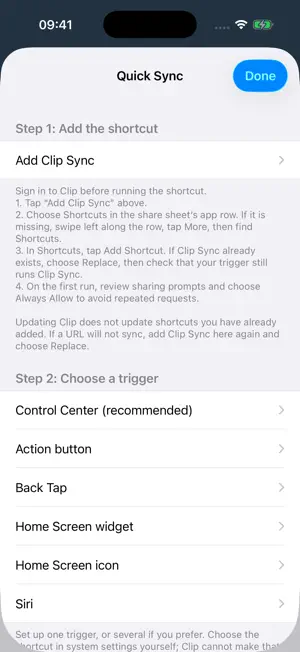
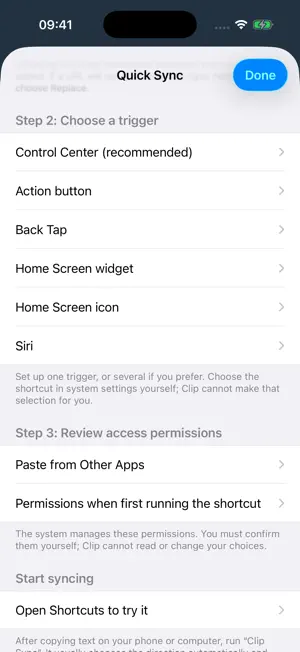
About Clip
Clip is a cross-platform clipboard updated in sync. · Powerful and productive. With Clip, you can update the content of clipboard from one device to another easily. For example, copy a piece of text on the iPhone and paste it directly on your PC, and vice versa. · Simple and smart. Across multiple devices, Clip synchronizes text, keeps recent clipboard records and recognizes received content to reduce duplicate uploads. You can also tap a history record to copy the text again. We attach great importance to the comprehensive experience of users. So Clip adopts a minimalist design without complex interactive interface and disturbing advertisement. What you need to do is just “copy” - “paste”. · Privacy and protection. Hash salt encryption is adopted in Clip to keep your account secure in our servers; it also uses SSL/TLS to encrypt links to secure the transfer of your clipboard content over the Internet. Passwords are stored as salted hashes rather than plain text. Tips & Advice Due to iOS and iPadOS restrictions, Clip cannot continuously read your clipboard in the background. Open Clip after copying or before pasting, or go to “More > Features > Quick Sync” on iOS 16 / iPadOS 16 or later to set up Shortcuts, Control Center, the Action button, Back Tap or Home Screen shortcuts, where supported by your device. The Today widget remains available on iOS 17 / iPadOS 17 or earlier. Requires iOS 13 / iPadOS 13 or later. Current versions support Unicode text and text synchronization up to 4 MiB. Synchronization with older clients is subject to their existing text limits.
Ratings & reviews
3.8
6 ratings
What’s new
Version 2.2.1 · Updated October 27, 2026
This update adds Quick Sync with Shortcuts, Control Center, the Action button, Back Tap and Home Screen shortcuts where supported, improves clipboard history with tap-to-copy, and makes synchronization more reliable across multiple devices and sessions. It also improves Unicode, long text and web link synchronization, first-use guidance and Chinese/English messages, and includes bug fixes.
App privacy
The developer, 仁乐 魏, reported these privacy practices to Apple.
Data Not Linked to You
The following data, which may be collected but is not linked to your identity, may be used for the following purposes:
- Identifiers: User ID, Device ID
- Usage Data: Product Interaction
Used for: Analytics, App Functionality
Alternatives to Clip
Looking for apps like Clip? Here are 6 similar apps on the App Store. The highest rated is Dartic (5.0/5), and all 6 are free to download.
-
 Dartic
5.0
-
 Inventorex
5.0
-
 PasteQ - Search Copy Paste
-
 Alarm & Reminder: GetNotify
-
 MemoCopy - Fast Copy, Sync
-
 NoteCast AI
| App | Rating | Price | Last updated | Compare |
|---|---|---|---|---|
| Clip | 3.8 / 5 (6 ratings) | 4.99 USD | October 27, 2026 | |
| Dartic | 5.0 / 5 (1) | Free | Oct 28, 2026 | Compare |
| Inventorex | 5.0 / 5 (1) | Free | Feb 2, 2025 | Compare |
| PasteQ - Search Copy Paste | – | Free | Oct 10, 2026 | Compare |
| Alarm & Reminder: GetNotify | – | Free | Mar 23, 2026 | Compare |
| MemoCopy - Fast Copy, Sync | – | Free | Jul 1, 2025 | Compare |
| NoteCast AI | – | Free | Feb 27, 2026 | Compare |
Compare Clip with the top alternatives: ratings, updates, ASO score and keyword gaps →