

Simple Budget Planner
Mehmet Cetin Finance iPhoneiPadiPod touch
Simple Budget Planner is a free Finance app for iPhone and iPad by Mehmet Cetin. Rated 4.4/5 from 283 ratings. Requires iOS 17.0. Updated October 24, 2026.
- Rating
- 4.4
- 283 ratings
- Price
- Free
- on the App Store
- Size
- 24 MB
- Age 4+
- Updated
- Oct 24
- 2026 · v4.4
Screenshots

About Simple Budget Planner
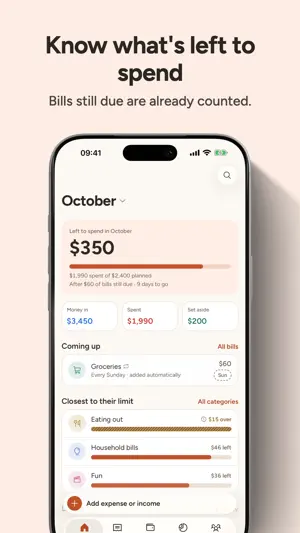
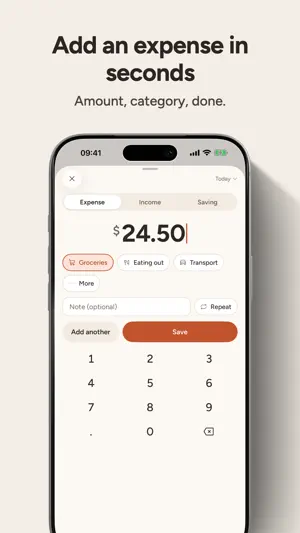
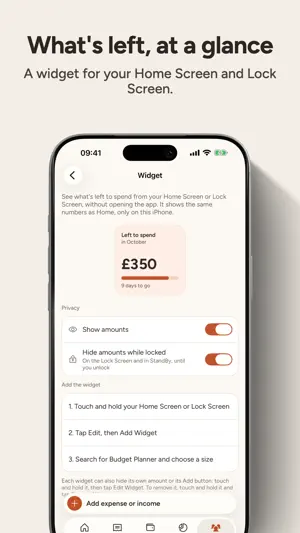
Simple Budget Planner is a calm, manual budget for you and your household. No bank login, no connected accounts, nothing automatic happening behind your back: you write down what you spend, and you always know what's left. PLAN YOUR MONTH • Give every category a budget, envelope-style, and see what's left at a glance • Bills and recurring payments are added for you and count before they arrive, so "left to spend" is honest • Monthly from your payday, weekly, or every 2 or 4 weeks • A "Left to spend" widget for your Home Screen and Lock Screen, with amounts you can hide TRACK IN SECONDS • Add an expense in three taps with the quick keypad • Edit anything in place, move entries between categories, undo a delete • Search, filter and sort by date or by due date SAVE ON PURPOSE • Savings goals with contributions and progress • Money set aside is shown separately, never counted as spending SHARE WITH YOUR HOUSEHOLD • Invite your partner or family to the same budget • Everyone sees the same numbers, on their own iPhone or iPad SEE WHERE IT GOES • Clear spending and income insights by category • Money in against spent over the last 6 months • Look back over any dates: a whole year, the last 3 months or your own range, with every entry in one list • Every chart has a text summary and a table view YOURS TO KEEP • Export everything to CSV at any time, on every plan • Works offline and syncs when you're back online • Your data is never sold and never used for ads • On iPhone and iPad, with two columns on the bigger screen PREMIUM Simple Budget Planner is free to download and use. The free plan includes 40 entries for your household, and every feature. Premium is an optional auto-renewing subscription that removes the entry limit. One subscription covers your household through Family Sharing. Payment is charged to your Apple Account at confirmation of purchase. The subscription renews automatically unless cancelled at least 24 hours before the end of the current period. You can manage or cancel it in your App Store account settings. Any unused part of a free trial is forfeited when you buy a subscription. Terms of Use: https://sbp.sh/terms Privacy Policy: https://sbp.sh/privacy
Ratings & reviews
4.4
283 ratings
What’s new
Version 4.4 · Updated October 24, 2026
A fresh, calmer Simple Budget Planner, rebuilt for iOS 26. • New design throughout, with Dark Mode and larger text support • Add an expense in three taps with the new keypad • Budget from payday: monthly from any day, every 2 weeks or every 4 weeks • New "Left to spend" widget for your Home Screen and Lock Screen • Bills and recurring payments now count toward your month before they're added • Move entries between categories, sort by due date, undo a delete • Savings are shown separately from spending • Insights: money in against spent over 6 months, and any dates you choose, like a whole year • Export to CSV now works, built on your iPhone or iPad, on every plan • Now on iPad, with two columns for the bigger screen • Works offline and syncs when you're back • Faster with large budgets, and many fixes Thank you for 8 years of feedback. Every review was read.
App privacy
The developer, Mehmet Cetin, reported these privacy practices to Apple.
Data Linked to You
The following data, which may be collected and linked to your identity, may be used for the following purposes:
- Purchases: Purchase History
- Location: Coarse Location
- Identifiers: User ID, Device ID
- Usage Data: Product Interaction
- Financial Info: Other Financial Info
- Contact Info: Email Address
Used for: Analytics, App Functionality
Data Not Linked to You
The following data, which may be collected but is not linked to your identity, may be used for the following purposes:
- Diagnostics: Crash Data
Used for: App Functionality