

Draw: Photos & Blank Canvas
泝诚 温 Graphics & Design iPhoneiPadiPod touch
Draw: Photos & Blank Canvas is a free Graphics & Design app for iPhone and iPad by 泝诚 温. Requires iOS 17.0. Updated October 19, 2026.
- Price
- Free
- on the App Store
- Size
- 14 MB
- Age 4+
- Updated
- Oct 19
- 2026 · v1.2
Screenshots


About Draw: Photos & Blank Canvas
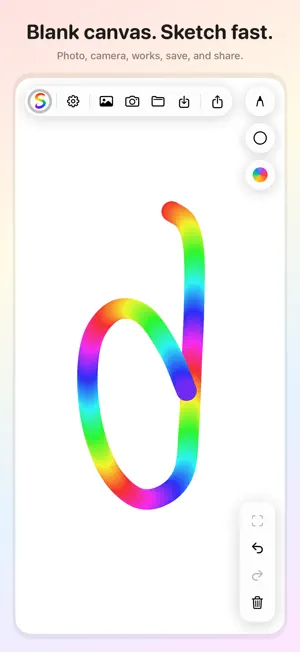
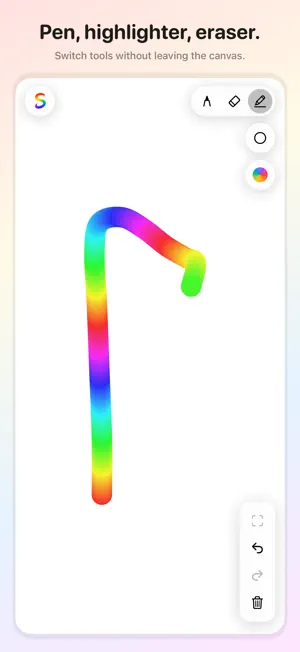
Draw is a light blank-canvas and photo-doodle app. On your Home Screen it appears as Draw. Open a clean canvas and sketch with your finger. Adjust brush size, color, and opacity, switch to eraser when you need to clean up, and try the rainbow stroke or highlighter for a colorful look. Prefer photo doodle? Add a picture from your library or camera as the background, then draw right on top. Save to your works library, sort and crop later, save to Photos, or share with friends. FEATURES • Blank canvas — open and sketch immediately • Photo doodle — library or camera as background • Pen, highlighter & eraser with size and opacity • Color palette, recent colors, and rainbow stroke • Undo / redo and clear tools • Fit or fill background with the viewfinder • Works library — preview, crop, continue creating • Save to Photos and share your creations • Optional one-time purchase to remove ads (not a subscription) Core sketching, saving, and sharing stay available without buying anything. Ads help keep Draw free; remove them anytime with a single purchase tied to your Apple ID. Whether you are jotting an idea on a blank canvas or marking up a photo, Draw keeps the tools light so you can focus on creating.
What’s new
Version 1.2 · Updated October 19, 2026
• Smoother drawing while you sketch • Your drawing stays put when the screen folds, rotates, or splits • The startup ad waits until after the first few launches • After an interstitial, a once-a-day choice to remove ads
App privacy
The developer, 泝诚 温, reported these privacy practices to Apple.
Data Used to Track You
The following data may be used to track you across apps and websites owned by other companies:
- Location: Coarse Location
- Identifiers: Device ID
- Usage Data: Advertising Data
Data Not Linked to You
The following data, which may be collected but is not linked to your identity, may be used for the following purposes:
- Location: Coarse Location
- Identifiers: Device ID
- Usage Data: Advertising Data, Product Interaction
- Diagnostics: Crash Data, Performance Data
- Purchases: Purchase History
Used for: Third-Party Advertising, Analytics, App Functionality
Alternatives to Draw: Photos & Blank Canvas
Looking for apps like Draw: Photos & Blank Canvas? Here are 6 similar apps on the App Store. The highest rated is SketchPad – Doodle & Draw (5.0/5), and all 6 are free to download.
-
 SketchPad – Doodle & Draw
5.0
SketchPad – Doodle & Draw
5.0
-
 DrawArtAI : Realtime Drawing
-
 Sticker Lab: Photo Stickers
4.5
Sticker Lab: Photo Stickers
4.5
-
 Realtime AI Drawing : Artistry
1.0
Realtime AI Drawing : Artistry
1.0
-
 Photo Editor retouch filters
4.5
Photo Editor retouch filters
4.5
-
 Magical Drawing & Coloring
5.0
Magical Drawing & Coloring
5.0
| App | Rating | Price | Last updated | Compare |
|---|---|---|---|---|
| Draw: Photos & Blank Canvas | – | Free | October 19, 2026 | |
| SketchPad – Doodle & Draw | 5.0 / 5 (1) | Free | Sep 15, 2026 | Compare |
| DrawArtAI : Realtime Drawing | – | Free | Jun 1, 2025 | Compare |
| Sticker Lab: Photo Stickers | 4.5 / 5 (38) | Free | Aug 25, 2026 | Compare |
| Realtime AI Drawing : Artistry | 1.0 / 5 (2) | Free | Sep 30, 2024 | Compare |
| Photo Editor retouch filters | 4.5 / 5 (92) | Free | Apr 9, 2024 | Compare |
| Magical Drawing & Coloring | 5.0 / 5 (2) | Free | Apr 7, 2026 | Compare |