

NguyenKey
Takayuki Imai Utilities iPhoneiPadiPod touch
NguyenKey is a paid Utilities app for iPhone and iPad by Takayuki Imai. Requires iOS 15.6. Updated September 24, 2026.
- Price
- 2.99 USD
- on the App Store
- Size
- 2 MB
- Age 4+
- Updated
- Sep 24
- 2026 · v5.1
Screenshots



About NguyenKey
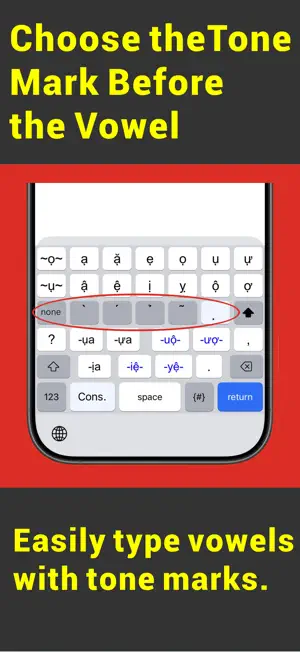
■ Background of the App NguyenKey is a new Vietnamese keyboard app designed to overcome the challenges of traditional Telex and VNI methods — such as the hassle of memorizing key combinations and the number of taps required. By separating the keyboard into dedicated Consonant and Vowel screens with automatic switching and multi-letter keys, NguyenKey enables a natural typing rhythm with significantly fewer taps. ■ Key Features • Automatic Screen Switching for Rhythmic Typing Consonant and vowel screens are separated and switch automatically as you type, allowing for a seamless, rhythmic input experience. • Multi-Letter Keys to Reduce Taps Consonant keys combining up to 3 letters and diphthongs available with a single tap greatly reduce the number of taps needed per word. • Intuitive Tone Input — No Memorization Required Simply select one of the 6 tone shift keys before choosing a vowel. There is no need to memorize complex key combinations. • Compact 6×7 Layout Optimized for One-Handed Use Specifically designed for smartphones, the compact 6×7 grid makes one-handed typing easy and comfortable. • Convenient Shift Key Options Includes a White Shift Key (capitalizes the next character) and a Black Shift Key (Caps Lock). • Phonetic Symbols (IPA) Display Optionally display International Phonetic Alphabet (IPA) symbols on consonant and vowel keys. Supports both Northern (Standard) and Southern dialects. It can also display pronunciation conditions, such as when the mouth needs to be closed after a final consonant. • 4 Typing Modes Easily switch between Vietnamese, English, Numbers, and Symbols modes. ■ Typing Example: "Việt" 1. On the consonant screen, tap the White Shift Key to capitalize, then tap "V". 2. The app automatically switches to the vowel screen. Select the underdot tone. 3. Tap the tone-marked diphthong "iệ". 4. The screen automatically switches back to the consonant screen. Tap "t" to finish. ■ Initial Setup 1. Go to iOS "Settings" > "General" > "Keyboard" > "Keyboards" > "Add New Keyboard…". 2. Select "NguyenKey" to enable it. 3. While typing in any app, press and hold the Globe icon on the keyboard and select "NguyenKey". ■ Compatibility • Requires iOS 15.6 or later / iPadOS 15.6 or later • Compatible with iPhone and iPad ■ Privacy & Security NguyenKey does not transmit or collect what you type through external servers. ■ Support & Contact Support Site: https://superscript.sakura.ne.jp/ Email: [[email protected]](mailto:[email protected]) Created by: Takayuki Imai
What’s new
Version 5.1 · Updated September 24, 2026
■ What's New in Ver 5.1 Improved the keyboard layout by swapping the positions of the “t” and “th” keys.
App privacy
The developer, Takayuki Imai, reported these privacy practices to Apple.
Data Not Collected
The developer does not collect any data from this app.
Alternatives to NguyenKey
Looking for apps like NguyenKey? Here are 6 similar apps on the App Store. The highest rated is FlushWater - Speaker Cleaner (5.0/5), and 5 of the 6 are free to download.
-
 Clear Speaker: WaveDry
-
 FlushWater - Speaker Cleaner
5.0
FlushWater - Speaker Cleaner
5.0
-
 Paranoia File Encryption PRO
5.0
Paranoia File Encryption PRO
5.0
-
 Clear Speaker – Water Eject
-
 Big Time Digital Clock
-
 SonicClear - Speaker Cleaner
| App | Rating | Price | Last updated | Compare |
|---|---|---|---|---|
| NguyenKey | – | 2.99 USD | September 24, 2026 | |
| Clear Speaker: WaveDry | – | Free | Jul 8, 2026 | Compare |
| FlushWater - Speaker Cleaner | 5.0 / 5 (1) | Free | Apr 16, 2026 | Compare |
| Paranoia File Encryption PRO | 5.0 / 5 (5) | 3.99 USD | Sep 14, 2026 | Compare |
| Clear Speaker – Water Eject | – | Free | Feb 9, 2026 | Compare |
| Big Time Digital Clock | – | Free | Mar 5, 2025 | Compare |
| SonicClear - Speaker Cleaner | – | Free | Dec 21, 2025 | Compare |
Compare NguyenKey with the top alternatives: ratings, updates, ASO score and keyword gaps →