

OneMockup - Make Custom Mockup
Chengdu Reinvent Technology Co., Ltd. Utilities iPhoneiPadiPod touch
OneMockup - Make Custom Mockup is a free Utilities app for iPhone and iPad by Chengdu Reinvent Technology Co., Ltd. Rated 4.3/5 from 115 ratings.
- Rating
- 4.3
- 115 ratings
- Price
- Free
- on the App Store
- Size
- 457 MB
- Age 4+
- Updated
- Oct 20
- 2026 · v5.1.0
Screenshots

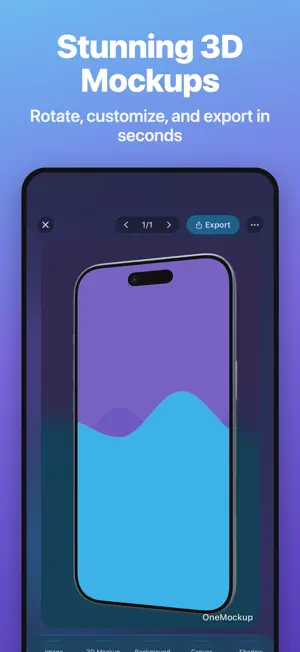
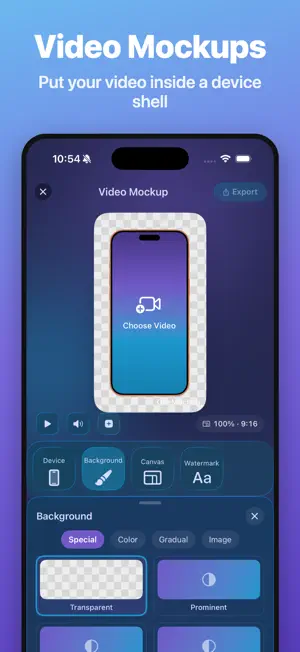

About OneMockup - Make Custom Mockup
Turn screenshots, photos, and screen recordings into polished device mockups. OneMockup combines device mockups, 3D motion, video presentation, and long-image tools in one creative workspace. Import your media to make work for sharing, presentations, and product launches. # 2D and 3D Mockups # Customize device models, viewing angles, 3D rotation, scale, position, backgrounds, canvas, shadows, image fill, rotation, and corner radius. Export transparent PNGs, process multiple images, save templates, and share quickly. # Supported Devices # Create mockups for iPhone Duo, iPhone 18 Pro, iPhone 18 Pro Max, iPhone Air, iPhone 17, iPhone 16, iPhone 15, iPhone 14, iPhone 13, iPhone 12, iPhone 11, iPhone X, iPhone XR, iPhone XS, iPhone 8, iPhone 7, iPhone 6s, and iPhone SE. Also supported: iPad, iPad mini, Apple Watch, MacBook, iMac, and Studio Display. Available 2D, 3D, video, angles, and colors vary by device. # 3D Motion and Video Mockups # Place a screen recording inside a 2D or 3D device model. Use keyframes, poses, camera movement, backgrounds, canvas settings, and motion templates to create dynamic presentations. Export a video or export the current frame as a PNG image. # iPhone Duo Dual-Screen Foldable Mockups # Edit the outer and inner screens separately. Create closed, half-open, and unfolded states with continuous hinge motion. Choose independent or inner-screen-following content, perspective, blur, lighting, device colors, and landscape or portrait presentation. # Long Images and Scrolling Screenshots # Automatically detect order and overlap to stitch multiple screenshots into one long image. Import a screen recording to generate a scrolling screenshot, fine-tune seams, and save the result. # Templates and Automation # Use frame, poster, device, mockup, and motion templates, or save your own. OneMockup also supports widgets, Shortcuts, Action extensions, URL schemes, Dark Mode, and optional iCloud data sync. OneMockup offers auto-renewable subscriptions. - Available plans, durations, and localized prices are shown on the purchase screen. Prices may vary by country or region. - Payment will be charged to your Apple Account when you confirm the purchase. - The subscription renews automatically unless you turn off auto-renew at least 24 hours before the end of the current period. - Your Apple Account will be charged for renewal within 24 hours before the end of the current period. - You can manage or cancel subscriptions in your App Store account settings after purchase. - Any unused portion of a free trial, if offered, will be forfeited when you purchase a subscription. Privacy Policy: https://docs.onenice.tech/#/OneMockup/privacy Terms of Service: https://docs.onenice.tech/#/OneMockup/terms Contact us: [email protected] Twitter: @onexdavis
Ratings & reviews
4.3
115 ratings
What’s new
Version 5.1.0 · Updated October 20, 2026
This update brings a more complete device mockup and motion workflow: • Added iPhone 18 Pro and iPhone 18 Pro Max 3D models with multiple colors. • Added the iPhone Duo dual-screen foldable model with closed, half-open, unfolded, landscape, and portrait states. • Duo Mockup now supports separate outer- and inner-screen editing with dedicated motion templates. • Motion now supports exporting the current frame as a PNG, with improved keyframe and video export workflows. • Improved screen perspective, blur effects, and iCloud data sync.
App privacy
The developer, Chengdu Reinvent Technology Co., Ltd., reported these privacy practices to Apple.
Data Not Collected
The developer does not collect any data from this app.
Alternatives to OneMockup - Make Custom Mockup
Looking for apps like OneMockup - Make Custom Mockup? Here are 6 similar apps on the App Store. The highest rated is ScreenCase (5.0/5), and all 6 are free to download.
-
 Record Maker
4.6
Record Maker
4.6
-
 iFrame - Frame Screenshots
4.6
iFrame - Frame Screenshots
4.6
-
 ScreenCase
5.0
ScreenCase
5.0
-
 Pandora - Subscription Tracker
4.0
Pandora - Subscription Tracker
4.0
-
 Teak Browser: Extensions
4.5
Teak Browser: Extensions
4.5
-
 Keke: Shell Screenshot
4.3
Keke: Shell Screenshot
4.3
| App | Rating | Price | Last updated | Compare |
|---|---|---|---|---|
| OneMockup - Make Custom Mockup | 4.3 / 5 (115 ratings) | Free | October 20, 2026 | |
| Record Maker | 4.6 / 5 (142) | Free | Oct 23, 2026 | Compare |
| iFrame - Frame Screenshots | 4.6 / 5 (16) | Free | Aug 24, 2026 | Compare |
| ScreenCase | 5.0 / 5 (5) | Free | Oct 19, 2026 | Compare |
| Pandora - Subscription Tracker | 4.0 / 5 (43) | Free | May 12, 2025 | Compare |
| Teak Browser: Extensions | 4.5 / 5 (43) | Free | Oct 24, 2026 | Compare |
| Keke: Shell Screenshot | 4.3 / 5 (52) | Free | Sep 22, 2025 | Compare |