

Chromatica Mark II
Natalya Petrenko Photo & Video iPhoneiPadiPod touchApple Watch
Chromatica Mark II is a paid Photo & Video app for iPhone and iPad by Natalya Petrenko. Rated 4.1/5 from 43 ratings. Requires iOS 17.6.
- Rating
- 4.1
- 43 ratings
- Price
- 3.99 USD
- on the App Store
- Size
- 15 MB
- Age 4+
- Updated
- Sep 25
- 2026 · v2026.3.0
Screenshots
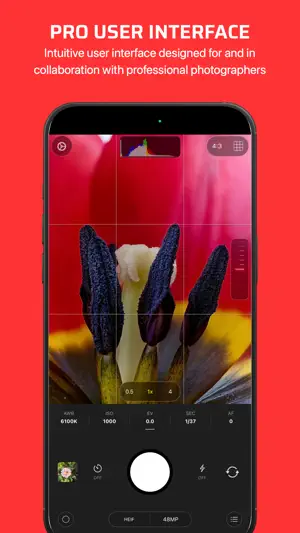

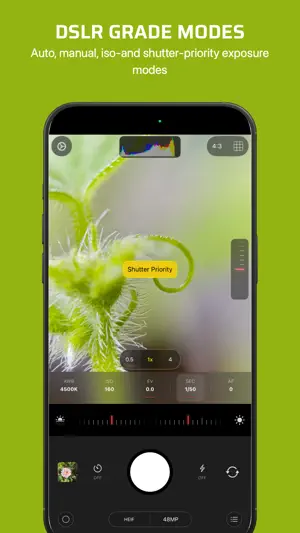
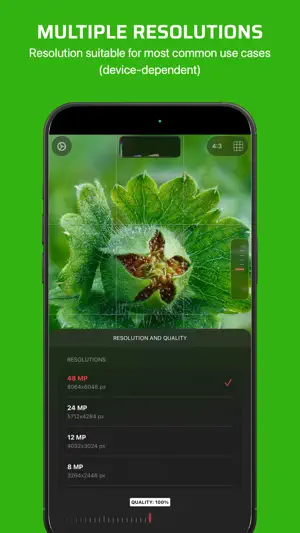
About Chromatica Mark II
Chromatica Mark II is a powerful manual camera designed for photographers who want precision, control, and clarity—without compromise. Whether you’re capturing fleeting moments or crafting deliberate compositions, Chromatica Mark II puts professional-grade tools directly in your hands. Take full control of your photography with an intuitive interface built for speed and focus. Adjust exposure, shutter speed, ISO, focus, and white balance with precision, and see your changes in real time. For those moments when you need a balance between control and convenience, Chromatica Mark II also offers semi-automatic modes, including ISO priority and shutter priority, so you can adapt instantly to changing light and motion. Stay locked onto your subject with intelligent object tracking, ensuring sharp results even in dynamic scenes. Choose from multiple resolutions to match your creative or practical needs, whether you’re shooting for social sharing or high-quality output. Light your scene exactly the way you want. Use flash or torch with adjustable brightness levels to fine-tune illumination, giving you more flexibility in low-light environments. Analyze your shots with built-in luminance and color histograms, helping you achieve perfect exposure and color balance every time. Create and save custom presets to streamline your workflow. Switch effortlessly between setups tailored for different scenarios—street, portrait, night, or experimental—so you’re always ready to capture the moment. Chromatica Mark II is designed with professionals in mind, featuring a clean, distraction-free interface that keeps your focus where it belongs: on your shot. With support for lock screen and capture controls, you can access key features faster and never miss an opportunity. Key Features: • Full manual controls: exposure, ISO, shutter speed, focus, and white balance • Semi-automatic modes: ISO priority and shutter priority • Intelligent object tracking for moving subjects • Multiple resolution options • Adjustable flash and torch brightness • Custom presets for faster shooting workflows • Real-time luminance and color histograms • Focus peaking and loupe for precise manual focus adjustements • Lock screen and capture control support • Portrait mode capture on supported devices • Clean, professional, and intuitive UI Chromatica Mark II isn’t just a camera—it’s a tool for photographers who demand more. Capture with intention. Create without limits.
Ratings & reviews
4.1
43 ratings
What’s new
Version 2026.3.0 · Updated September 25, 2026
We’ve added support for 18 MP front-camera shots on compatible devices, introduced a clever new selector to help you choose between quality and AI processing, and sorted out a few bugs. Keep an eye out for the next update – aperture control on iPhone 18 Pro!
App privacy
The developer, Natalya Petrenko, reported these privacy practices to Apple.
Data Not Collected
The developer does not collect any data from this app.
Alternatives to Chromatica Mark II
Looking for apps like Chromatica Mark II? Here are 6 similar apps on the App Store. The highest rated is Mute Video & Extract Audio (5.0/5), and 5 of the 6 are free to download.
-
 Halcyon Camera
1.0
Halcyon Camera
1.0
-
 Mute Video & Extract Audio
5.0
Mute Video & Extract Audio
5.0
-
 Fliply: Photo Shuffle
-
 HOOKCAM - Fishing Camera
4.0
HOOKCAM - Fishing Camera
4.0
-
 UnSee - Photo Privacy
5.0
UnSee - Photo Privacy
5.0
-
 MP4 Video Player: Framelens
3.9
MP4 Video Player: Framelens
3.9
| App | Rating | Price | Last updated | Compare |
|---|---|---|---|---|
| Chromatica Mark II | 4.1 / 5 (43 ratings) | 3.99 USD | September 25, 2026 | |
| Halcyon Camera | 1.0 / 5 (3) | Free | Sep 26, 2026 | Compare |
| Mute Video & Extract Audio | 5.0 / 5 (2) | Free | Oct 7, 2026 | Compare |
| Fliply: Photo Shuffle | – | 0.99 USD | Sep 16, 2026 | Compare |
| HOOKCAM - Fishing Camera | 4.0 / 5 (2) | Free | Sep 25, 2026 | Compare |
| UnSee - Photo Privacy | 5.0 / 5 (4) | Free | Sep 22, 2026 | Compare |
| MP4 Video Player: Framelens | 3.9 / 5 (16) | Free | Oct 12, 2026 | Compare |
Compare Chromatica Mark II with the top alternatives: ratings, updates, ASO score and keyword gaps →