

Key Retrieve
Farren Domenici Productivity iPhoneiPadiPod touch
Key Retrieve is a paid Productivity app for iPhone and iPad by Farren Domenici. Requires iOS 12.0. Updated March 12, 2026.
- Price
- 9.99 USD
- on the App Store
- Size
- 12 MB
- Age 4+
- Updated
- Mar 12
- 2026 · v1.1.3
Screenshots


About Key Retrieve
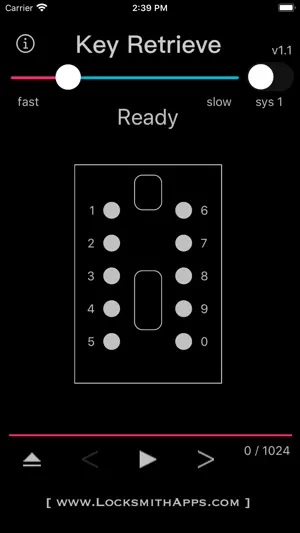
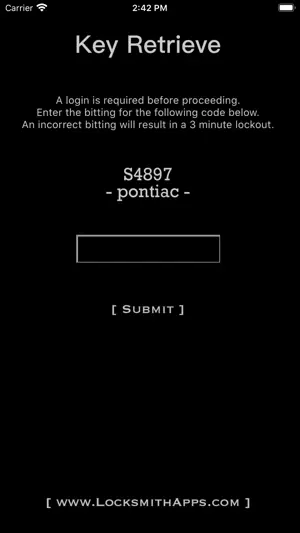
***Important: Key Retrieve requires a login each and every time before using. The login will generate a random lock code in which the correct bitting will need to be provided. If you are not in the locksmith industry you will be unable to use this app.*** Have a customer who lost the combination to their push button lock box? Then this tool will help you retrieve your customer's keys and allow the ability to reuse their lock box. This tool was made specifically for the style lock boxes that have mechanical push buttons numbered one through five along the left side, 6 through zero along the right side, a vertical slider in the top-middle to open, and a vertical slider in the bottom-middle to clear all the buttons that may have been pressed. These lock boxes allow any combination of the ten numbers to be set from simply no combination at all to using all ten numbers, barring that no number can be repeated and the order in which the numbers are pressed do not matter. There are two different methods in which Key Retrieve uses: lock boxes that cannot be manipulated and lock boxes that can. This tool will not help manipulate nor will it show which method to use, but instead facilitates the process by eliminating wasted attempts and removes possibilities that would never exist. Overview: Key Retrieve consists of two different methods for opening which are simply named System 1 and System 2. You can toggle between the systems using the switch in the upper right hand corner. Both systems are executed using the controls at the bottom: Eject resets everything to default. Left Arrow moves back a step. Play begins the sequence automatically. Pause stops the sequence. And Right Arrow moves forward a step. (moving back a step is infinite for System 1 but limited to one step for System 2). Right above the controls is a progress bar that displays the amount of combinations tried out of the combinations available, as well at the very top is a slider to control the speed when using the automatic sequence (play control). Lastly, in the middle displays the combination to be tried in text as well as a graphic representation of the lock where the corresponding numbers/buttons will highlight to help as a visual aid. System 1: This system is only used on locks that cannot be manipulated and/or when no prior knowledge exists. Use System 2 if any part of the combination is known. Because these locks do not care about order and numbers cannot be repeated, there are only 1,024 possibilities (including no combination). This system will exhaust all 1,024 if needed, which with no strategy amounts to pressing over 7,000 buttons. However, only about a third of this 7,000+ total will be required for this system's method. To start, press Play or use the Next control repeatedly. The app will tell you one by one which button to press that you will simply copy onto the lock. You can set your speed by using the slider at the top if utilizing the Play control to run automatically. Tip: Before starting set the speed at various settings to calibrate your comfort. System 2: This system is only used when you have at least one known number in the combination, which is typically achieved from manipulation. Every number that is known in advance cuts the total possibilities in half. To start, tap on each number that is known and one at a time the number will be highlighted with a blue halo (tap again to turn off). After all known numbers have been selected, begin by using the Play or Next controls similar to System 1, except instead of a single button being displayed, the entire combination followed by Open and Clear will result as a single cycle. Remember that order does not matter: if the combination displayed contains a 1, 5, and an 8, then pressing 8 then 1 then 5 will result the same. Tip: Take your time manipulating the lock before using the app. Spending an extra minute or two up front can save much more later on.
What’s new
Version 1.1.3 · Updated March 12, 2026
-Under the hood repairs
App privacy
The developer, Farren Domenici, reported these privacy practices to Apple.
Data Not Collected
The developer does not collect any data from this app.
Alternatives to Key Retrieve
Looking for apps like Key Retrieve? Here are 6 similar apps on the App Store. The highest rated is EE ToolKit PRO (4.9/5), and 5 of the 6 are free to download.
-
 JLR Mobile Tech
-
 GeoReminder: Location Reminder
4.2
GeoReminder: Location Reminder
4.2
-
 EE ToolKit PRO
4.9
EE ToolKit PRO
4.9
-
 MyAutoSmart
4.2
MyAutoSmart
4.2
-
 Collabtic App
3.2
Collabtic App
3.2
-
 Scan Things
3.9
Scan Things
3.9
| App | Rating | Price | Last updated | Compare |
|---|---|---|---|---|
| Key Retrieve | – | 9.99 USD | March 12, 2026 | |
| JLR Mobile Tech | – | Free | May 9, 2024 | Compare |
| GeoReminder: Location Reminder | 4.2 / 5 (5) | Free | Oct 11, 2026 | Compare |
| EE ToolKit PRO | 4.9 / 5 (293) | 9.99 USD | Mar 7, 2026 | Compare |
| MyAutoSmart | 4.2 / 5 (11) | Free | Jul 13, 2026 | Compare |
| Collabtic App | 3.2 / 5 (6) | Free | Oct 18, 2026 | Compare |
| Scan Things | 3.9 / 5 (7) | Free | Jun 10, 2025 | Compare |
Compare Key Retrieve with the top alternatives: ratings, updates, ASO score and keyword gaps →