

SoundNote - Voice Recorder
Newkline Co., Ltd. Productivity iPhoneiPadiPod touchApple Watch
SoundNote - Voice Recorder is a free Productivity app for iPhone and iPad by Newkline Co., Ltd. Rated 4.7/5 from 633 ratings. Requires iOS 15.0.
- Rating
- 4.7
- 633 ratings
- Price
- Free
- on the App Store
- Size
- 68 MB
- Age 4+
- Updated
- May 18
- 2026 · v6.0.2
Screenshots

About SoundNote - Voice Recorder
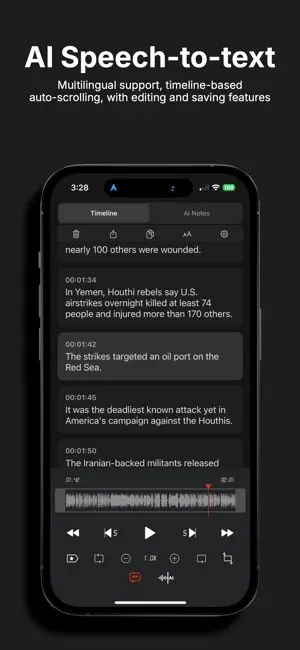
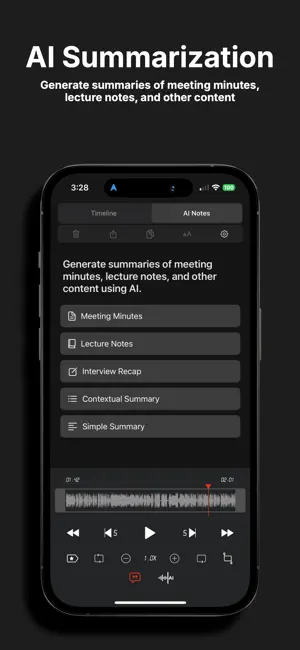
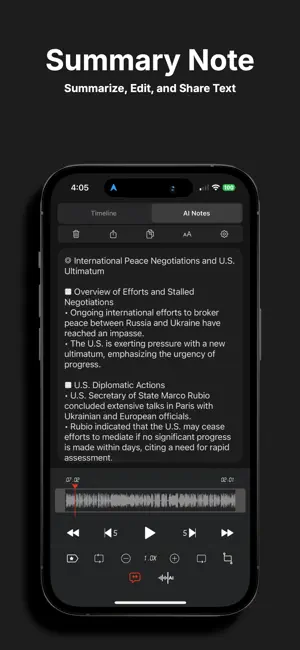
SoundNote offers AI-powered transcription features that easily generate meeting minutes, class notes, interview summaries, and paragraph summaries. It allows you to quickly capture important information, save time, and enhance work efficiency. The AI-driven transcription and summarization features significantly reduce work time and provide a smarter, more productive work environment. Supporting MP3, WAV, and M4A formats, SoundNote is a high-quality voice recorder with speech-to-text conversion and AI noise reduction capabilities. It's the perfect solution for anyone needing to manage voice memos, including business professionals, reporters, tutors, audio experts, sound engineers, and students. With excellent playback control and audio editing features, SoundNote makes it easy to edit and modify recorded files for greater efficiency. It supports Apple Watch and is available on both iPhone and iPad. ■ Main Features · AI-powered meeting minutes, lecture notes, interview summaries, and general summarization · AI noise reduction · Speech-to-text transcription · Live Activities (Dynamic Island), Now Playing · Direct recording in MP3, WAV, and M4A formats · High-quality audio recording · Unlimited recording time · Background recording · Wave display for recording status · Various audio quality options (11,025KHz, 22,050KHz, 44,100KHz, 48,000KHz) · Mono/stereo recording · Playable on various media · Resume recording after phone call pause (up to 3 minutes) · Add descriptions to recordings · Easy and fast to use · Display file size · Safe stop for low battery or storage space · Bluetooth support · Music library import function · File sorting · Voice-to-text transcription ■ AI-powered · Meeting minutes, lecture notes, interview summaries, and general summarization · Noise reduction · Speech-to-text transcription ■ Powerful File Sharing & Management · Transfer files via iTunes, Email, AirDrop, or Wi-Fi · File sharing with other apps (“Open in”) ■ Folder Management · Create, edit, delete, and organize folders efficiently ■ Playback Control · Repeat, slow, or fast play; adjust playback speed (0.1x ~ Play) ■ Trim & Cut Audio · Trim and cut recordings as needed (MP3, WAV, M4A formats) ■ Audio Visualization · Visualize recordings to identify sections easily ■ Sound Tags · Add tags to specific locations for instant playback ■ File Combination · Combine multiple audio files into one, creating a custom sequence ■ PREMIUM Subscription · Payment will be charged to your Apple ID upon confirmation. Subscriptions automatically renew unless canceled at least 24 hours before the end of the current period. Renewal charges occur within 24 hours of the period's end. You can manage or cancel your subscription anytime through your App Store account settings. Subscription Options: · Monthly Subscription: Auto-renew with 3-day free trial, unlocks all features / AD-Free · Yearly Subscription: Auto-renew with 3-day free trial, unlocks all features / AD-Free Privacy Policy: https://newkline.com/apps/avrx/privacy_en.html Terms of Service: https://newkline.com/apps/avrx/terms.html
Ratings & reviews
4.7
633 ratings
What’s new
Version 6.0.2 · Updated May 18, 2026
Bug fixes and performance improvements. Improved audio editing features (cut, copy, paste, trim, add audio). Improved bookmark functionality. Added pinch-to-zoom support for the waveform in the audio editing screen. Enhanced recording waveform visuals. Now supports iPhone, iPad, and Mac.
App privacy
The developer, Newkline Co., Ltd., reported these privacy practices to Apple.
Data Used to Track You
The following data may be used to track you across apps and websites owned by other companies:
- Usage Data: Advertising Data
Data Not Linked to You
The following data, which may be collected but is not linked to your identity, may be used for the following purposes:
- Identifiers: Device ID
- Usage Data: Advertising Data
- Diagnostics: Crash Data, Performance Data, Other Diagnostic Data
Used for: Third-Party Advertising, Developer’s Advertising or Marketing, Analytics, App Functionality
Alternatives to SoundNote - Voice Recorder
Looking for apps like SoundNote - Voice Recorder? Here are 6 similar apps on the App Store. The highest rated is Voxly: Voice Recorder & Memos (4.8/5), and all 6 are free to download.
-
 Voice Recorder ⁺ Recording
4.6
Voice Recorder ⁺ Recording
4.6
-
 Voice Record Pro 7
4.7
Voice Record Pro 7
4.7
-
 Voice Recorder, Voice Memos ®
4.4
Voice Recorder, Voice Memos ®
4.4
-
 AI Voice Recorder & Memos
4.7
AI Voice Recorder & Memos
4.7
-
 Voice Recorder,Screen Recorder
4.5
Voice Recorder,Screen Recorder
4.5
-
 Voxly: Voice Recorder & Memos
4.8
Voxly: Voice Recorder & Memos
4.8
| App | Rating | Price | Last updated | Compare |
|---|---|---|---|---|
| SoundNote - Voice Recorder | 4.7 / 5 (633 ratings) | Free | May 18, 2026 | |
| Voice Recorder ⁺ Recording | 4.6 / 5 (1,259) | Free | Jun 5, 2025 | Compare |
| Voice Record Pro 7 | 4.7 / 5 (1,157) | Free | May 26, 2026 | Compare |
| Voice Recorder, Voice Memos ® | 4.4 / 5 (12,103) | Free | Nov 2, 2026 | Compare |
| AI Voice Recorder & Memos | 4.7 / 5 (888) | Free | May 7, 2026 | Compare |
| Voice Recorder,Screen Recorder | 4.5 / 5 (208) | Free | Apr 20, 2026 | Compare |
| Voxly: Voice Recorder & Memos | 4.8 / 5 (36) | Free | Oct 23, 2026 | Compare |