

Crow Media Player
The Language Conservancy, Inc. Education iPhoneiPadiPod touch
Crow Media Player is a free Education app for iPhone and iPad by The Language Conservancy, Inc. Rated 3.0/5 from 2 ratings. Requires iOS 12.0.
- Rating
- 3.0
- 2 ratings
- Price
- Free
- on the App Store
- Size
- 914 MB
- Age 4+
- Updated
- Dec 9
- 2024 · v2
Screenshots


About Crow Media Player
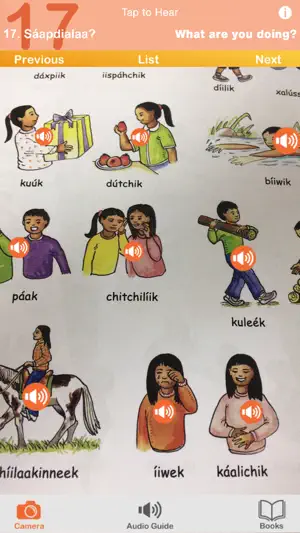
A fun audio companion for your Crow textbook! Just look, tap, and listen! Audio available for: Bíiluukaalilaah! - Speak Crow! Level 1 Bíiluukaalilaah! - Speak Crow! Level 2 Chihpám Bachimmiléek - Prairie Dog Goes to School The Crow Media Player is a companion to the Crow Language Consortium series of textbooks and children's books. Just point your phone at the page and tap to hear Native speakers pronounce the words. The AR and Page Modes give you complete access to the textbook vocabulary and audio with an easy tap and swipe interface. -Augmented reality (AR) places audio players right on the page in every unit! -Hit the Play button in the bottom left corner to play through All Audio within the unit. Play always starts from the last played audio so you will pick up where you left off. Instructions: The Crow Media Player is easy to use. You’ll start out in Books, where you can select your book. Tap the book again to enter Page Mode. If you are asked to allow camera use, press agree or yes if you wish to use AR Mode. Tap the AR Mode Switch to switch to the camera view. Tap Play to start auto-playback. Tap the right or left arrows to proceed to the next or previous Section. Tap the hamburger button to select the section from a list. Page Mode - Pinch to zoom - Drag to navigate between pages - Press Play to start auto-playback of all audio in the section - Tap buttons on page to play audio - Tap a button on the page and then tap Play to start auto-playback from that button AR Mode - Tap the AR Mode Switch to enter AR Mode - Look at the page in your book through your phone or tablet's camera - You will see the page overlay and you may tap buttons to hear the audio * Image recognition performance may vary depending on the device. * Some devices are not compatible with AR mode. If your device isn’t compatible, you will see a warning that will return you to Page Mode. About the Crow Language Consortium: The Crow Language Consortium provides accessible language-learning tools and resources — textbooks, apps, dictionaries and more — to help preserve Crow. Get to know us at https://crowlanguage.org and check out some of our other Crow products! Thanks to the generous support of -St. Labre Indian School -Santa Fe Natural Tobacco Company Foundation -Humanities Montana
What’s new
Version 2 · Updated December 9, 2024
Crow Level 2 Textbook added.
App privacy
The developer, The Language Conservancy, Inc., reported these privacy practices to Apple.
Data Not Collected
The developer does not collect any data from this app.
Alternatives to Crow Media Player
Looking for apps like Crow Media Player? Here are 6 similar apps on the App Store. The highest rated is Speak Shawnee (5.0/5), and all 6 are free to download.
-
 Hardin Public Schools
-
 Ponca
4.5
-
 Speak Shawnee
5.0
-
 Learn Demotic Egyptian
-
 Lame Deer Public Schools
-
 Denaakk'e QR Reader
| App | Rating | Price | Last updated | Compare |
|---|---|---|---|---|
| Crow Media Player | 3.0 / 5 (2 ratings) | Free | December 9, 2024 | |
| Hardin Public Schools | – | Free | Oct 17, 2026 | Compare |
| Ponca | 4.5 / 5 (10) | Free | Sep 2, 2026 | Compare |
| Speak Shawnee | 5.0 / 5 (9) | Free | Apr 2, 2026 | Compare |
| Learn Demotic Egyptian | – | Free | Jan 12, 2025 | Compare |
| Lame Deer Public Schools | – | Free | Dec 22, 2025 | Compare |
| Denaakk'e QR Reader | – | Free | Apr 8, 2025 | Compare |
Compare Crow Media Player with the top alternatives: ratings, updates, ASO score and keyword gaps →