

Magic Cinema ViewFinder
Roman Medvid Photo & Video iPhoneiPadiPod touch
Magic Cinema ViewFinder is a free Photo & Video app for iPhone and iPad by Roman Medvid. Rated 4.6/5 from 81 ratings. Requires iOS 12.0.
- Rating
- 4.6
- 81 ratings
- Price
- Free
- on the App Store
- Size
- 18 MB
- Age 4+
- Updated
- Sep 8
- 2026 · v1.9.2
Screenshots
About Magic Cinema ViewFinder
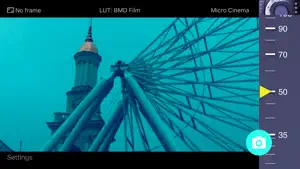
Magic Cinema ViewFinder presents you a precise framing preview for the real Blackmagic camera/lens combination you'll be shooting with, right where you stand with your iPhone / iPad. It simulates the field of view of any Blackmagic camera or lens and can help thousands of professionals in filmmaking at the preproduction. PLEASE READ: this app does not turn your Apple device into an external monitor, but operates as a stand-alone director's viewfinder. The app contains ad banners, which can be turned off with additional in-app purchase (in 'About the App' menu). The app is a digital directors viewfinder -- it helps you see the exact field of view for your future shot. Select the camera from the menu and rotate the wheel to select the focal length of the lens. Supported cameras: - Blackmagic URSA 4.6K / URSA Mini - Blackmagic URSA - Blackmagic URSA Mini Pro - Blackmagic URSA Broadcast - Blackmagic BMCC, BMPC 4K - Blackmagic Micro Cinema / Pocket / 4K Magic ViewFinder simulates using tele adapters or anamorphic optics on your camera (see menu). From the menu you can also select the aspect ratio of the frame guide overlaying your image. Magic ViewFinder also lets you apply some commonly used color presets (also known as LUTs) to the live picture, which brings you even closer to the final shot. When you have found the right view, you may save it for future reference, with additional data like the focal length, date and time and camera / lens information. While taking a photo, you may lock exposure and turn on and off the auto focus to better control the captured picture. You can set camera to work in constant auto-focus mode, or lock the focus temporarily. You can also tap the live screen to focus on particular objects (which turns on the focus-locked mode). White balance may work in Auto, Locked or Manual mode. If the field of view of your real camera is wider than your in-device camera, the app adds 'padding' around the image, since the device cannot 'see' what is beyond. It is the best solution that we developed first amongst other viewfinder apps. Please note that position of your iPhone/iPad should correspond to the 'nodal point' of your real lens, which is somewhere in the middle of the lens. Ad policy: The ads are designed to appear non-intrusively, and help me to develop. Additional info about the app may be read at: http://dev.kadru.net/index.php/magic-viewfinder/ If you have any issues please email us for a quick support: [email protected] To activate additional settings (i.e. to use all available optical adapters and frame guides) and to turn off advertising, please subscribe to (Option #1) or purchase Premium Features (Option #2) in 'About the App' menu. In-App Purchase Option #1: - Title of service: Premium features: subscription - Length of subscription: a month (auto-renewable) - Contents of service: Turned off ads and additional options for frame guides, optical adapters, anamorphic indices, more LUTs - Payment will be charged to iTunes Account at confirmation of purchase - Subscription automatically renews unless auto-renew is turned off at least 24-hours before the end of the current period - Account will be charged for renewal within 24-hours prior to the end of the current period, and identify the cost of the renewal - Subscriptions may be managed by the user and auto-renewal may be turned off by going to the user’s Account Settings after purchase - Any unused portion of a free trial period will be forfeited when the user purchases a subscription to that publication, where applicable Terms of Use: http://dev.kadru.net/tos.html In-App Purchase Option #2: - Title of service: Premium features: purchase - Length of subscription: once and forever - Contents of service: Turned off ads and additional options for frame guides, optical adapters, anamorphic indices, more LUTs Privacy Policy: http://dev.kadru.net/privacy_policy/Privacy_Policy_Magic_Cinema_ViewFinder.html
Ratings & reviews
4.6
81 ratings
What’s new
Version 1.9.2 · Updated September 8, 2026
- minor improvements
App privacy
The developer, Roman Medvid, reported these privacy practices to Apple.
Data Not Linked to You
The following data, which may be collected but is not linked to your identity, may be used for the following purposes:
- Usage Data: Product Interaction, Advertising Data, Other Usage Data
- Diagnostics: Other Diagnostic Data, Crash Data, Performance Data
Used for: Third-Party Advertising, Analytics
Alternatives to Magic Cinema ViewFinder
Looking for apps like Magic Cinema ViewFinder? Here are 6 similar apps on the App Store. The highest rated is FinderKit: Viewfinder (4.9/5), and all 6 are free to download.
-
 FinderKit: Viewfinder
4.9
FinderKit: Viewfinder
4.9
-
 Shot Designer
3.8
Shot Designer
3.8
-
 CameraKit: Camera Tools
4.7
CameraKit: Camera Tools
4.7
-
 FrameUp - Cinema Viewfinder
4.9
FrameUp - Cinema Viewfinder
4.9
-
 LensKit: Lens Tools
4.9
LensKit: Lens Tools
4.9
-
 Artemis Director's Viewfinder
3.9
Artemis Director's Viewfinder
3.9
| App | Rating | Price | Last updated | Compare |
|---|---|---|---|---|
| Magic Cinema ViewFinder | 4.6 / 5 (81 ratings) | Free | September 8, 2026 | |
| FinderKit: Viewfinder | 4.9 / 5 (13) | Free | Sep 25, 2026 | Compare |
| Shot Designer | 3.8 / 5 (10) | Free | Oct 1, 2024 | Compare |
| CameraKit: Camera Tools | 4.7 / 5 (321) | Free | Sep 25, 2026 | Compare |
| FrameUp - Cinema Viewfinder | 4.9 / 5 (17) | Free | Sep 23, 2026 | Compare |
| LensKit: Lens Tools | 4.9 / 5 (56) | Free | Sep 25, 2026 | Compare |
| Artemis Director's Viewfinder | 3.9 / 5 (153) | Free | Sep 26, 2026 | Compare |