

Expense Tracker - Money Note
Komorebi Inc. Finance iPhoneiPadiPod touch
Expense Tracker - Money Note is a free Finance app for iPhone and iPad by Komorebi Inc. Rated 4.9/5 from 3,019 ratings. Requires iOS 15.0.
- Rating
- 4.9
- 3K ratings
- Price
- Free
- on the App Store
- Size
- 110 MB
- Age 4+
- Updated
- Jul 10
- 2026 · v5.2.1
Screenshots

About Expense Tracker - Money Note
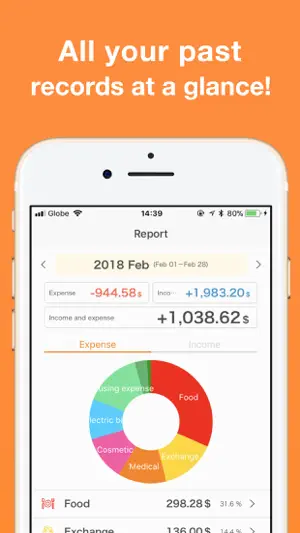
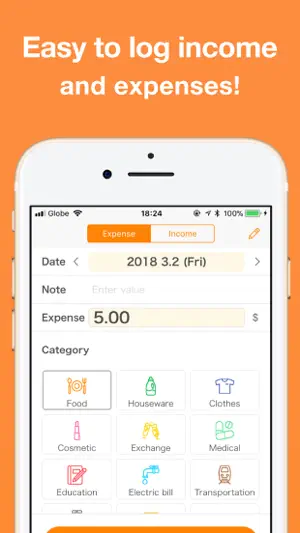
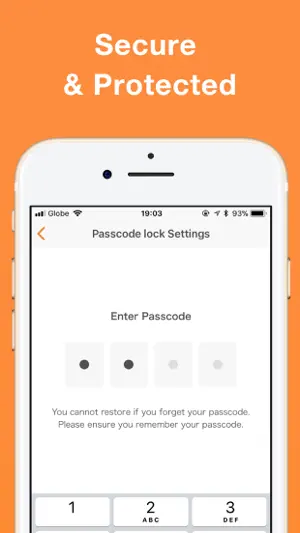
Simple & Free Budget Tracker A simple budgeting app to track income and expenses with ease. No account registration, no bank connections, and no subscriptions. All data is stored locally for fast, secure, offline use. Designed with a familiar iOS interface, This app lets anyone start budgeting instantly. FEATURES ---------------- • Extremely simple and easy to use • No account registration required • Free to use forever (no hidden charges later) • Built-in calendar for easy tracking • Budget settings by category • Monthly, yearly, and cumulative reports • Unlimited custom categories • Unlimited fixed income and expense settings • 20+ theme colors and 20+ app icons • CSV (Excel) export, PDF export, and printing • Passcode lock with Face ID and Touch ID • iCloud backup and iPad sync • 15+ Home Screen widgets • Lock Screen widgets supported Everything you need for daily expense management, completely free. RECOMMENDED FOR ---------------- • People who don’t want a complicated budgeting app • Users who feel uneasy linking bank accounts or credit cards • Those who dislike apps that constantly connect to the internet • Anyone who wants to record expenses simply and quickly • Users who gave up on receipt scanning apps • People who just want easy input • Anyone who doesn’t want monthly subscription fees This app stores all data locally, so it’s fast, secure, and works offline. Unlike many other apps, there are no monthly subscriptions, and useful features remain free. FEATURE DETAILS ---------------- [ Input ] Tap large, easy-to-press category buttons and enter amounts quickly. The built-in calculator keyboard makes input fast and comfortable. An automatic input mode allows you to enter multiple receipts continuously. [ Calendar ] Check daily income and expenses at a glance on the calendar. Customize the start day of the week and monthly start or closing dates, making it easy to begin tracking from your payday. Add or delete entries directly from the calendar for easy bulk input. Savings and initial balances can be set to display carry-overs and cumulative totals. [ Reports ] Monthly income and expenses are displayed in clear pie charts. View spending ratios by category to easily spot overspending or hidden waste. [ Backup / CSV / PDF Export ] All data can be exported as CSV (Excel-compatible) files. Use exported files as backups and import them when changing devices, including iPhone and iPad. CSV data can also be used on a computer for accounting or tax filing. Monthly data can be exported as PDF files for archiving or printing. [ Theme Colors & App Icons ] Customize the app with over 20 theme colors, from cute pinks to chic dark blues. Change the app icon to match your style, choosing from more than 20 designs. [ Passcode Lock ] Protect your financial data with a passcode. Face ID and Touch ID are fully supported. [ Widgets ] Supports both Home Screen and Lock Screen widgets. Check remaining budgets by category without opening the app. See how much you can still spend this month. Display a mini calendar showing recorded days. Add new entries directly from the Lock Screen with a single tap. ABOUT THE APP ---------------- This is a simple and free budgeting app with no subscriptions. Just record your income and expenses, and the app automatically organizes them into clear calendars and reports, helping you understand your finances at a glance. Unlike overly complex apps that rely on bank syncing or receipt scanning, This app focuses on essential features only, designed to be fast, clear, and easy for anyone to use. 【Terms of Service】 https://komorebi-studio.com/tos_en.html 【Privacy Policy】 https://komorebi-studio.com/policyredirect.html
Ratings & reviews
4.9
3K ratings
What’s new
Version 5.2.1 · Updated July 10, 2026
- Fixed display issues on the Calendar and Report screens that had become hard to read after the previous update. - Fixed an issue where the Report could sometimes show only part of your data.
App privacy
The developer, Komorebi Inc., reported these privacy practices to Apple.
Data Used to Track You
The following data may be used to track you across apps and websites owned by other companies:
- Identifiers: User ID, Device ID
- Usage Data: Product Interaction, Advertising Data
Data Not Linked to You
The following data, which may be collected but is not linked to your identity, may be used for the following purposes:
- Identifiers: User ID, Device ID
- Usage Data: Product Interaction, Advertising Data
- Purchases: Purchase History
- Diagnostics: Crash Data, Performance Data
Used for: Third-Party Advertising, Analytics, App Functionality
Alternatives to Expense Tracker - Money Note
Looking for apps like Expense Tracker - Money Note? Here are 6 similar apps on the App Store. The highest rated is My Simple Expenses (5.0/5), and all 6 are free to download.
-
 Organizze Budget Planner
4.7
Organizze Budget Planner
4.7
-
 Mobills - Budget Planner
4.7
Mobills - Budget Planner
4.7
-
 My Simple Expenses
5.0
My Simple Expenses
5.0
-
 My Finances: Money & AI
4.9
My Finances: Money & AI
4.9
-
 Minhas Economias
4.7
Minhas Economias
4.7
-
 Easy Money Manager
5.0
Easy Money Manager
5.0
| App | Rating | Price | Last updated | Compare |
|---|---|---|---|---|
| Expense Tracker - Money Note | 4.9 / 5 (3,019 ratings) | Free | July 10, 2026 | |
| Organizze Budget Planner | 4.7 / 5 (539) | Free | Oct 18, 2026 | Compare |
| Mobills - Budget Planner | 4.7 / 5 (4,381) | Free | Oct 31, 2026 | Compare |
| My Simple Expenses | 5.0 / 5 (3) | Free | Jun 1, 2026 | Compare |
| My Finances: Money & AI | 4.9 / 5 (69) | Free | Oct 31, 2026 | Compare |
| Minhas Economias | 4.7 / 5 (1,041) | Free | Oct 26, 2026 | Compare |
| Easy Money Manager | 5.0 / 5 (4) | Free | Oct 22, 2026 | Compare |