

TrialPad - Trial Presentation
LIT SOFTWARE, LLC Business iPhoneiPadiPod touchMac
TrialPad - Trial Presentation is a free Business app for iPhone and iPad by LIT SOFTWARE, LLC. Rated 4.5/5 from 379 ratings. Requires iOS 26.0.
- Rating
- 4.5
- 379 ratings
- Price
- Free
- on the App Store
- Size
- 62 MB
- Age 4+
- Updated
- Oct 23
- 2026 · v26.11.1
Screenshots



About TrialPad - Trial Presentation
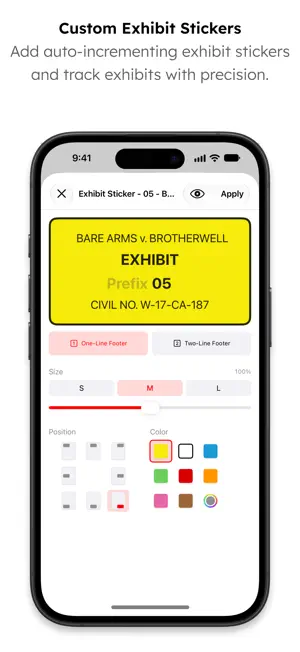
TrialPad is the award-winning trial presentation app for iPad, iPhone, iPhone Duo, and Mac, all included with one LIT SUITE subscription. Organize your evidence, then present documents, photos, video, and audio wirelessly in the courtroom or a remote setting, from whichever device you have with you. Call out and highlight key passages, compare documents side by side, play and edit video clips, add exhibit stickers, and search every word of your case. TrialPad integrates with your Windows workflow, is powerful, easy to use, and a fraction of the cost of traditional or cloud-based programs, all while being secure, private, mobile, and efficient. TrialPad was named “The Best Trial Presentation App” with an A+ TechnoScore by LitigationWorld. Since 2010, LIT SOFTWARE has set the bar for developing the best in litigation apps, garnering awards for innovation and ease of use. Our apps have been featured by Apple, and are loved by lawyers. **** LIT SUITE REVIEWS **** “The short review. Wow.” “TrialPad offers a full trial presentation system in a simple-to-use package at a fraction of the cost.” “These are incredibly sophisticated and useful apps that are in many ways more powerful than PC software costing hundreds of dollars more.” “For anybody doing any amount of trial work...TrialPad is a must have application.” “TrialPad is the perfect case organizer and presenter.” “TrialPad is one of the most complete and high tech presentation systems designed for lawyers and it is available right on your iPad [and Mac].” “TrialPad...is the industry leader.” **** Core Features - iPad, iPhone, iPhone Duo, and Mac **** • Full electronic courtroom presentation, no cloud connection needed • Present via HDMI to a TV or projector, or wirelessly using an Apple TV • Create callouts you can resize with a pinch, recolor, and use to dim the rest of the page • Highlight, annotate, redact, and zoom in, or circle key areas with the Laser Trail tool • Split View shows two documents, two videos, or a video next to a document • Add auto-incrementing exhibit stickers and mark documents as admitted • Run your examination from presenter notes, with timestamps that jump to that moment in a video • Play, loop, and edit video clips, change playback speed, and capture still frames • Bookmark document pages and video timestamps • Create Key Docs from important pages or video segments, and draw on whiteboards • Search file names or full text across a document, a folder, or the whole case • Organize evidence into witness or issue folders, and swipe to mark Admitted, add a sticker, or export • Create reports of your evidence, presenter notes, or a time-stamped presentation log • Use War Room Mode to share your case with co-counsel and clients • Import from email, USB drive, AirDrop, ZIP files, or cloud storage providers like Box, Citrix Files, Dropbox, Google Drive, Microsoft OneDrive, and many more • Import production sets and videos from DocReviewPad, and synced video depositions, reports, and impeachment slides from TranscriptPad • Share entire case files using cloud storage or a USB drive • File formats supported: PDF, JPG, PNG, TIF, TXT, video and audio **** Optimized for iPhone and iPhone Duo - Your Entire Case in Your Pocket **** • Review and present your evidence anywhere, right from your iPhone • Unfold iPhone Duo for a larger view of documents and video, and write with Apple Pencil **** Optimized for iPad and Mac - Built for the Courtroom **** • Buttery smooth handwriting with Apple Pencil on iPad • Keyboard shortcuts and right-click menus on Mac LIT SUITE SUBSCRIPTION One subscription gives you access to all LIT SUITE apps on iPhone, iPhone Duo, iPad, and Mac. After your 7-day free trial, your App Store account will be charged and your subscription will renew automatically unless canceled in advance. Manage your subscription in your App Store account settings.
Ratings & reviews
4.5
379 ratings
What’s new
Version 26.11.1 · Updated October 23, 2026
• NEW / IMPROVED – TrialPad is now also available on iPhone and iPhone Duo, included with your subscription at no extra cost! Your entire case now fits in your pocket. Review and present your evidence anywhere! – Improved ZIP imports to let users choose whether to import documents, multimedia, or both when a ZIP contains mixed content. – Added a View in Sidebar option to the document menu for quickly locating documents in the sidebar. – Improved Key Docs folder management to preserve the original folder structure when adding multiple folders using the Select tool. – Improved Case File closing behavior to prompt for confirmation only when a presentation is active, with a message explaining that closing the Case File will stop the presentation. – Improved document and multimedia viewer interactions by displaying a standard context menu when long-pressing or right-clicking in the viewer. – Ongoing performance and usability improvements. • FIXED – Fixed an issue where text typed in anchored notes could appear empty after switching to floating notes. – Fixed an issue where the delete confirmation for a bookmark appeared below the bookmark list instead of next to the bookmark. – Additional bug fixes and stability improvements. Please let us know if you encounter an issue or have other feedback. We value your feedback as it helps us address issues, refine features, and update documentation. – Visit our Help Center: https://support.litsoftware.com – Email Support: [email protected] – Learn Online with LIT SUITE Academy: https://learn.litsoftware.com
App privacy
The developer, LIT SOFTWARE, LLC, reported these privacy practices to Apple.
Data Linked to You
The following data, which may be collected and linked to your identity, may be used for the following purposes:
- Contact Info: Email Address, Name
- Identifiers: User ID, Device ID
Used for: App Functionality
Data Not Linked to You
The following data, which may be collected but is not linked to your identity, may be used for the following purposes:
- Usage Data: Product Interaction
- Diagnostics: Crash Data
Used for: Analytics
Alternatives to TrialPad - Trial Presentation
Looking for apps like TrialPad - Trial Presentation? Here are 6 similar apps on the App Store. The highest rated is Jurybox - Jury Selection (5.0/5), and all 6 are free to download.
-
 Jurybox - Jury Selection
5.0
-
 Case Crafter - Trial Presenter
2.7
-
 Timeline Presenter
4.0
-
 JuryBoard
5.0
-
 Honey Juror
5.0
-
 Case Notebook E-Transcript
1.8
| App | Rating | Price | Last updated | Compare |
|---|---|---|---|---|
| TrialPad - Trial Presentation | 4.5 / 5 (379 ratings) | Free | October 23, 2026 | |
| Jurybox - Jury Selection | 5.0 / 5 (3) | Free | Oct 29, 2026 | Compare |
| Case Crafter - Trial Presenter | 2.7 / 5 (7) | Free | Sep 16, 2026 | Compare |
| Timeline Presenter | 4.0 / 5 (45) | Free | Oct 10, 2025 | Compare |
| JuryBoard | 5.0 / 5 (8) | Free | Jul 15, 2026 | Compare |
| Honey Juror | 5.0 / 5 (1) | Free | Sep 22, 2025 | Compare |
| Case Notebook E-Transcript | 1.8 / 5 (39) | Free | Sep 24, 2026 | Compare |