

DocReviewPad - Review Docs
LIT SOFTWARE, LLC Business iPhoneiPadiPod touchMac
DocReviewPad - Review Docs is a free Business app for iPhone and iPad by LIT SOFTWARE, LLC. Rated 4.4/5 from 81 ratings. Requires iOS 26.0.
- Rating
- 4.4
- 81 ratings
- Price
- Free
- on the App Store
- Size
- 49 MB
- Age 4+
- Updated
- Oct 22
- 2026 · v26.11.1
Screenshots



About DocReviewPad - Review Docs
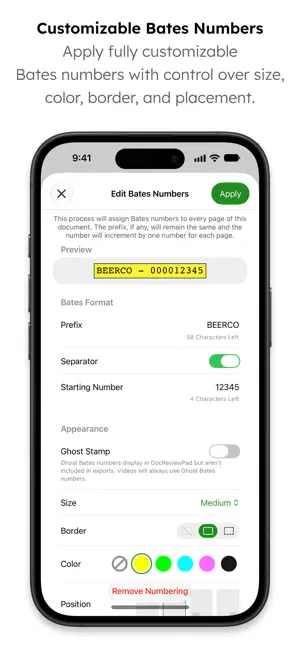
DocReviewPad is the full-featured document review app for iPad, iPhone, iPhone Duo, and Mac, and now it reviews video too, all included with one LIT SUITE subscription. Import documents and videos, assign custom Bates numbers, tag and issue code every page, annotate and redact, and search your entire case in an instant. Create production sets, privilege logs, and beautifully organized reports with all your review information. DocReviewPad integrates with your Windows workflow, is powerful, easy to use, and a fraction of the cost of traditional or cloud-based programs, all while being secure, private, mobile, and efficient. Since 2010, LIT SOFTWARE has set the bar for developing the best in litigation apps, garnering awards for innovation and ease of use. Our apps have been featured by Apple, and are loved by lawyers. **** LIT SUITE REVIEWS **** “The short review. Wow.” “This app can do things I’ve previously had to do on a desktop, but much easier and faster.” “Super way to review documents quickly.” “Generates professional reports with all the bates numbers listed, and exports to TrialPad into folders named for the issue code. Extremely useful.” “Helps me keep documents organized, bates stamps them, and create issue codes, which can then be generated into an easy-to-read report.” “Initial document analysis on iPad is fresh and fast, and frankly is a big winner.” “These are incredibly sophisticated and useful apps that are in many ways more powerful than PC software costing hundreds of dollars more.” **** New - Video Review **** • Import MP4 and MOV files alongside your documents and play them with frame previews, adjustable speed, and loop • Add timecode bookmarks, Issue Codes, and notes to videos • Give each video a Bates number that shows on the player without being burned into the file • Use Capture Frame to save a still from any video as a new document • Export videos to the TrialPad Multimedia tab, ready to present **** Core Features - iPad, iPhone, iPhone Duo, and Mac **** • Full-featured document review, no cloud connection needed • Organize documents or pages with color-coded issue codes, assigned to many at once • Mark documents or pages as confidential or privileged with built-in tags • Apply custom Bates numbers to thousands of documents in seconds, with a live preview • Use Ghost Bates Numbers for documents already stamped, still listed and searchable • Search your entire case instantly, with automatic OCR of scanned pages • Highlight, annotate, redact, and add multiple virtual sticky notes to each page • Split documents and extract pages by choosing them visually from thumbnails • Create reports with Bates ranges, notes, tags, and issue codes for each document or page • Granular export options for a production set, omitting confidential or privileged documents • Export your documents to TrialPad, organized by issue codes, into Key Doc folders • Import in the background from email, USB drive, or cloud storage like Box, Dropbox, Google Drive, and OneDrive • Share case files using cloud storage or a USB drive • File formats supported: PDF, JPG, PNG, TIF, TXT, MP4, and MOV **** Optimized for iPhone and iPhone Duo - Review Documents Anywhere **** • Swipe to speed review, and tag, code, or Bates number documents on the road • Unfold iPhone Duo for a larger view of every page, and write with Apple Pencil **** Optimized for iPad and Mac - Power Review **** • Larger screens to see more of your case at once • Apple Pencil handwriting on iPad, and keyboard shortcuts throughout LIT SUITE SUBSCRIPTION One subscription gives you access to all LIT SUITE apps on iPhone, iPhone Duo, iPad, and Mac. After your 7-day free trial, your App Store account will be charged and your subscription will renew automatically unless canceled in advance. Manage your subscription in your App Store account settings.
Ratings & reviews
4.4
81 ratings
What’s new
Version 26.11.1 · Updated October 22, 2026
• NEW / IMPROVED – DocReviewPad is now also available on iPhone and iPhone Duo, included with your subscription at no extra cost! Your entire case now fits in your pocket. Review your documents anywhere! – DocReviewPad has been redesigned with a modern interface on iPad, iPhone, and Mac, bringing it in line with TrialPad and the rest of the LIT SUITE. – DocReviewPad now supports video, so you can import MP4 and MOV files alongside your documents and play them in a built-in player with frame previews as you scrub, adjustable playback speed, loop, and full screen. – Review videos like the rest of your evidence by adding timecode bookmarks, Issue Codes, and a note, giving each video a Bates number that shows on the player without being burned into the file, and using Capture Frame to save a still as a new document. – Videos show a preview thumbnail in the document list, and DocReviewPad remembers where you left off in each video when you switch documents. – Videos exported to TrialPad now arrive in its Multimedia tab, ready to present. – Search your entire case in an instant, with documents indexed in the background, scanned pages run through OCR automatically, and every match highlighted on the page. – Swiping up or down now moves through the list you opened a document from, whether a folder, an Issue Code, or your search results, and documents opened from search land on their first matching page. – Ghost Bates Numbers let you assign Bates numbers without stamping the page, ideal for documents that already carry a Bates stamp, while still showing them in the document list and having them searchable. – Redesigned the Bates Numbering workflow with a live preview of the stamp on the page, one-tap placement in any corner, and a progress bar that keeps the app responsive when numbering large batches. – Assign Issue Codes to many documents at once from the document list, or to several pages at once from the page grid inside a document. – The annotation palette now matches TrialPad, with titled tool buttons, settings that open over the palette, and Floating, Top Anchored, or Side Anchored placement so the palette doesn’t cover the page. – Imports now run in the background with a progress bar, so you can keep working during large imports, cancel an import in progress, or undo one once it finishes. – Split Document and Extract Pages now let you choose pages visually from thumbnails, Rotate Document works the same way as in TrialPad, Grid View shows a document’s pages at a glance, and keyboard shortcuts work throughout the new interface. – Updated the import menu label from “Import Documents” to “Import Files” to better reflect support for documents and multimedia. – Ongoing performance and usability improvements. • FIXED – Additional bug fixes and stability improvements. Please let us know if you encounter an issue or have other feedback. We value your feedback as it helps us address issues, refine features, and update documentation. – Visit our Help Center: https://support.litsoftware.com – Email Support: [email protected] – Learn Online with LIT SUITE Academy: https://learn.litsoftware.com
App privacy
The developer, LIT SOFTWARE, LLC, reported these privacy practices to Apple.
Data Linked to You
The following data, which may be collected and linked to your identity, may be used for the following purposes:
- Contact Info: Email Address, Name
- Identifiers: User ID, Device ID
Used for: App Functionality
Data Not Linked to You
The following data, which may be collected but is not linked to your identity, may be used for the following purposes:
- Usage Data: Product Interaction
- Diagnostics: Crash Data
Used for: Analytics
Alternatives to DocReviewPad - Review Docs
Looking for apps like DocReviewPad - Review Docs? Here are 6 similar apps on the App Store. The highest rated is Jurybox - Jury Selection (5.0/5), and all 6 are free to download.
-
 Jurybox - Jury Selection
5.0
-
 Case Crafter - Trial Presenter
2.7
-
 JuryBoard
5.0
-
 Case Notebook E-Transcript
1.8
-
 Honey Juror
5.0
-
 ExhibitSuite
| App | Rating | Price | Last updated | Compare |
|---|---|---|---|---|
| DocReviewPad - Review Docs | 4.4 / 5 (81 ratings) | Free | October 22, 2026 | |
| Jurybox - Jury Selection | 5.0 / 5 (3) | Free | Oct 29, 2026 | Compare |
| Case Crafter - Trial Presenter | 2.7 / 5 (7) | Free | Sep 16, 2026 | Compare |
| JuryBoard | 5.0 / 5 (8) | Free | Jul 15, 2026 | Compare |
| Case Notebook E-Transcript | 1.8 / 5 (39) | Free | Sep 24, 2026 | Compare |
| Honey Juror | 5.0 / 5 (1) | Free | Sep 22, 2025 | Compare |
| ExhibitSuite | – | Free | Oct 20, 2026 | Compare |