

Simple Rota Maker
Members of Us Limited Productivity iPhoneiPadiPod touch
Simple Rota Maker is a free Productivity app for iPhone and iPad by Members of Us Limited. Rated 3.0/5 from 2 ratings. Requires iOS 15.0.
- Rating
- 3.0
- 2 ratings
- Price
- Free
- on the App Store
- Size
- 38 MB
- Age 4+
- Updated
- Oct 10
- 2026 · v23
Screenshots
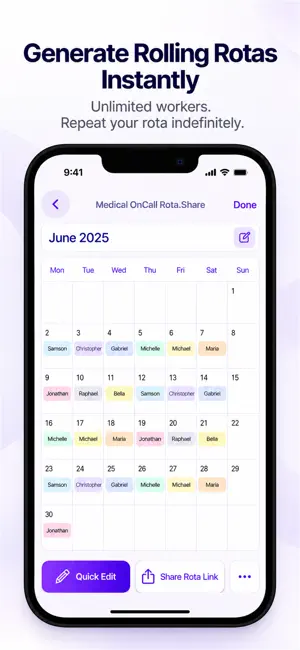
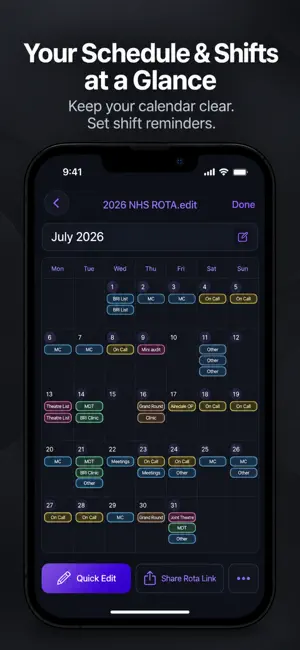


About Simple Rota Maker
Automatically generate rolling rota patterns—perfect for scheduling multiple workers over an indefinite period. Easily create your schedule or manual rotas with a few taps—ideal for managing your work shifts, personal schedules, appointments, or customizing worker rota patterns. A powerful yet simple task manager. Organize your to-do lists alongside your work shifts to stay super productive & on top of your schedule. In a hurry? Quickly record an audio note to replay anytime. Seamlessly create tasks, assign them to workers, & share dynamic links that open the task directly on their devices, automatically saving a copy for easy access and tracking. The simplest tool to customize your work shifts, personal schedules, appointments, & timetables—or create & share rolling rotas to roster multiple workers into hourly or daily shifts, complete with a built-in task manager. -For an automated rolling shift pattern, simply enter: • The names & number of workers • Optional worker availability or exclusion dates: Specify dates when workers must work or must be away, & the app will include or exclude them as needed Done! The app generates: • A beautiful monthly calendar for 24-hour or once-a-day shifts. • A sleek weekly calendar for shifts lasting 1-23 hours. Key Features: • Ensures workers receive an equal number of shifts. • Allows multiple workers per shift. • Lets you set a daily shift end time with ease. • Handles complex rolling block patterns like ‘n’ days on ‘n’ days off seamlessly. -Export rotas to spreadsheet apps like Excel -View detailed rota breakdowns, including the number of weekdays, weekends, & hours each worker is scheduled to work, along with additional worker statistics. -Easily edit the rota to adjust shifts, give workers more or fewer shifts, or modify must-work & away dates with ease. -Take full control & create your custom rota manually in just three easy taps. -For your personal work shifts, schedules, appointments, or timetables: • Simply enter shift or schedule names, select a date range, & populate the calendar with just a tap! • View 1-3 shifts per day in a clean, easy-to-read calendar format. • annotate your custom calendar with powerful notes that expand when you tap on a date. Share dynamic links to allow coworkers to view & edit the rota. Each time a link is opened, a duplicate “.share” version of your rota is created, which can be edited & shared back & forth. From these links, workers can: • Open the rota on their device. • Download their specific shifts. • Add shifts to their device calendar. • Set shift reminders. • Download the rota as a spreadsheet. -Annotate the rota with notes that follows & updates with the dynamic link to your rota. -Enhance your notes with powerful formatting options, including headings, bold, italics, underline, & a variety of font colours. - Stay organised & in control with your all-in-one task manager—perfect for creating to-do lists, shopping lists, & assigning tasks to coworkers. Whether you’re managing personal goals or team projects, it’s the simple way to keep everything on track. -Export your rota, schedule, or shifts seamlessly to your Calendar app for effortless integration and accessibility. -Set reminders for shifts or schedules & receive notifications to stay informed when a work shift is approaching. -Access your rota & tasks from any device—your task lists & rosters are securely saved to your profile for seamless access anytime. -Long-press the name of your rota or tasks to pin them to the top of your list for quick access. -Save & rename multiple versions of your rota & tasks for easy organization & reference, with an archive page to store & access old tasks & rosters. -Save your rota as an image or print it directly for easy sharing and reference. -Start your day with daily motivational quotes delivered directly to your profile. -Enjoy an integrated games page to unwind, relax, & recharge with a variety of fun games. Need help? Email us!
What’s new
Version 23 · Updated October 10, 2026
A fresh new look for Simple Rota Maker! • Modernised design for a smoother, easier experience. • New statistics graphs to help you understand your rota at a glance. • Bug fixes and performance improvements to keep things running smoothly. More features are on the way. Thanks for being part of Simple Rota Maker!
App privacy
The developer, Members of Us Limited, reported these privacy practices to Apple.
Data Used to Track You
The following data may be used to track you across apps and websites owned by other companies:
- Identifiers: Device ID
- Usage Data: Product Interaction, Advertising Data
Data Linked to You
The following data, which may be collected and linked to your identity, may be used for the following purposes:
- Identifiers: Device ID
- Usage Data: Product Interaction, Advertising Data
- Diagnostics: Crash Data, Performance Data
- Contact Info: Email Address
Used for: Third-Party Advertising, Analytics, App Functionality
Alternatives to Simple Rota Maker
Looking for apps like Simple Rota Maker? Here are 6 similar apps on the App Store. The highest rated is Shift Work Calendar & Planner (5.0/5), and all 6 are free to download.
-
 Sked: Work Schedule Maker
3.7
Sked: Work Schedule Maker
3.7
-
 Rota Calendar: Shift Planner
4.7
Rota Calendar: Shift Planner
4.7
-
 Shift Work Calendar & Planner
5.0
Shift Work Calendar & Planner
5.0
-
 10Cal - Colourful calendar app
4.7
10Cal - Colourful calendar app
4.7
-
 Roster-Calendar
4.4
Roster-Calendar
4.4
-
 PunchClock: Shift Calendar
| App | Rating | Price | Last updated | Compare |
|---|---|---|---|---|
| Simple Rota Maker | 3.0 / 5 (2 ratings) | Free | October 10, 2026 | |
| Sked: Work Schedule Maker | 3.7 / 5 (164) | Free | Oct 18, 2024 | Compare |
| Rota Calendar: Shift Planner | 4.7 / 5 (730) | Free | Sep 18, 2026 | Compare |
| Shift Work Calendar & Planner | 5.0 / 5 (3) | Free | Jul 31, 2026 | Compare |
| 10Cal - Colourful calendar app | 4.7 / 5 (21) | Free | Mar 6, 2026 | Compare |
| Roster-Calendar | 4.4 / 5 (63) | Free | Oct 16, 2026 | Compare |
| PunchClock: Shift Calendar | – | Free | Sep 9, 2026 | Compare |
Compare Simple Rota Maker with the top alternatives: ratings, updates, ASO score and keyword gaps →