

GaZou: Blur, Crop Photo Editor
AppSeed, Incorporated. Photo & Video iPhoneiPadiPod touch
GaZou: Blur, Crop Photo Editor is a free Photo & Video app for iPhone and iPad by AppSeed, Incorporated. Requires iOS 13.0. Updated October 17, 2026.
- Price
- Free
- on the App Store
- Size
- 52 MB
- Age 4+
- Updated
- Oct 17
- 2026 · v2.0.6
Screenshots



About GaZou: Blur, Crop Photo Editor
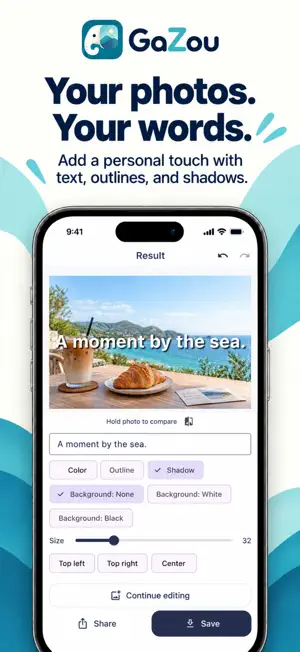
GaZou is a simple photo editor for everyday edits: crop pictures, add mosaic or blur, write text and date stamps, rotate, flip and resize images. Hide selected parts of a photo by dragging over the area, then save or share the result. Basic editing is free. USEFUL FOR • Adding mosaic or blur to faces, backgrounds or details you do not want to share • Cropping a photo to keep the part you like • Adding captions, watermarks and shooting dates • Straightening, mirroring or resizing pictures • Preparing photos for social media and messages PHOTO CROPPING Select the area with drag and pinch gestures. Crop freely or use an aspect ratio to keep the composition you want. MOSAIC AND BLUR Select an area manually and choose pixelated mosaic, smooth blur or a circular spot effect. Adjust the intensity to suit your photo. Check the result before sharing. TEXT AND DATE STAMPS Add your own text and move it to the right position. Choose fonts, colors, background colors and text size, with outline and shadow options. Date presets use the photo's shooting date when available, making it easy to label travel photos and family memories. ROTATE, FLIP AND RESIZE Rotate in 90-degree steps or adjust the angle freely. Flip horizontally or vertically and change image dimensions while keeping the aspect ratio. Undo and redo edits, and compare with the original photo. SAVE AND SHARE Save edited pictures to your photo library or share them with social and messaging apps. EASY TO START No account or registration is required. Photo processing happens on your device, and editing works offline. Available in English, Spanish, German, French, Korean, Simplified Chinese, Traditional Chinese and Japanese. ADS AND OPTIONAL PREMIUM The free plan includes ads. Watch a video to hide ads for one hour. Optional Gazou Premium is a one-time purchase that unlocks: • Removal of all ads • Batch editing of up to 50 photos • Saving and reusing editing settings Basic editing remains free. Prices are shown on the purchase screen. Restore your purchase with the same App Store account after reinstalling. SUPPORT Send questions and feature requests through Contact Us in the app, or email [email protected]. Your feedback helps improve GaZou.
What’s new
Version 2.0.6 · Updated October 17, 2026
• Added Spanish, German, French, Simplified Chinese and Traditional Chinese; GaZou now supports 8 languages. • Added one-time Premium: remove ads, edit multiple photos and save editing settings. • Improved small-screen layouts, language selection and ad display.
App privacy
The developer, AppSeed, Incorporated., reported these privacy practices to Apple.
Data Used to Track You
The following data may be used to track you across apps and websites owned by other companies:
- Location: Coarse Location
- Identifiers: Device ID
- Usage Data: Product Interaction, Advertising Data
- Diagnostics: Crash Data, Performance Data
Data Linked to You
The following data, which may be collected and linked to your identity, may be used for the following purposes:
- Location: Coarse Location
- Identifiers: Device ID
- Usage Data: Product Interaction, Advertising Data
- Diagnostics: Performance Data
Used for: Third-Party Advertising
Data Not Linked to You
The following data, which may be collected but is not linked to your identity, may be used for the following purposes:
- Diagnostics: Crash Data
Used for: Third-Party Advertising
Alternatives to GaZou: Blur, Crop Photo Editor
Looking for apps like GaZou: Blur, Crop Photo Editor? Here are 6 similar apps on the App Store. The highest rated is Bezier Image Clipper (3.7/5), and 5 of the 6 are free to download.
-
 Bezier Image Clipper
3.7
Bezier Image Clipper
3.7
-
 ClipEdge:One Tap AI magic
1.0
ClipEdge:One Tap AI magic
1.0
-
 Mozapi
-
 Easy Mosaic Camera :AnonyCam
3.7
Easy Mosaic Camera :AnonyCam
3.7
-
 mosaiccy
-
 Mosaic - Face Blur Photo App
2.0
Mosaic - Face Blur Photo App
2.0
| App | Rating | Price | Last updated | Compare |
|---|---|---|---|---|
| GaZou: Blur, Crop Photo Editor | – | Free | October 17, 2026 | |
| Bezier Image Clipper | 3.7 / 5 (3) | Free | Oct 29, 2025 | Compare |
| ClipEdge:One Tap AI magic | 1.0 / 5 (1) | Free | Aug 4, 2026 | Compare |
| Mozapi | – | 1.99 USD | Oct 11, 2026 | Compare |
| Easy Mosaic Camera :AnonyCam | 3.7 / 5 (3) | Free | Apr 14, 2024 | Compare |
| mosaiccy | – | Free | Oct 15, 2026 | Compare |
| Mosaic - Face Blur Photo App | 2.0 / 5 (1) | Free | Oct 23, 2026 | Compare |