

Otter Transcribe Voice Notes
Otter.ai, Inc. Productivity iPhoneiPadiPod touch
Otter Transcribe Voice Notes is a free Productivity app for iPhone and iPad by Otter.ai, Inc. Rated 4.8/5 from 87,117 ratings. Requires iOS 16.0.
- Rating
- 4.8
- 87.1K ratings
- Price
- Free
- on the App Store
- Size
- 145 MB
- Age 4+
- Updated
- Oct 22
- 2026 · v3.110.1
Screenshots


About Otter Transcribe Voice Notes
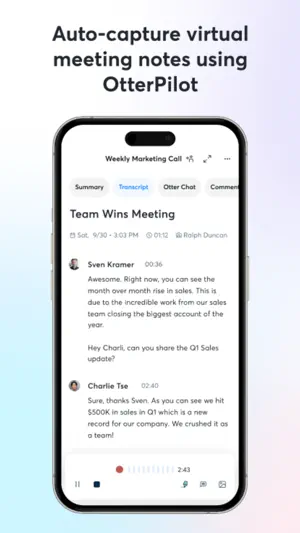
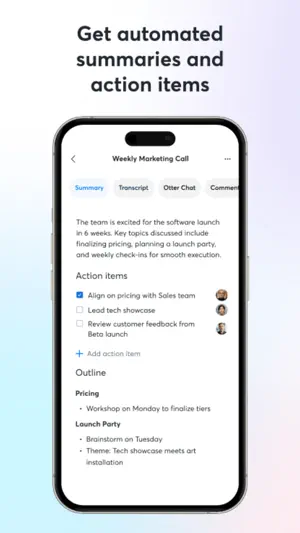
Never take meeting notes again. Otter AI is the fastest way to transcribe voice in real time. Get a meeting assistant that records audio, writes notes, automatically captures slides, and generates summaries. Available in English, Spanish, French and Japanese. Otter AI is also available on the web. Start for free. Trusted by over 10 million people and featured by Apple as "App of the Day" and "Editors' Choice." Automated meeting notes for Zoom, Google Meet, Microsoft Teams, and more. Stay connected and collaborative when you work from home. Otter transcribes all your meetings, interviews, lectures, and everyday voice conversations in real time, so you can focus on the discussion. KEY FEATURES • AI Meeting Assistant: get automated meeting notes & summaries • AI Chat: get answers and generate content • AI Channels: combine live conversations with async updates. Chat with teammates. • Record & transcribe live • Automated meeting notes & summaries • Share & collaborate • All notes are searchable & shareable • Edit & highlight • Organize & export • Import & sync Looking for a specific feature? Here are the details: RECORD & TRANSCRIBE LIVE • Instantly record in one tap • Transcribe in real time • Highlight key points to review later • Insert photos of whiteboard discussions, slides, etc. • Input audio via built-in mic or Bluetooth device ENRICH NOTES WITH AI • Gather information across all your conversations • Ask questions about a specific meeting • Generate follow- up emails • Automated Slide Capture during virtual meetings • Generate summary, outline and keywords after all meetings • Punctuate, capitalize, and break paragraphs automatically SHARE & COLLABORATE • Invite group members to view, edit, and highlight collaboratively • Add comments and assign action items • Share links externally SEARCH & PLAYBACK • Search the text so you don't have to scrub through the whole audio • Playback at adjustable speeds • Follow along the highlighted word as the audio is playing • Tap on any word to jump the audio to that spot EDIT & HIGHLIGHT • Edit the text to correct any errors • Tag the speakers to label the paragraphs and train Otter to identify speakers too • Highlight sentences in one tap IMPORT & SYNC • Import audio and video files • Upload from other call recording apps • Sync your calendars to be reminded to record your meetings and auto-title your notes • Import your contacts for easy sharing OPTIMIZED FOR iOS • Start/Stop recording with Siri Shortcut & home widget • Record via AirPods • Sync with iOS Calendar, Contacts & Camera Otter Pro Get more playback speeds, skip silence, and bulk export. Payment will be charged to your iTunes Account at confirmation of purchase. Subscription automatically renews unless auto-renew is turned off at least 24-hours before the end of the current period. Account will be charged for renewal within 24-hours prior to the end of the current period. You can manage your subscriptions in Settings and auto-renewal may be turned off by going to your Account Settings after purchase. Any unused portion of a free trial period, if offered, will be forfeited when you purchase a subscription. Need help? Check out our Help Center: https://help.otter.ai Terms of Service: https://otter.ai/terms-of-service Privacy Policy: https://otter.ai/privacy-policy
Ratings & reviews
4.8
87.1K ratings
What’s new
Version 3.110.1 · Updated October 22, 2026
Adds support for iPhone Duo
App privacy
The developer, Otter.ai, Inc., reported these privacy practices to Apple.
Data Used to Track You
The following data may be used to track you across apps and websites owned by other companies:
- Identifiers: User ID, Device ID
Data Linked to You
The following data, which may be collected and linked to your identity, may be used for the following purposes:
- Contact Info: Email Address, Name
- Location: Coarse Location
- Contacts: Contacts
- User Content: Photos or Videos, Audio Data, Customer Support, Other User Content
- Search History: Search History
- Identifiers: User ID, Device ID
- Usage Data: Product Interaction
- Diagnostics: Crash Data, Performance Data, Other Diagnostic Data
Used for: Developer’s Advertising or Marketing, Analytics, Product Personalization, App Functionality
Alternatives to Otter Transcribe Voice Notes
Looking for apps like Otter Transcribe Voice Notes? Here are 6 similar apps on the App Store. The highest rated is Minutes: AI Meeting Note Taker (4.9/5), and all 6 are free to download.
-
 Minutes: AI Meeting Note Taker
4.9
Minutes: AI Meeting Note Taker
4.9
-
 iTranscribe - Audio to Text
4.6
iTranscribe - Audio to Text
4.6
-
 Fireflies: AI notetaker
4.8
Fireflies: AI notetaker
4.8
-
 Notta Transcribe Voice to Text
4.1
Notta Transcribe Voice to Text
4.1
-
 Voice to Text - Speech Note
4.5
Voice to Text - Speech Note
4.5
-
 Noted: Transcribe Audio Notes
4.5
Noted: Transcribe Audio Notes
4.5
| App | Rating | Price | Last updated | Compare |
|---|---|---|---|---|
| Otter Transcribe Voice Notes | 4.8 / 5 (87,117 ratings) | Free | October 22, 2026 | |
| Minutes: AI Meeting Note Taker | 4.9 / 5 (14,017) | Free | Oct 26, 2026 | Compare |
| iTranscribe - Audio to Text | 4.6 / 5 (6,845) | Free | Sep 8, 2026 | Compare |
| Fireflies: AI notetaker | 4.8 / 5 (5,397) | Free | Oct 27, 2026 | Compare |
| Notta Transcribe Voice to Text | 4.1 / 5 (1,470) | Free | Oct 27, 2026 | Compare |
| Voice to Text - Speech Note | 4.5 / 5 (11,348) | Free | Oct 28, 2026 | Compare |
| Noted: Transcribe Audio Notes | 4.5 / 5 (3,704) | Free | Oct 29, 2026 | Compare |