

Walking Locus
Yoshinobu Ishigaki Health & Fitness iPhoneiPad
Walking Locus is a free Health & Fitness app for iPhone and iPad by Yoshinobu Ishigaki. Requires iOS 12.0. Updated December 17, 2025.
- Price
- Free
- on the App Store
- Size
- 14 MB
- Age 12+
- Updated
- Dec 17
- 2025 · v9.0
Screenshots
About Walking Locus
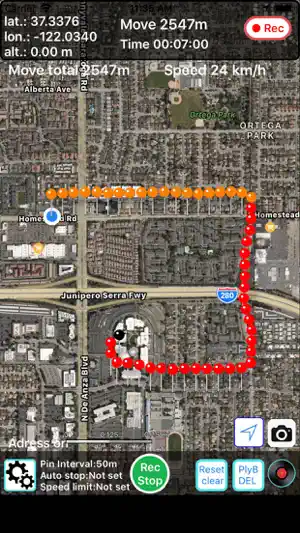
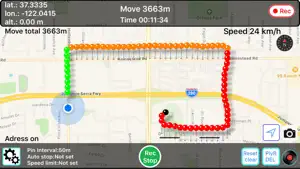
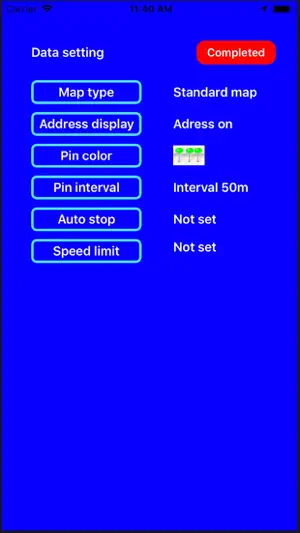
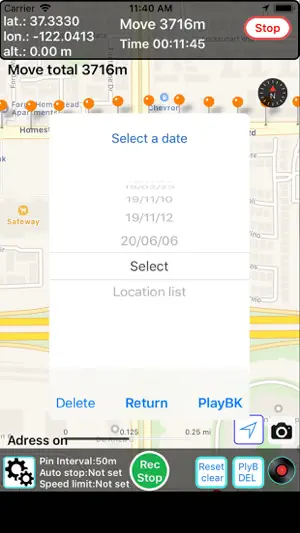
Walking Locus Functional Description You can record and save (route, distance, time) of movement such as walking and jogging in one day units, and play back later. The full text of Functional Description is here ( http://ysnbisgk.life.coocan.jp/walkinglocusplus.html ) *** please note *** This app works on iOS 11.0 and above. When you start up for the first time, please enable "Use location service". If you do not allow it, the application will end. Also, turn on "Motion and Fitness" for the pedometer. In the case of WalkRecord Plus, please turn on this app in iCloud of the device to save the data in iCloud. ● App description It is an application that displays the movement track using GPS. The route you walked and moved is recorded with a pin, and it moves at set distance intervals. The time and distance traveled from the recording start point at each point, latitude , longitude and altitude are displayed at the top of the screen. There is also a pedometer function that records the number of steps taken and distance and displays them on the screen. When you click on any pin, the time when the point passes and the distance from the recording start point will be displayed as pin information. The distance between movement points shows the straight line distance between GPS points, and the movement distance within the set interval is not counted. if GPS cannot be detected, you may not be able to update the pin, but since distance measurement is automatically restarted from the point where GPS is caught again. ● Function and operation(extract) The main button functions and operations are as follows. ・ Record / Stop button Click the [Record / Stop] button to start the location information service (recording), and click it again to stop the location information service. ・ [Setting] button ① Setting the map type You can switch between standard map and satellite map. ② Address display setting If you tap any point on the map with the address display ON, the zip code and address of that point will be displayed. ③ Pin color setting You can choose the pin color (default: red) from 10 colors as needed. ④Pin recording interval setting Display pins at distance intervals of 50m, 100m, 200m, 500m It is also possible to record the pin recording interval by time, 30 seconds, or 1 minute. ⑤ Automatic recording stop setting After starting recording, you can set and record 1H and 2H time to prevent forgetting to press the recording stop button. This will automatically stop recording after the set time to prevent battery drain ⑥ Speed limit setting If you set a maximum speed (km / h) when moving and exceed this speed limit, you will be notified with a chime. ・ [Reset/Clear] button Clear the distance meter to your current position to zero The recording time from the recording start point can also be cleared to zero. You can clear the pedometer data (step count and walking distance) to zero. ・ [Playback / delete] button You can play the recorded data and delete the recorded data by date by selecting the date. If you select "all" at the top and select "Delete", all the saved data will be deleted. Select "Location list" to display a list of registered sites that have been registered so far. ・[Record shaped] button Lists the number of days and pins saved on the title and the date saved in iCloud. ・ Save to iCloud: Upload and save all the data in the app to iCloud ・ Restore from iCloud: Download all data in iCloud and restore in the app This allows you to share data between iOS devices via iCloud and take over the data when you change devices ・ Pin distance measurement Select any two pins to see the distance between them ・ Label at the top of the screen Displays the latitude, longitude and altitude of the current position (pin position) Displays the distance and time from the recording start point to the current location The total distance traveled on the day, the number of steps taken, and the walking distance are displayed.
What’s new
Version 9.0 · Updated December 17, 2025
Age restrictions have been revised
App privacy
The developer, Yoshinobu Ishigaki, reported these privacy practices to Apple.
Data Used to Track You
The following data may be used to track you across apps and websites owned by other companies:
- Usage Data: Advertising Data
Data Linked to You
The following data, which may be collected and linked to your identity, may be used for the following purposes:
- Usage Data: Advertising Data
Used for: Third-Party Advertising
Alternatives to Walking Locus
Looking for apps like Walking Locus? Here are 6 similar apps on the App Store. The highest rated is Fitness Track Planner (5.0/5), and 5 of the 6 are free to download.
-
 Walk+
1.0
Walk+
1.0
-
 innios
-
 Fitness Track Planner
5.0
Fitness Track Planner
5.0
-
 GainHabits: Habit Tracker
-
 Diaphragm Recovery
5.0
Diaphragm Recovery
5.0
-
 HealthLens: Export CSV + PDF
| App | Rating | Price | Last updated | Compare |
|---|---|---|---|---|
| Walking Locus | – | Free | December 17, 2025 | |
| Walk+ | 1.0 / 5 (1) | Free | Oct 3, 2026 | Compare |
| innios | – | Free | Oct 1, 2026 | Compare |
| Fitness Track Planner | 5.0 / 5 (2) | Free | Jun 3, 2026 | Compare |
| GainHabits: Habit Tracker | – | Free | May 6, 2026 | Compare |
| Diaphragm Recovery | 5.0 / 5 (3) | 9.99 USD | Jun 25, 2024 | Compare |
| HealthLens: Export CSV + PDF | – | Free | Sep 29, 2026 | Compare |
Compare Walking Locus with the top alternatives: ratings, updates, ASO score and keyword gaps →