

Mien
Robert Atherton Navigation iPhoneiPadiPod touch
Mien is a free Navigation app for iPhone and iPad by Robert Atherton. Requires iOS 15.0. Updated January 20, 2024.
- Price
- Free
- on the App Store
- Size
- 3 MB
- Age 4+
- Updated
- Jan 20
- 2024 · v2.4.2
Screenshots


About Mien
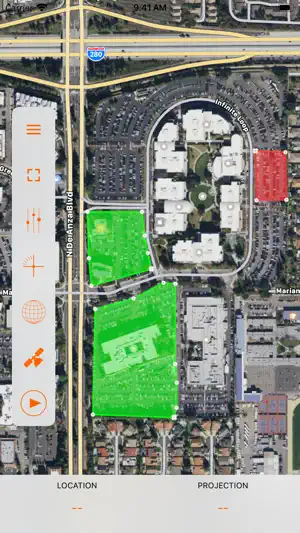
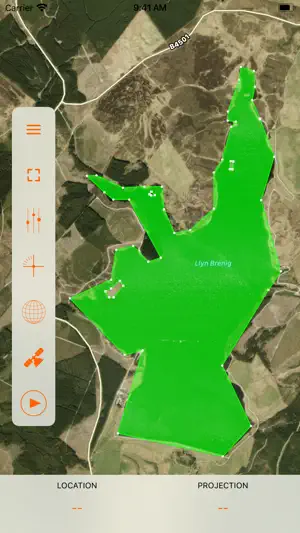
Mien is a simple app which uses the device screen as a viewfinder to take a bearing, just like a prismatic compass. The app then draws this bearing onto a map, so you can see what features you are looking at. The app is useful when working out what a geographical or architectural feature is in the distance. You can also import and visualise geographic data from GeoJSON files. To use just tap the play button or the middle of the viewfinder. The app will then turn on the camera and begin to use the device GPS capability to determine your location. When you have your feature in your sights tap the stop button or the graticule in the centre of the viewfinder. Tap the little map in the viewfinder to show a map full screen. You can start and stop the device from the full screen map by tapping the play button. You can also change the map type and switch back to the viewfinder from here. There is a graded slider at the bottom of the screen which determines how far out the bearing is to be drawn and the app displays the point at which the drawn bearing ends in GPS decimal coordinates. The other slider controls the level of zoom in the viewfinder. In the settings menu the distance to the projected point can be entered manually as centimetres. The projection distance can also be set in the full screen map view by tapping and holding, then moving your finger around, which manually sets the projection location and projection distance. The updated heading is displayed above. The newly set projection distance remains even when you hit play and use the viewfinder. The heading can be displayed in degrees, radians or NATO mils. Please note: continued use of the app with the compass and GPS on will use a considerable amount of battery power. This is because the app needs your location as accurately as possible in order to draw the bearing onto the map. The app doesn't use the camera or GPS system when it is in the background. In addition the app will require a data connection to display map and satellite imagery. It should be noted that this app should not be used as an emergency tool and its accuracy is directly dependant on the accuracy of the GPS system within the device.
What’s new
Version 2.4.2 · Updated January 20, 2024
+ Improved use of space when viewing maps + Choice for coordinate display style used throughout + Current location, projection and bearing now shown on the layers view
App privacy
The developer, Robert Atherton, reported these privacy practices to Apple.
Data Not Collected
The developer does not collect any data from this app.
Alternatives to Mien
Looking for apps like Mien? Here are 6 similar apps on the App Store. The highest rated is Geodata Map Viewer (4.3/5), and all 6 are free to download.
-
 Bearing Compass: Sail & Hike
-
 FreedomAir
-
 Geodata Map Viewer
4.3
Geodata Map Viewer
4.3
-
 Cuspart: Altimeter
-
 Street View: 3D Maps
4.0
Street View: 3D Maps
4.0
-
 Mapilio
| App | Rating | Price | Last updated | Compare |
|---|---|---|---|---|
| Mien | – | Free | January 20, 2024 | |
| Bearing Compass: Sail & Hike | – | Free | Oct 14, 2026 | Compare |
| FreedomAir | – | Free | Mar 11, 2026 | Compare |
| Geodata Map Viewer | 4.3 / 5 (35) | Free | Oct 22, 2025 | Compare |
| Cuspart: Altimeter | – | Free | Aug 25, 2025 | Compare |
| Street View: 3D Maps | 4.0 / 5 (4) | Free | Sep 28, 2026 | Compare |
| Mapilio | – | Free | Jun 2, 2024 | Compare |
Compare Mien with the top alternatives: ratings, updates, ASO score and keyword gaps →