

Auggie Personal Safety
Vincent Spagnolo Lifestyle iPhoneiPadiPod touch
Auggie Personal Safety is a free Lifestyle app for iPhone and iPad by Vincent Spagnolo. Rated 5.0/5 from 4 ratings. Requires iOS 15.6.
- Rating
- 5.0
- 4 ratings
- Price
- Free
- on the App Store
- Size
- 49 MB
- Age 4+
- Updated
- Jan 21
- 2026 · v2.0.105
Screenshots
About Auggie Personal Safety
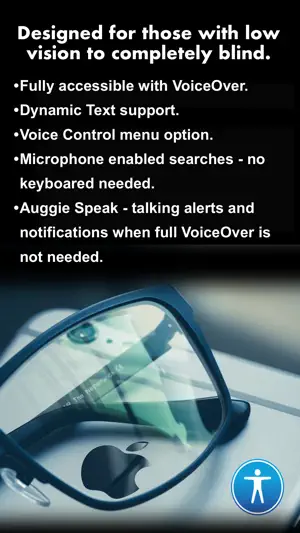
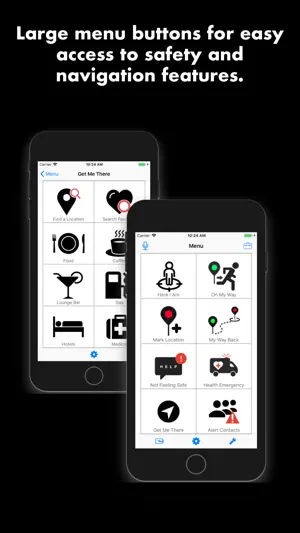
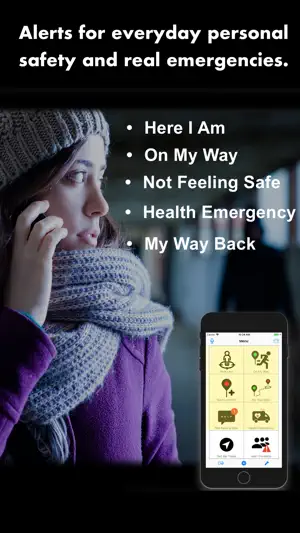
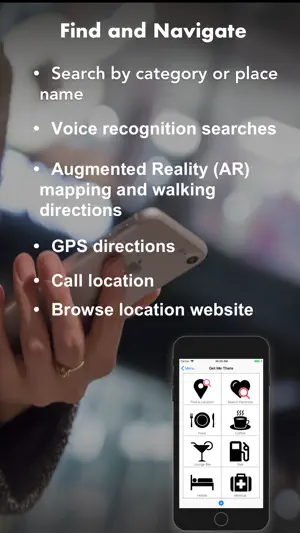
Auggie is a free personal safety and navigation app designed for the low vision community that provides a great experience for all users.. Comprehensive and easy to use features for both everyday safety and real emergencies make this the ultimate personal safety tool for you and your loved ones. Auggie provides usability that encompasses a range of vision-ability from those with low vision condition to those who are completely blind, which include: Inclusive Design We believe that inclusive design gives more people the opportunity to enjoy our apps by ensuring that everyone can use and understand them. Design with Accessibility in Mind Accessibility, for us, is not just about making information available to users with disabilities—it's about making information available to everyone, regardless of their capabilities or situation. Designing an app with accessibility in mind means prioritizing simplicity and perceivability and examining every design decision to ensure that it doesn't exclude users who have different abilities or interact with their devices in different ways. ACCESSIBILITY FEATURES ▷ Fully accessible with VoiceOver and Dynamic Text. ▷ Dark Mode Support ▷ Apple Voice Control Support ▷ Large menu buttons. ▷ Voice Control menu option. ▷ Auggie Speak - Talking alerts and notifications. ▷ Optimized for the color impairments. ▷ Easy to navigate Alert and Accessibility settings. ▷ Voice recognition searching. No keypad necessary. ▷ Search results with Augmented Reality (AR) ▷ Voice recognition searching. No keypad necessary. PERSONAL SAFETY and EMERGENCY FEATURES ALERT CONTACTS ▷ Create a trusted Alert Contacts list with family, friends, co-workers. ▷ Choose the type of alerts you want your contacts to receive. ▷ Alert Contacts can be notified by text message or email. A map snapshot showing your location will automatically included in the alert message. If detected, heading and motion such as: in automobile, walking, running or cycling will also be included in the alert message. Even attach a photo, video or audio recording to your Alert. ▷ Your phone’s GPS will be used to include your exact location with every message. mySafety is very gentle on your battery. Our alert features only turn on GPS to get your current location and then immediately turn it off. NOT SAFE or NEED HELP Walking home alone, in a dark parking lot or garage, traveling, on a bad date or in any unsafe or unsure situation. HEALTH or MEDICAL EMERGENCY Home alone, traveling, at the gym, walking, jogging, hiking or in any situation that you are having a health or medical emergency. ON MY WAY Let someone know that you are leaving work or school, heading to an event or friend's house, leaving a location and walking or driving alone or leaving any location that you feel uncomfortable. HERE I AM Let friends and family know you have arrived safety or simply let them know where you are. MARK LOCATION Leave a digital Breadcrumb Trail! Find your way back to your hotel, your car in a parking lot, your way back home or back to any marked location. FIND WAY BACK Find your way back to any Marked Location with turn-by-turn GPS route directions or simple route instructions. GET ME THERE Traveling or in an unfamiliar area, search for any location near you by category such as restaurants, gas stations or emergency services or by place name/address. From the search results, you can call the location, access the location's website or get GPS directions from within the app. You can even get Augmented Reality (AR) powered map views and GPS directions. *** Auggie is NOT a replacement for calling Emergency 911. Please note that the use of GPS running in the background can dramatically decrease battery life. NO SERVICE OR SUBSCRIPTIONS FEES REQUIRED TO USE AUGGIE!
What’s new
Version 2.0.105 · Updated January 21, 2026
Thank you for choosing Auggie Personal Safety! We're committed to enhancing your experience with regular updates. This version focuses on changes under the hood to fix bugs and provide performance enhancements and UI improvements to enhance your user experience. Here's what's new: Improved handling of international phone number in Emergency Contacts Many UI improvements made in Get Me There to enhance your user experience. General bug fixes Continual improvements made to Accessibility throughout the app. Update now to enjoy a more refined and feature-rich Auggie Personal Safety experience!
App privacy
The developer, Vincent Spagnolo, reported these privacy practices to Apple.
Data Not Collected
The developer does not collect any data from this app.
Alternatives to Auggie Personal Safety
Looking for apps like Auggie Personal Safety? Here are 6 similar apps on the App Store. The highest rated is Voice-enabled Makeup Assistant (4.9/5), and all 6 are free to download.
-
 Tappy Guide
4.0
Tappy Guide
4.0
-
 PingPath - Blind AI Tools
4.6
PingPath - Blind AI Tools
4.6
-
 Seeing Dogs
3.7
Seeing Dogs
3.7
-
 BlindLook
-
 Voice-enabled Makeup Assistant
4.9
Voice-enabled Makeup Assistant
4.9
-
 Ally - Accessible AI Assistant
3.9
Ally - Accessible AI Assistant
3.9
| App | Rating | Price | Last updated | Compare |
|---|---|---|---|---|
| Auggie Personal Safety | 5.0 / 5 (4 ratings) | Free | January 21, 2026 | |
| Tappy Guide | 4.0 / 5 (5) | Free | Nov 19, 2025 | Compare |
| PingPath - Blind AI Tools | 4.6 / 5 (8) | Free | Mar 28, 2026 | Compare |
| Seeing Dogs | 3.7 / 5 (3) | Free | Jan 29, 2024 | Compare |
| BlindLook | – | Free | Sep 20, 2026 | Compare |
| Voice-enabled Makeup Assistant | 4.9 / 5 (17) | Free | May 28, 2024 | Compare |
| Ally - Accessible AI Assistant | 3.9 / 5 (41) | Free | Mar 21, 2026 | Compare |