

Reverse Audio
Nobutaka Yuasa Music iPhoneiPadiPod touch
Reverse Audio is a free Music app for iPhone and iPad by Nobutaka Yuasa. Rated 4.7/5 from 39,198 ratings. Requires iOS 15.0. Updated August 11, 2026.
- Rating
- 4.7
- 39.1K ratings
- Price
- Free
- on the App Store
- Size
- 36 MB
- Age 4+
- Updated
- Aug 11
- 2026 · v3.7.0
Screenshots



About Reverse Audio
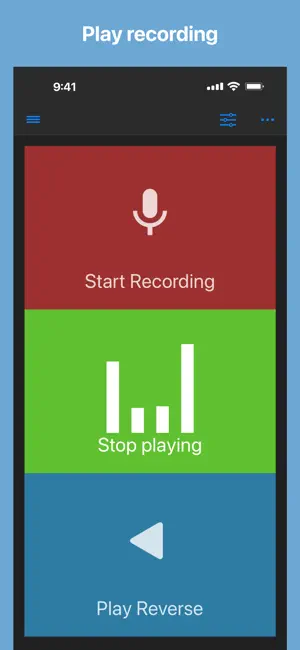
Record, listen, and reverse your audio with just a tap! Easily record audio from your microphone and play it back forwards or in reverse. How it works: 1. Record sound using your device’s microphone 2. Play the recorded audio normally or reverse it for a unique listening experience Perfect for fun, creative projects, or audio experimentation! When playing audio, you can change - playback rate (Range: x0.5 to x2.0) - pitch by a half tone (Range: -2 octave to +2 octave) This app can import an audio file from other apps by share action or from Files app. Supported files: wav, mp3, mp4, m4a, aifc, aiff, caf, flac Saved audio files are also accessible from Files app: Files app -> On My iPhone/iPad -> Reverse Play -> Audio Enjoy! If you have suggestions to improve, just rewrite a review. I will do my best!
Ratings & reviews
4.7
39.1K ratings
What’s new
Version 3.7.0 · Updated August 11, 2026
■ 3.7.0 - Minor improvements・Update SDK ■ 3.6.0 - Minor improvements・Update SDK ■ 3.5.0 – Now requires iOS 15 or later for stability and performance improvements - Minor improvements and refactoring - Update iOS/iPadOS SDKs & libraries ■ 3.4.1 - Minor improvements and bug fixes ■ 3.4.0 - Added a "Buy Me A Coffee" in the Menu so you can support the app if you’d like. Your support helps keep development going. Thank you! - Minor bug fixes Have you come across any interesting phonetic palindromes? If you're not sure what to do with this app, try recording the word "Famima" and then playing it in reverse. (By the way, Famima (short for FamilyMart) is a Japanese convenience store chain.) Appreciate your reviews. If you haven't already and you like the app, please leave a review. Your feedback is valuable to me! If you're experiencing difficulty with recording, try restarting your device. If you're using headphones, ensure they are connected *correctly*; this may resolve the issue. If not, you could give me an email via App Support → Scroll down to Contact. Thanks!
App privacy
The developer, Nobutaka Yuasa, reported these privacy practices to Apple.
Data Used to Track You
The following data may be used to track you across apps and websites owned by other companies:
- Identifiers: User ID, Device ID
- Usage Data: Advertising Data
- Diagnostics: Other Diagnostic Data
Data Linked to You
The following data, which may be collected and linked to your identity, may be used for the following purposes:
- Location: Coarse Location
- Identifiers: User ID, Device ID
- Usage Data: Product Interaction, Advertising Data
- Diagnostics: Crash Data, Performance Data, Other Diagnostic Data
- Other Data: Other Data Types
Used for: Third-Party Advertising, Developer’s Advertising or Marketing, Analytics, App Functionality
Data Not Linked to You
The following data, which may be collected but is not linked to your identity, may be used for the following purposes:
- Purchases: Purchase History
- Usage Data: Other Usage Data
Used for: Analytics
Alternatives to Reverse Audio
Looking for apps like Reverse Audio? Here are 6 similar apps on the App Store. The highest rated is Reverse Singing (4.7/5), and all 6 are free to download.
-
 Reverse Singing
4.7
Reverse Singing
4.7
-
 Reverse Audio Singing Trend
3.8
Reverse Audio Singing Trend
3.8
-
 Reverse Audio - Sing & Record
4.2
Reverse Audio - Sing & Record
4.2
-
 Reverse Audio: Sing Challenge
4.5
Reverse Audio: Sing Challenge
4.5
-
 Reverse Singing: Fun Audio
3.0
Reverse Singing: Fun Audio
3.0
-
 Reverse Audio Play
4.6
Reverse Audio Play
4.6
| App | Rating | Price | Last updated | Compare |
|---|---|---|---|---|
| Reverse Audio | 4.7 / 5 (39,198 ratings) | Free | August 11, 2026 | |
| Reverse Singing | 4.7 / 5 (7,824) | Free | Sep 29, 2026 | Compare |
| Reverse Audio Singing Trend | 3.8 / 5 (1,198) | Free | Nov 12, 2025 | Compare |
| Reverse Audio - Sing & Record | 4.2 / 5 (432) | Free | Jan 14, 2026 | Compare |
| Reverse Audio: Sing Challenge | 4.5 / 5 (30,078) | Free | Sep 30, 2026 | Compare |
| Reverse Singing: Fun Audio | 3.0 / 5 (2) | Free | Jun 24, 2026 | Compare |
| Reverse Audio Play | 4.6 / 5 (263) | Free | Sep 8, 2025 | Compare |
Compare Reverse Audio with the top alternatives: ratings, updates, ASO score and keyword gaps →