

Making Change AUD
Blooming Kids Software LLC Education iPad
Making Change AUD is a free Education app for iPad by Blooming Kids Software LLC. Requires iOS 11.0. Updated December 24, 2025.
- Price
- Free
- on the App Store
- Size
- 81 MB
- Age 4+
- Updated
- Dec 24
- 2025 · v1.3
Screenshots
About Making Change AUD
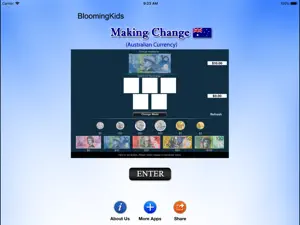
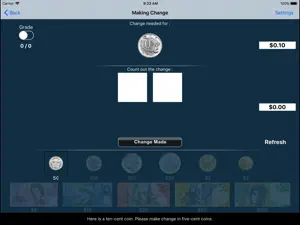
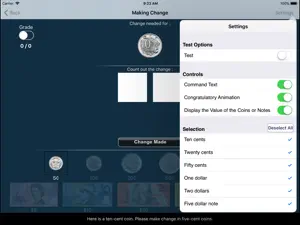
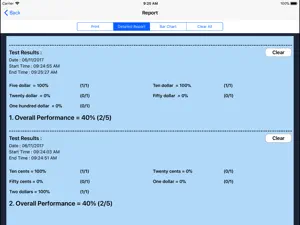
Click on “Making Change" and then click the “Enter" button to open this program. This program teaches the student about changing (converting) larger denominations of currency into smaller ones, such as breaking a dollar note into five twenty-cent or ten ten-cent or any other collections of coins that add up to the dollar. The screen has a top box showing the coin or note for which change is needed. To the right of the top box is a counter giving the value of the currency in the top box. Under the top box are more boxes in the middle of the screen with spaces for the coins or notes that the student is using to make change for the money in the top box. To the right of the middle boxes is a counter giving the value of the change in the middle boxes. At the bottom is another set of boxes with a coin or note in each box. The student clicks on these coins or notes to make change for the coin or note in the top box. Change Made The student clicks this button when he/she thinks the correct change has been placed in the boxes in the middle. Settings Training The Training mode is selected by default Test Here, the student can test him/herself. Both counters are disabled. The test results are recorded and “Report" becomes enabled. Report This displays results of the “Test". The report features are similar to those of reports used in other programs. Display the Value of the Coins or Notes is on This is the default setting. The value of the coin or note (such as “10¢" under ten-cent coin) appears under the coin or note. Display the Value of the Coins or Notes is off The value of the coin or note (such as “10¢" under ten-cent coin) will not appear under the coin or note. Command Text This option is selected by default. When this is checked, text appears at the bottom of the screen instructing the student to (for instance) “Here is five dollars. Please make change with 4 one-dollar notes and the rest in twenty-cent pieces." If not checked, the command text does not appear. Congratulatory Animation This is selected by default. When the student makes the correct change and clicks on the “Change Made" button, there will be a congratulatory animation. Click anywhere on the screen or press the space bar to stop the congratulatory animation. When not checked, the animation will not appear. Selection Here the teacher/therapist can select the coins and/or notes that the student can use to make change. By default “Select All" is checked. Select All This selects all coins and notes.
What’s new
Version 1.3 · Updated December 24, 2025
The current app version updated with the new age rating.
App privacy
The developer, Blooming Kids Software LLC, reported these privacy practices to Apple.
Data Not Collected
The developer does not collect any data from this app.
Alternatives to Making Change AUD
Looking for apps like Making Change AUD? Here are 6 similar apps on the App Store. The highest rated is Ballyland Code 1: Say Hello (5.0/5), and 2 of the 6 are free to download.
-
 Magical Concepts
-
 Bible stories in Khakas
-
 Ballyland Code 1: Say Hello
5.0
Ballyland Code 1: Say Hello
5.0
-
 SkippyNums
5.0
SkippyNums
5.0
-
 Sentence Ninja
4.2
Sentence Ninja
4.2
-
 Money Up! - Build Life Skills
4.6
Money Up! - Build Life Skills
4.6
| App | Rating | Price | Last updated | Compare |
|---|---|---|---|---|
| Making Change AUD | – | Free | December 24, 2025 | |
| Magical Concepts | – | 9.99 USD | Dec 3, 2025 | Compare |
| Bible stories in Khakas | – | Free | Feb 7, 2025 | Compare |
| Ballyland Code 1: Say Hello | 5.0 / 5 (1) | 2.99 USD | Apr 24, 2026 | Compare |
| SkippyNums | 5.0 / 5 (1) | Free | Mar 25, 2026 | Compare |
| Sentence Ninja | 4.2 / 5 (5) | 21.99 USD | Feb 10, 2026 | Compare |
| Money Up! - Build Life Skills | 4.6 / 5 (57) | 15.99 USD | Jun 23, 2026 | Compare |
Compare Making Change AUD with the top alternatives: ratings, updates, ASO score and keyword gaps →