

Record it! :: Screen Recorder
DIGISET LLC Utilities iPhoneiPadiPod touch
Record it! :: Screen Recorder is a free Utilities app for iPhone and iPad by DIGISET LLC. Rated 4.6/5 from 456,388 ratings. Requires iOS 17.0.
- Rating
- 4.6
- 456K ratings
- Price
- Free
- on the App Store
- Size
- 41 MB
- Age 9+
- Updated
- Oct 2
- 2026 · v5.1
Screenshots

About Record it! :: Screen Recorder
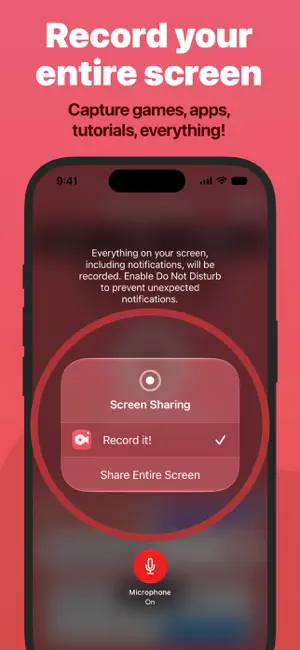
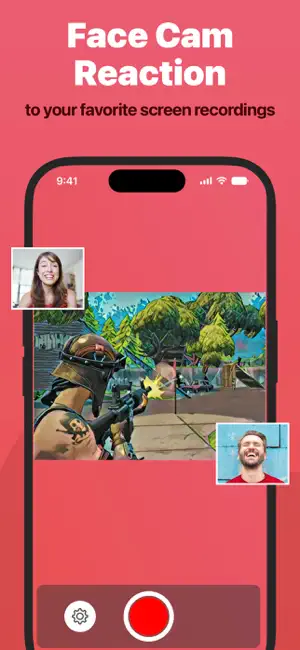
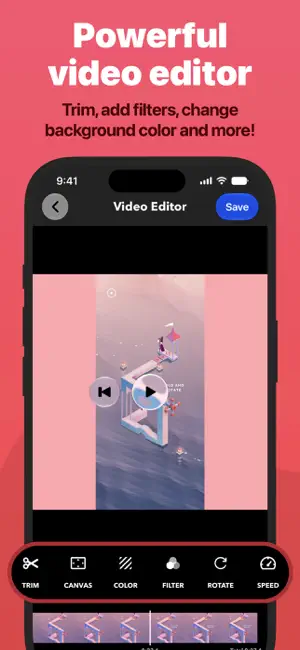
Record It! is a screen recorder for iPhone and iPad. Capture anything on your screen in one tap: games, app demos, tutorials, training videos, then trim it, add a face-cam reaction, and share it without leaving the app. RECORD • One tap to start recording your entire screen • Capture games, apps, tutorials, and walkthroughs • Configure bitrate, audio channels, video encoder, and quality. • A Live Activity keeps recording status visible in the Dynamic Island FACE CAM REACTIONS • Overlay your camera live while you record, on supported iPad models • Or add a face-cam reaction to any recording afterward • React to videos from your camera roll • Set the reaction's shape, position, and size AUDIO COMMENTARY • Record audio-only commentary over your video VIDEO EDITOR • Trim, rotate, and adjust playback speed • Apply video filters • Change the canvas and background color ORGANIZER • Every recording in one place, with quick access to what you need SHARE • Save straight to your camera roll • AirDrop to a Mac or another device • Export to Files, email, or any app that accepts video — including desktop editors for more specialized work Face-cam reactions are the fastest way to put yourself in the frame: let people watch you play, or walk someone through a task in your own voice. Sharing is limited to 10-minute videos. Upgrade to Record It! Pro to share longer recordings (In-App Purchase).
Ratings & reviews
4.6
456K ratings
What’s new
Version 5.1 · Updated October 2, 2026
+ You can now configure a Start countdown to give you time before recording starts. (iOS 27) + You can now save recordings directly to camera roll (iOS 27)
App privacy
The developer, DIGISET LLC, reported these privacy practices to Apple.
Data Used to Track You
The following data may be used to track you across apps and websites owned by other companies:
- Location: Coarse Location
- Identifiers: Device ID
- Usage Data: Product Interaction, Advertising Data
- Diagnostics: Crash Data, Performance Data
Data Linked to You
The following data, which may be collected and linked to your identity, may be used for the following purposes:
- Location: Coarse Location
- Identifiers: Device ID
- Usage Data: Product Interaction, Advertising Data
- Diagnostics: Performance Data
Used for: Third-Party Advertising, Analytics
Data Not Linked to You
The following data, which may be collected but is not linked to your identity, may be used for the following purposes:
- Diagnostics: Crash Data
Used for: Third-Party Advertising, Analytics
Alternatives to Record it! :: Screen Recorder
Looking for apps like Record it! :: Screen Recorder? Here are 6 similar apps on the App Store. The highest rated is Screen Recorder ‑ Record Video (4.7/5), and all 6 are free to download.
-
 Screen Recorder: Go Record
4.5
Screen Recorder: Go Record
4.5
-
 Screen Recorder- Record Game
4.3
Screen Recorder- Record Game
4.3
-
 Screen Recorder Z - Livestream
4.4
Screen Recorder Z - Livestream
4.4
-
 Screen Recorder Pro⋆
4.5
Screen Recorder Pro⋆
4.5
-
 Screen Recorder ‑ Record Video
4.7
Screen Recorder ‑ Record Video
4.7
-
 Screen Recorder - Go Record
3.2
Screen Recorder - Go Record
3.2
| App | Rating | Price | Last updated | Compare |
|---|---|---|---|---|
| Record it! :: Screen Recorder | 4.6 / 5 (456,388 ratings) | Free | October 2, 2026 | |
| Screen Recorder: Go Record | 4.5 / 5 (111,419) | Free | Jan 8, 2026 | Compare |
| Screen Recorder- Record Game | 4.3 / 5 (10,812) | Free | Apr 5, 2025 | Compare |
| Screen Recorder Z - Livestream | 4.4 / 5 (9,402) | Free | Nov 20, 2025 | Compare |
| Screen Recorder Pro⋆ | 4.5 / 5 (23,358) | Free | Jul 31, 2026 | Compare |
| Screen Recorder ‑ Record Video | 4.7 / 5 (10,273) | Free | Aug 14, 2026 | Compare |
| Screen Recorder - Go Record | 3.2 / 5 (118) | Free | Jul 3, 2024 | Compare |