

NpKs Keyboard
Puthirith Nuon Utilities iPhoneiPadiPod touch
NpKs Keyboard is a free Utilities app for iPhone and iPad by Puthirith Nuon. Rated 3.8/5 from 5 ratings. Requires iOS 15.0. Updated September 5, 2026.
- Rating
- 3.8
- 5 ratings
- Price
- Free
- on the App Store
- Size
- 6 MB
- Age 4+
- Updated
- Sep 5
- 2026 · v2.0.1
Screenshots
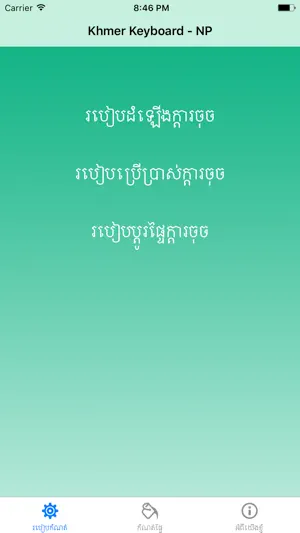
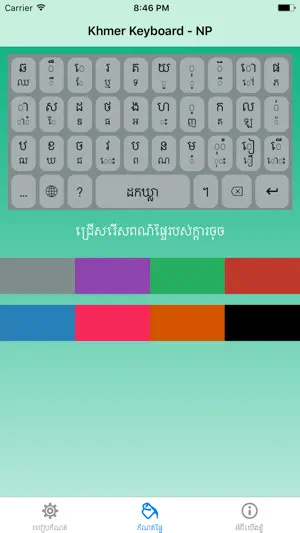
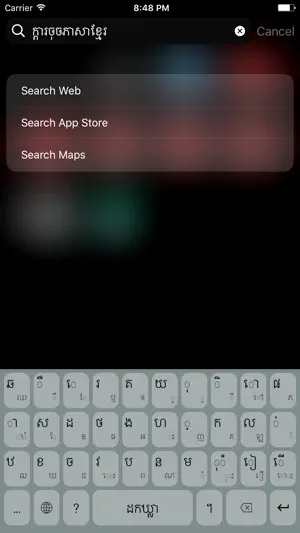

About NpKs Keyboard
Type Khmer faster, easier, and more naturally with NpKs Keyboard. Designed for everyday communication, NpKs Keyboard introduces an intuitive typing experience that lets you access more characters without switching layouts. With a simple tap for primary characters and swipe gestures for secondary characters, you can type Khmer efficiently while keeping the keyboard clean and easy to use. Whether you're chatting with friends, posting on social media, writing emails, or working on documents, NpKs Keyboard is built to make Khmer typing smooth and enjoyable. Key Features: Smart Tap & Swipe Typing - Tap to enter primary Khmer characters. - Swipe on keys to access secondary characters instantly. - Reduce unnecessary layout switching for faster typing. - Clean and intuitive keyboard design. Personalize Your Keyboard - Make your keyboard truly yours with customization options: - Multiple built-in color themes. - Choose your favorite keyboard color. - Set your own photo as the keyboard background. - Modern and beautiful interface. Fast & Responsive - Lightweight and optimized for smooth performance. - Comfortable typing experience. - Designed for daily Khmer communication. Made for Khmer Users NpKs Keyboard is created with Khmer typing in mind, providing a practical and user-friendly experience for everyone who writes in Khmer. Perfect for: - Messaging - Social media - School and study - Office work - Everyday communication Why Choose NpKs Keyboard? - Innovative tap-and-swipe typing experience - Easy access to secondary Khmer characters - Beautiful customizable themes - Personal background image support - Free to use - Simple, clean, and modern design Our goal is to make Khmer typing more convenient, efficient, and enjoyable for everyone. Download NpKs Keyboard today and experience a smarter way to type Khmer.
Ratings & reviews
3.8
5 ratings
What’s new
Version 2.0.1 · Updated September 5, 2026
We've refreshed NpKs Keyboard with a brand-new look and improved performance. New in this version: - Redesigned interface with a modern and cleaner look. - Improved user experience for smoother navigation and typing. - Performance enhancements for faster and more responsive typing. - Bug fixes and overall stability improvements. Thank you for using NpKs Keyboard. We're committed to making Khmer typing faster, easier, and more enjoyable with every update.
App privacy
The developer, Puthirith Nuon, reported these privacy practices to Apple.
Data Not Collected
The developer does not collect any data from this app.
Alternatives to NpKs Keyboard
Looking for apps like NpKs Keyboard? Here are 6 similar apps on the App Store. The highest rated is Khemera Keyboard (5.0/5), and all 6 are free to download.
-
 Khmer Keyboard – Fonts
3.0
Khmer Keyboard – Fonts
3.0
-
 Khmer Keyboard: iBoard
4.4
Khmer Keyboard: iBoard
4.4
-
 Khmer Keyboard & Translator
4.3
Khmer Keyboard & Translator
4.3
-
 Khmer Keyboard And Translator
4.3
Khmer Keyboard And Translator
4.3
-
 Khemera Keyboard
5.0
Khemera Keyboard
5.0
-
 Khmer Smart Keyboard
4.4
Khmer Smart Keyboard
4.4
| App | Rating | Price | Last updated | Compare |
|---|---|---|---|---|
| NpKs Keyboard | 3.8 / 5 (5 ratings) | Free | September 5, 2026 | |
| Khmer Keyboard – Fonts | 3.0 / 5 (1) | Free | Apr 2, 2025 | Compare |
| Khmer Keyboard: iBoard | 4.4 / 5 (157) | Free | Oct 19, 2026 | Compare |
| Khmer Keyboard & Translator | 4.3 / 5 (43) | Free | Jan 23, 2024 | Compare |
| Khmer Keyboard And Translator | 4.3 / 5 (71) | Free | May 29, 2026 | Compare |
| Khemera Keyboard | 5.0 / 5 (1) | Free | Feb 23, 2026 | Compare |
| Khmer Smart Keyboard | 4.4 / 5 (371) | Free | Oct 19, 2026 | Compare |
Compare NpKs Keyboard with the top alternatives: ratings, updates, ASO score and keyword gaps →