

Easy Stop Motion Camera
KOJI HARA Photo & Video iPhoneiPadiPod touch
Easy Stop Motion Camera is a paid Photo & Video app for iPhone and iPad by KOJI HARA. Rated 5.0/5 from 7 ratings. Requires iOS 15. Updated August 23, 2026.
- Rating
- 5.0
- 7 ratings
- Price
- 9.99 USD
- on the App Store
- Size
- 15 MB
- Age 4+
- Updated
- Aug 23
- 2026 · v9
Screenshots

About Easy Stop Motion Camera
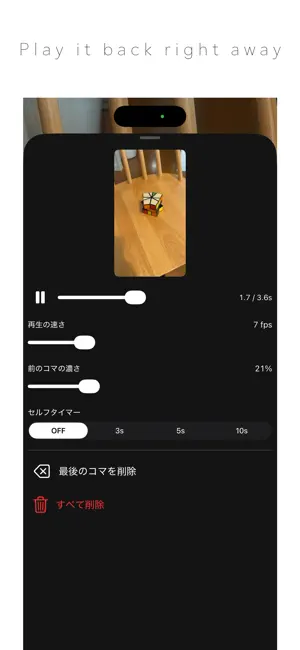
◆Tap the screen and what the camera sees at that moment is recorded as one frame. Move your subject a little, tap again, and repeat: that is all it takes to build a stop-motion video. ◆No ads. No notifications. No account needed. Everything from shooting to saving happens on your device, so it works without an internet connection. Your photos and videos are never sent anywhere. ◆The previous frame stays on screen semi-transparently, so lining up the next one is easy. Move your subject a little at a time and you can make things jump, vanish or multiply exactly as you intend. It suits clay animation with modelling clay, figures, dolls and miniatures. ◆Work in progress is saved automatically inside the app. The frames you are still working on live only inside the app; only the finished video ends up in your photo library. Quit the app or restart your device and you can pick up where you left off, so you can take your time over a long piece. ◆Playback speed, the opacity of the previous frame and the self-timer can be changed at any point. Playback speed is not only for the preview: it is also the frame rate of the video you export. You can play back what you have so far without leaving the shoot. ◆This is the paid version Videos you save carry no LITE VERSION watermark. There is no limit on the number of frames either. *We recommend trying the free Lite version first, to check that it runs well on your device.
Ratings & reviews
5.0
7 ratings
What’s new
Version 9 · Updated August 23, 2026
Thank you for your continued support. ◆ Your frames are now saved automatically. Quit the app or restart your device, and the next time you open it you can carry on from where you left off. ◆ We've added a settings screen. You can play your frames back right there to check how they look. ◆ You can now set Playback Speed, Previous Frame Opacity and the Self-Timer. Playback Speed is also the frame rate of the video you export. ◆ Delete Last Frame lets you redo just the frame you took most recently. ◆ We've tidied up the buttons on the shooting screen: settings at the bottom left, save at the bottom centre, camera flip at the bottom right and help at the top right. ◆ The app is now available in 10 languages. ◆ Other bug fixes and small improvements We will continue to make improvements and add new features. Please contact us via the "Feedback/Requests" button. Your feedback will be used to improve our service.
App privacy
The developer, KOJI HARA, reported these privacy practices to Apple.
Data Not Collected
The developer does not collect any data from this app.
Alternatives to Easy Stop Motion Camera
Looking for apps like Easy Stop Motion Camera? Here are 6 similar apps on the App Store. The highest rated is Vista Viewer (5.0/5), and all 6 are free to download.
-
 1 Photo AI: Portrait Editor
-
 Background Swap AI: Brand Wall
-
 ドン!! - 漫画吹き出し・擬音・集中線・文字入れ
-
 Vista Viewer
5.0
Vista Viewer
5.0
-
 Coto Edit
-
 CRT Monitor FX :RetroTVCamera
4.2
CRT Monitor FX :RetroTVCamera
4.2
| App | Rating | Price | Last updated | Compare |
|---|---|---|---|---|
| Easy Stop Motion Camera | 5.0 / 5 (7 ratings) | 9.99 USD | August 23, 2026 | |
| 1 Photo AI: Portrait Editor | – | Free | Jun 22, 2026 | Compare |
| Background Swap AI: Brand Wall | – | Free | May 11, 2026 | Compare |
| ドン!! - 漫画吹き出し・擬音・集中線・文字入れ | – | Free | Sep 1, 2026 | Compare |
| Vista Viewer | 5.0 / 5 (1) | Free | May 28, 2026 | Compare |
| Coto Edit | – | Free | May 17, 2026 | Compare |
| CRT Monitor FX :RetroTVCamera | 4.3 / 5 (4) | Free | Sep 1, 2025 | Compare |