

Smart Splash: Recolor Photos
induben barai Photo & Video iPhoneiPadiPod touch
Smart Splash: Recolor Photos is a free Photo & Video app for iPhone and iPad by induben barai. Rated 4.4/5 from 326 ratings. Requires iOS 18.0.
- Rating
- 4.4
- 326 ratings
- Price
- Free
- on the App Store
- Size
- 222 MB
- Age 4+
- Updated
- Mar 16
- 2026 · v5.1
Screenshots



About Smart Splash: Recolor Photos
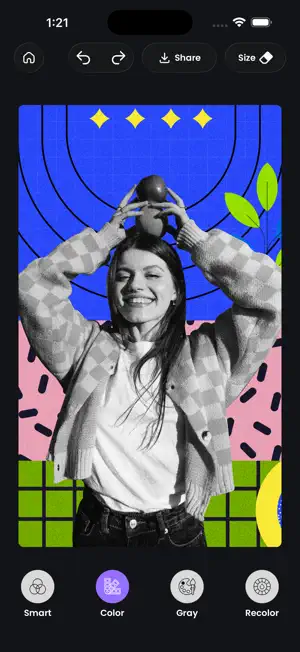
Turn ordinary photos into powerful visual stories with AI-powered color splash, recolor tools, and professional photo editing features — all in one app. Create dramatic black & white backgrounds, highlight vibrant subjects, remove backgrounds instantly, and apply creative effects with real-time preview. Perfect for Instagram posts, profile photos, reels, thumbnails, and artistic edits. Key Features 1) AI Color Splash Editor Smart automatic color detection Black & white photo effects Recolor specific areas with precision Touch & rub to restore or remove color Gray, Smart, Color & Recolor modes Create stunning selective color effects in seconds. 2) Background Remover & Cutout AI background eraser Replace backgrounds with: Solid colors Gradients Patterns Custom images Zoom, move & blend layers seamlessly Create professional cutouts without Photoshop skills. 3) Creative Effects & Overlays Torn photo effect Dripping paint effect Twin-tone color transitions Backdrop burst styles Artistic overlays Make your photos stand out instantly. 4) Professional Filters Mono • Noir • Tonal • Chrome • Vintage • Film • Cinema • Lomo & more Adjust intensity with simple sliders for perfect control. 5) Precision Blur Tool Advanced brush blur Control depth of field Highlight your subject like a DSLR effect 6) Full Photo Adjustment Controls Brightness Contrast Exposure Sharpness Saturation Highlights Vignette Why Smart Splash? Whether you're a content creator, social media enthusiast, photographer, or just love editing photos — Smart Splash gives you studio-quality results without complex tools. Download Smart Splash today and create eye-catching color splash photos, stunning cutouts, and artistic edits effortlessly. Please Find the in-App purchase privacy URL : https://www.apple.com/legal/internet-services/itunes/dev/stdeula/
Ratings & reviews
4.4
326 ratings
What’s new
Version 5.1 · Updated March 16, 2026
7-Day Free Premium Trial for New Users New users now get full Premium access automatically — all AI effects, all templates, and watermark-free saving — free for 7 days. No credit card required to start. Trial Reminder Notifications We'll send you a heads-up before your trial ends so you never get caught off guard.
App privacy
The developer, induben barai, reported these privacy practices to Apple.
Data Used to Track You
The following data may be used to track you across apps and websites owned by other companies:
- Usage Data: Advertising Data
Data Linked to You
The following data, which may be collected and linked to your identity, may be used for the following purposes:
- Usage Data: Advertising Data
Used for: Third-Party Advertising
Data Not Linked to You
The following data, which may be collected but is not linked to your identity, may be used for the following purposes:
- Identifiers: Device ID
- Diagnostics: Crash Data, Performance Data, Other Diagnostic Data
Used for: Third-Party Advertising, Analytics
Alternatives to Smart Splash: Recolor Photos
Looking for apps like Smart Splash: Recolor Photos? Here are 6 similar apps on the App Store. The highest rated is Maya Coloring Book (4.5/5), and all 6 are free to download.
-
 color pop photo
4.4
-
 Color Splash and Photo Editor
4.3
-
 Maya Coloring Book
4.5
-
 Change color of photos Auto
4.0
-
 Color Splash : Photo Color Pop
3.0
-
 Color Effects, Photo Editor
| App | Rating | Price | Last updated | Compare |
|---|---|---|---|---|
| Smart Splash: Recolor Photos | 4.4 / 5 (326 ratings) | Free | March 16, 2026 | |
| color pop photo | 4.4 / 5 (262) | Free | Mar 28, 2024 | Compare |
| Color Splash and Photo Editor | 4.3 / 5 (472) | Free | May 9, 2026 | Compare |
| Maya Coloring Book | 4.5 / 5 (70) | Free | Oct 13, 2026 | Compare |
| Change color of photos Auto | 4.0 / 5 (633) | Free | Sep 28, 2026 | Compare |
| Color Splash : Photo Color Pop | 3.0 / 5 (2) | Free | May 19, 2024 | Compare |
| Color Effects, Photo Editor | – | Free | Jul 12, 2024 | Compare |