

Working Hours 4b
Sorin-George Budescu Productivity iPhoneiPadiPod touch
Working Hours 4b is a free Productivity app for iPhone and iPad by Sorin-George Budescu. Rated 4.7/5 from 354 ratings. Requires iOS 16.0.
- Rating
- 4.7
- 354 ratings
- Price
- Free
- on the App Store
- Size
- 136 MB
- Age 4+
- Updated
- Oct 8
- 2026 · v9.3.0
Screenshots


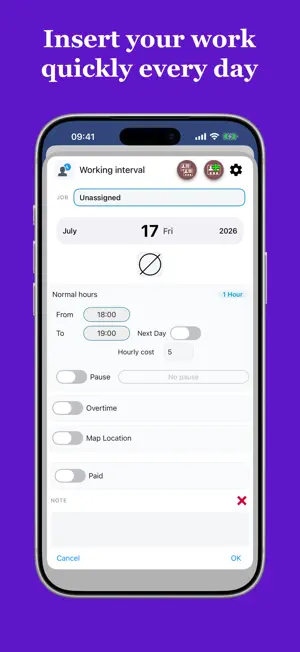
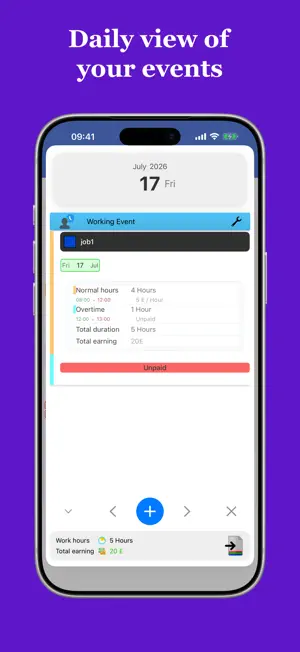
About Working Hours 4b
Tired of tracking your work hours on paper and wrestling with a calculator at the end of the month? Working Hours 4b takes care of it for you — a complete, easy-to-use time-tracking app built for employees, freelancers, and anyone who needs to keep accurate records of their working hours and earnings. TRACK EVERY DETAIL Log your work hours with a simple, intuitive interface. Each entry can include: • Regular hours • Extra time: early entry and overtime • Breaks (paid or unpaid) • Bonuses, expenses and meal vouchers, sorted into categories (Car, Food, Fuel, Hotel, Parking, and more) • Custom tags to label and filter your history any way you like • A custom icon, note, and photo attachment (e.g. receipts) CALCULATE YOUR EARNINGS Instantly see how much you've earned — monthly, weekly, biweekly/fortnightly (14 or 15 days), annually, or over any custom date range. SMART CALENDAR Enter, edit, and review your work intervals directly from the calendar. View each month's details broken down by hours and earnings: • Regular hours • Extra: early entry and overtime • Paid and unpaid breaks • Bonuses and expenses • Total hours and earnings Use the Paid/Unpaid indicator to track which intervals have already been paid — so you never miss a payment again. Work intervals can span up to 48 hours, giving you full flexibility to log day shifts, night shifts, and everything in between. TRAVEL & MILEAGE Log travel separately from your shifts and let the app calculate your earnings automatically, by cost-per-hour or cost-per-distance (km/mi). WORK BANK Don't want to cash out your extra hours right away? Store them in your personal Work Bank and convert them back into paid time — or paid time off — whenever you need it. WORKING PROFILES Do many of your shifts follow the same pattern, with only small variations? Save reusable working profiles, name them however you like (e.g. Monday, Tuesday, Night shift, Day shift), and apply them to any date in seconds. Profiles aren't set in stone — edit or adjust them at any time, even while adding a new interval. HOLIDAYS & LEAVE Add holidays and sick leave to your calendar and keep a running count at any time. STATISTICS & EXPORT Review your statistics for any custom date range, then export your data as Plain Text, CSV or PDF and share it however you like. Visualize your earnings and hours with clear graphs — annual totals month by month, and monthly totals day by day. REMINDERS Never forget to log your hours. Set a reminder time and choose the days of the week — Working Hours 4b will notify you right on schedule. MULTIPLE JOBS & CLIENTS Working more than one job, or managing several clients? Add multiple jobs, each with its own color and notes, so every entry stands out at a glance on your calendar. MADE TO FIT YOU Set your preferred currency, hours format, minute-rounding rule, and which day your week starts on — the whole app adapts to how you work. Available in over 50 languages. CLOUD & DEVICE SYNC Your data is securely saved to the cloud using your chosen sign-in method, and kept in sync across all your devices in real time. This app offers optional in-app purchases: • Remove Ads — disable ads throughout the app • Multiple Jobs — unlock the ability to add more than one job COMMUNITY & SUPPORT Found a bug or have an idea for a new feature? Join the community: Facebook: https://www.facebook.com/working.hours.4b X: https://x.com/workingHours4b Or reach out directly via the Contact section in the app's settings. Terms and conditions: https://workinghours4b.com/terms-and-conditions
Ratings & reviews
4.7
354 ratings
What’s new
Version 9.3.0 · Updated October 8, 2026
Overtime hours can now be added automatically: set in Options how many regular hours can be worked per day, week, two weeks, or month. The buttons in the event insertion toolbar can now be reordered.
App privacy
The developer, Sorin-George Budescu, reported these privacy practices to Apple.
Data Used to Track You
The following data may be used to track you across apps and websites owned by other companies:
- Contact Info: Email Address
- Identifiers: Device ID
Data Linked to You
The following data, which may be collected and linked to your identity, may be used for the following purposes:
- Identifiers: Device ID
Used for: Third-Party Advertising, Developer’s Advertising or Marketing
Data Not Linked to You
The following data, which may be collected but is not linked to your identity, may be used for the following purposes:
- Contact Info: Email Address
- Identifiers: User ID
- Usage Data: Product Interaction
- Diagnostics: Crash Data
Used for: Third-Party Advertising, Developer’s Advertising or Marketing, Analytics, App Functionality
Alternatives to Working Hours 4b
Looking for apps like Working Hours 4b? Here are 6 similar apps on the App Store. The highest rated is Working Timer - Timesheet (4.9/5), and all 6 are free to download.
-
 WorkTime: Hours Tracker Log
4.8
WorkTime: Hours Tracker Log
4.8
-
 Work Hours Tracker & Paycheck
4.8
Work Hours Tracker & Paycheck
4.8
-
 WorkingHours • Time Tracker
4.8
WorkingHours • Time Tracker
4.8
-
 Working Timer - Timesheet
4.9
Working Timer - Timesheet
4.9
-
 WorkTime: Shift Work Calendar
4.4
WorkTime: Shift Work Calendar
4.4
-
 Bixpe Worktime Tracking
4.7
Bixpe Worktime Tracking
4.7
| App | Rating | Price | Last updated | Compare |
|---|---|---|---|---|
| Working Hours 4b | 4.7 / 5 (354 ratings) | Free | October 8, 2026 | |
| WorkTime: Hours Tracker Log | 4.8 / 5 (621) | Free | Oct 9, 2026 | Compare |
| Work Hours Tracker & Paycheck | 4.8 / 5 (218) | Free | Apr 22, 2026 | Compare |
| WorkingHours • Time Tracker | 4.8 / 5 (352) | Free | Oct 9, 2026 | Compare |
| Working Timer - Timesheet | 4.9 / 5 (12) | Free | Oct 11, 2026 | Compare |
| WorkTime: Shift Work Calendar | 4.4 / 5 (4,699) | Free | Aug 22, 2026 | Compare |
| Bixpe Worktime Tracking | 4.7 / 5 (178) | Free | Jul 31, 2026 | Compare |
Compare Working Hours 4b with the top alternatives: ratings, updates, ASO score and keyword gaps →