

PitchCenter
John Nastos Music iPhoneiPadiPod touch
PitchCenter is a paid Music app for iPhone and iPad by John Nastos. Rated 4.8/5 from 4 ratings. Requires iOS 18.0. Updated September 23, 2026.
- Rating
- 4.8
- 4 ratings
- Price
- 2.99 USD
- on the App Store
- Size
- 5 MB
- Age 4+
- Updated
- Sep 23
- 2026 · v2026.1.0
Screenshots
About PitchCenter
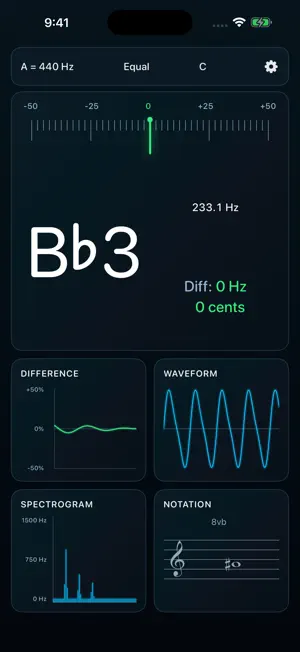
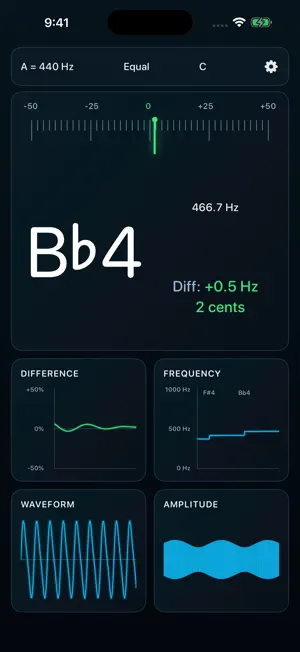
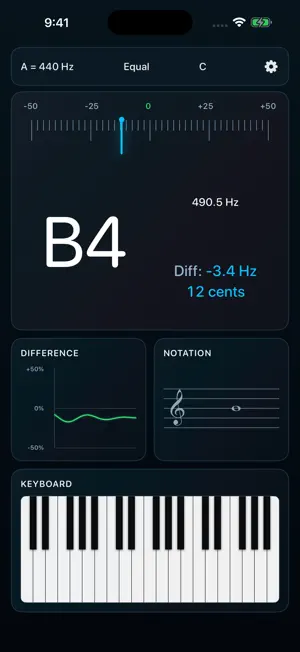
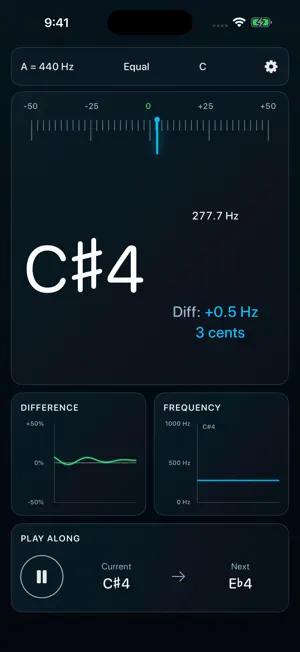
PitchCenter is an innovative tuner that combines helpful visual feedback with a huge collection of adjustable settings to help you with your intonation. Use it as a simple tuner to check your intonation quickly, or dive into its extensive set of graphs and visualizations to work on your intonation in the practice room. PitchCenter is made up of 9 different "panels." Each panel displays tuning information in a different way and can be displayed or hidden in Settings. These panels include: - Tuner view: Standard tuner view including a needle, plus text with the note being played, the frequency of that note in Hz, and the difference between that frequency and what an "in-tune" note should be. - Notation View: The notation view displays the current note on a staff. - Difference Graph: displays pitch (measured in the difference in cents from "in-tune") over time. - Frequency Graph: shows the frequency of the pitch over time. - Waveform View: shows a real-time picture of the current sound wave. - Amplitude Graph: displays the amplitude (or volume) over time. - Spectrogram: displays a visual representation of the prevalence of certain frequencies in the sound wave. - Keyboard: allows you to play pitches using a built-in synthesizer. - Play-along: PitchCenter features a play-along feature that can generate sequences of notes that will be played by the built-in synthesizer. You can then play along with the synthesizer, trying to stay in-tune with the notes being played by the app. PitchCenter and its panels are highly customizable, including settings for: - Equal and just intonation - Frequency calibration (default is A=440) - Clef preference (treble, bass, alto, tenor) - Transposition (any arbitrary transposition -- not just the common C, Eb, Bb, and F) - Color and speed preferences for all the graphs - Note ranges for the tuner, graphs, and play-along - and more! PitchCenter comes with a full manual (accessible from the Settings screen) to help you use all of its features. Questions or comments about the app? Send an email to [email protected] If you love the app, leave a review!
What’s new
Version 2026.1.0 · Updated September 23, 2026
- Updated design - New audio engine
App privacy
The developer, John Nastos, reported these privacy practices to Apple.
Data Not Collected
The developer does not collect any data from this app.
Alternatives to PitchCenter
Looking for apps like PitchCenter? Here are 6 similar apps on the App Store. The highest rated is The Color Encyclopedia (5.0/5).
-
 Pitch Center: Marching Tuner
-
 Amusia
-
 Simple Piano CAEN - Keyboard
-
 The Color Encyclopedia
5.0
The Color Encyclopedia
5.0
-
 Gxnarly
5.0
Gxnarly
5.0
-
 Additive Drum Machine
5.0
Additive Drum Machine
5.0
| App | Rating | Price | Last updated | Compare |
|---|---|---|---|---|
| PitchCenter | 4.8 / 5 (4 ratings) | 2.99 USD | September 23, 2026 | |
| Pitch Center: Marching Tuner | – | 1.99 USD | Mar 5, 2026 | Compare |
| Amusia | – | 3.99 USD | Oct 1, 2026 | Compare |
| Simple Piano CAEN - Keyboard | – | 0.99 USD | Jul 20, 2026 | Compare |
| The Color Encyclopedia | 5.0 / 5 (6) | 9.99 USD | Jul 29, 2026 | Compare |
| Gxnarly | 5.0 / 5 (1) | 4.99 USD | Oct 3, 2026 | Compare |
| Additive Drum Machine | 5.0 / 5 (3) | 2.99 USD | Mar 7, 2024 | Compare |
Compare PitchCenter with the top alternatives: ratings, updates, ASO score and keyword gaps →