

QRefine: QR Code Scanner
T TECH, LIMITED LIABILITY CO. Utilities iPhoneiPadiPod touch
QRefine: QR Code Scanner is a free Utilities app for iPhone and iPad by T TECH, LIMITED LIABILITY CO. Rated 4.3/5 from 3 ratings. Requires iOS 16.0.
- Rating
- 4.3
- 3 ratings
- Price
- Free
- on the App Store
- Size
- 38 MB
- Age 4+
- Updated
- Sep 4
- 2026 · v4.1.0
Screenshots


About QRefine: QR Code Scanner
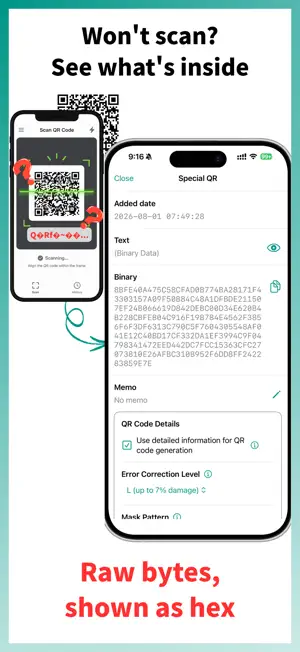
QRefine is a QR code scanner, generator and manager built for people who need QR codes handled accurately, not just quickly. It reads and creates both text and binary QR codes, and it reproduces a scanned code faithfully instead of re-encoding it into something that merely looks similar. WHY QRefine IS DIFFERENT Most QR apps stop at "it scanned". QRefine also tells you how the code was built, and lets you rebuild it the same way. - Read the detailed parameters of a code: error correction level, mask pattern and QR version - Generate a new code with those exact parameters, so the result matches the original pattern - Full binary support, shown and edited as hex, for game codes and enterprise data payloads - Regenerate a blurry, low-resolution or photographed code into a clean, scannable image If your camera recognizes a code but shows nothing, or another app turns it into garbled text, the code is not broken. QRefine gets the data out: the raw bytes are shown as hex, and the text can be read as the code specifies (ECI or Kanji mode) or in the encoding you choose (UTF-8 / Shift_JIS / ISO-8859-1). SCAN AND CREATE - Scan with the camera, or import an image from your photo library - Detect a code embedded inside a screenshot or a saved picture - Re-read scanned text in a different encoding, or as the code specifies - Type text manually to create a QR code - Enter binary data as hex to create a code no ordinary generator can produce - Create a QR code from a file, with its content embedded as binary data (Pro, or free by watching an ad) - Save the result as a PNG image, or export the raw binary as a file - Share the image or the binary data with other apps and devices ORGANIZE YOUR LIBRARY A scan history is fine until you have fifty codes in it. QRefine treats what you save as a library, not a log. - Give every code a name so you can recognize it later - Add a memo to record what it is for - Organize your codes into folders (Pro) - Search by name or memo - Sort and reorder the list - Delete what you no longer need - Back up the whole library to a file and restore it on a new device WHO IT IS FOR - Developers and QA engineers who need to test specific payloads and parameters - Business users who handle enterprise QR codes carrying binary data - Anyone who receives game codes as images and needs a clean, scannable version - Anyone who collects Wi-Fi, ticket, payment or contact codes and wants them in one searchable place QREFINE PRO QRefine remains free: everything the app could do before is still free. QRefine Pro is an optional plan for those who want more. - No ads - Use folders and file-based QR creation without watching ads - Choose a monthly or yearly subscription, or a one-time lifetime purchase ALSO INCLUDED - Dark mode support - A simple, uncluttered interface - Works on iPhone and iPad Scanning, creating, organizing and reusing QR codes, all in one app. If you have ever wished a QR app would tell you what is actually inside the code, this is that app. Terms of Use: https://qrefine.app/terms/ QR Code is a registered trademark of DENSO WAVE INCORPORATED in Japan and in other countries.
What’s new
Version 4.1.0 · Updated September 4, 2026
What's new in this version – You can now change how a QR code's text is displayed. On the details screen, read it as the QR code specifies (ECI or Kanji mode), or in an encoding you choose (UTF-8 / Shift_JIS / ISO-8859-1). The raw bytes are still shown as hex, and the original data is always kept.
App privacy
The developer, T TECH, LIMITED LIABILITY CO., reported these privacy practices to Apple.
Data Used to Track You
The following data may be used to track you across apps and websites owned by other companies:
- Identifiers: Device ID
Data Linked to You
The following data, which may be collected and linked to your identity, may be used for the following purposes:
- Location: Coarse Location
- Identifiers: Device ID, User ID
- Usage Data: Product Interaction, Advertising Data
- Purchases: Purchase History
- Contact Info: Email Address
- User Content: Customer Support
Used for: Third-Party Advertising, Analytics, App Functionality
Data Not Linked to You
The following data, which may be collected but is not linked to your identity, may be used for the following purposes:
- Diagnostics: Crash Data, Performance Data, Other Diagnostic Data
Used for: Analytics, App Functionality
Alternatives to QRefine: QR Code Scanner
Looking for apps like QRefine: QR Code Scanner? Here are 6 similar apps on the App Store. The highest rated is Universal Code Scanner (5.0/5), and all 6 are free to download.
-
 matometeQR
-
 Japan-US Unit Conversion
4.7
Japan-US Unit Conversion
4.7
-
 Fast QR Scanner & Generator
-
 簡単受付QR
-
 QR Scanner Max
-
 Universal Code Scanner
5.0
Universal Code Scanner
5.0
| App | Rating | Price | Last updated | Compare |
|---|---|---|---|---|
| QRefine: QR Code Scanner | 4.3 / 5 (3 ratings) | Free | September 4, 2026 | |
| matometeQR | – | Free | Jan 5, 2024 | Compare |
| Japan-US Unit Conversion | 4.7 / 5 (19) | Free | Oct 26, 2026 | Compare |
| Fast QR Scanner & Generator | – | Free | Oct 13, 2026 | Compare |
| 簡単受付QR | – | Free | May 29, 2024 | Compare |
| QR Scanner Max | – | Free | Oct 27, 2025 | Compare |
| Universal Code Scanner | 5.0 / 5 (1) | Free | Oct 1, 2026 | Compare |