

Dexcom G6
Dexcom Medical iPhoneiPod touchApple Watch
Dexcom G6 is a free Medical app for iPhone and iPod touch by Dexcom. Rated 3.1/5 from 9,048 ratings. Requires iOS 18.6. Updated July 16, 2026.
- Rating
- 3.1
- 9K ratings
- Price
- Free
- on the App Store
- Size
- 66 MB
- Age 4+
- Updated
- Jul 16
- 2026 · v1.16.0
Screenshots


About Dexcom G6
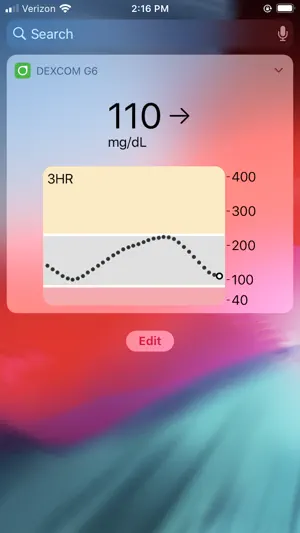
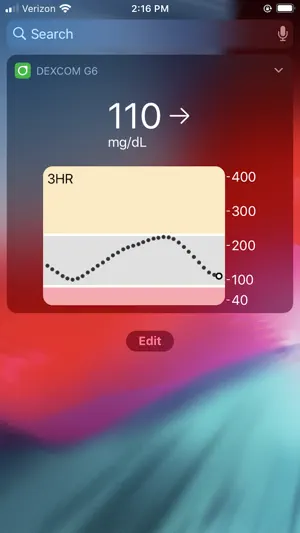
Only use this app if you have the Dexcom G6 or G6 Pro CGM Systems. Always know your glucose number and where it’s heading with the Dexcom G6 and G6 Pro Continuous Glucose Monitoring (CGM) Systems –indicated for diabetes treatment decisions with zero fingersticks and no calibration.* Before you start making treatment decisions with your G6 or G6 Pro, work with your healthcare provider to learn how. *Fingersticks required for diabetes management decisions if symptoms do not match readings. Always know your glucose number with just a quick glance at your compatible smartphone or smartwatch. For a list of compatible devices visit www.dexcom.com/compatibility. Dexcom G6 and G6 Pro provide real-time glucose readings for patients with type 1 or type 2 diabetes every five minutes. Dexcom G6 and G6 Pro are indicated for children, age 2 years and older. The Dexcom G6 and G6 Pro Systems provide personalized trend alerts on your smart device and let you see when your glucose levels are going too low, or too high, so you can better manage your diabetes. The Alert Schedule** feature lets you schedule and customize a second set of alerts. Custom alert sounds are available, including a Vibrate-Only option on the phone for glucose alerts. The only exception is the Urgent Low Alarm, which you can’t turn off. The Always Sound** setting, which is on by default, allows you to receive certain Dexcom CGM Alerts even if your phone sound is off, set to vibrate, or in Do Not Disturb mode. This allows you to silence calls or texts but still receive audible CGM Alarm and Alerts, including the Urgent Low Alarm, Low and High Glucose alerts, Urgent Low Soon Alert**, and Rise and Fall Rate alerts**. A Home screen icon shows you if your Alerts will sound or not. For safety, the Urgent Low Alarm and three alerts can’t be silenced: Transmitter Failed, Sensor Failed, and App Stopped. Other features: • Share** your glucose data with up to ten followers in real time. Followers can monitor your glucose data and trends in real time on their compatible smart device with the Dexcom Follow** app. Share and Follow functions require an internet connection • Health app access so you can share retrospective glucose data with third party apps • Today View widget allows you to view your glucose data on the lock screen of your smart device • Add a shortcut to Siri to run by asking Siri to read your current glucose value, using a custom phrase **Not available on Dexcom G6 Pro CGM System Apple Watch View your glucose information, trend graph, and alerts and alarm right from your wrist with the Dexcom G6 Apple Watch app. Watches require compatible smart device to use app. Customer Reviews This app store should not be used as your first point of contact to resolve technical or customer services issues. In order to protect your privacy and personal information, and promptly resolve any technical or customer services issues you are having with any Dexcom product, please contact 1-888-738-3646 or www.dexcom.com/tech-support. Dexcom is required to follow up with customers regarding product-related complaints. If Dexcom determines that your comment/complaint requires follow up, a technical support representative will attempt to contact you to gather more information regarding your comment/complaint. Dexcom is a registered trademark in the US.
Ratings & reviews
3.1
9K ratings
What’s new
Version 1.16.0 · Updated July 16, 2026
Performance enhancements and bug fixes
App privacy
The developer, Dexcom, reported these privacy practices to Apple.
Data Linked to You
The following data, which may be collected and linked to your identity, may be used for the following purposes:
- User Content: Customer Support, Other User Content
- Identifiers: User ID
- Usage Data: Product Interaction, Other Usage Data
- Diagnostics: Performance Data, Other Diagnostic Data
- Other Data: Other Data Types
- Health & Fitness: Health, Fitness
- Contact Info: Email Address, Name, Other User Contact Info
- Contacts: Contacts
Used for: Analytics, App Functionality, Other Purposes
Data Not Linked to You
The following data, which may be collected but is not linked to your identity, may be used for the following purposes:
- Diagnostics: Crash Data
Used for: Analytics, App Functionality, Other Purposes
Alternatives to Dexcom G6
Looking for apps like Dexcom G6? Here are 6 similar apps on the App Store. The highest rated is Glooko - Track Diabetes Data (4.7/5), and all 6 are free to download.
-
 Omnipod 5 App
3.5
Omnipod 5 App
3.5
-
 Glooko - Track Diabetes Data
4.7
Glooko - Track Diabetes Data
4.7
-
 Tandem t:slim Mobile App
3.1
Tandem t:slim Mobile App
3.1
-
 Glucose | Blood Sugar Tracker
4.6
Glucose | Blood Sugar Tracker
4.6
-
 FreeStyle LibreLink - US
2.9
FreeStyle LibreLink - US
2.9
-
 SNAQ - Diabetes Food Tracker
4.6
SNAQ - Diabetes Food Tracker
4.6
| App | Rating | Price | Last updated | Compare |
|---|---|---|---|---|
| Dexcom G6 | 3.1 / 5 (9,048 ratings) | Free | July 16, 2026 | |
| Omnipod 5 App | 3.5 / 5 (1,762) | Free | Oct 1, 2026 | Compare |
| Glooko - Track Diabetes Data | 4.7 / 5 (9,931) | Free | Aug 28, 2026 | Compare |
| Tandem t:slim Mobile App | 3.1 / 5 (2,146) | Free | Aug 27, 2026 | Compare |
| Glucose | Blood Sugar Tracker | 4.6 / 5 (28,331) | Free | Sep 21, 2026 | Compare |
| FreeStyle LibreLink - US | 2.9 / 5 (3,350) | Free | Apr 14, 2026 | Compare |
| SNAQ - Diabetes Food Tracker | 4.6 / 5 (3,070) | Free | Sep 23, 2026 | Compare |
Compare Dexcom G6 with the top alternatives: ratings, updates, ASO score and keyword gaps →