

Scan How 2
Fonden Unges Uddannelsescenter, Stu - Saerligt Tilrettelagt Ungdomsuddannelse Productivity iPhoneiPadiPod touch
Scan How 2 is a free Productivity app for iPhone and iPad by Fonden Unges Uddannelsescenter, Stu - Saerligt Tilrettelagt Ungdomsuddannelse.
- Rating
- 1.0
- 1 ratings
- Price
- Free
- on the App Store
- Size
- 17 MB
- Age 4+
- Updated
- Jan 21
- 2026 · v1.2.4
Screenshots

About Scan How 2
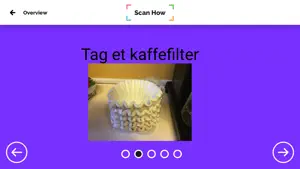
Visualize Workflows with images, video, audio and text - Print QR code - Scan code - Follow the workflow step-by-step! • Do you work with people with special needs to whom visualization is a big help? • Are you a schoolteacher wanting increased activity and independence in the classroom, or do you wish to futher Yothe inclusion of students with special needs? • Do you need to pass information to your colleagues, for example. process descriptions, citizen information etc. • Are you parents and want your child to do more tasks independently? With Scan How, you can quickly and easily create a visual and auditory Workflow that enables people with cognitive difficulties like ADHD, Autism, Dementia, etc. to complete the task. You can create personalized Workflows targeted to the individual's needs. Simply print a QR code and place it where there is a need for support. When the QR code is scanned the tutorial activates and guides them through the process step-by-step. Special needs care (Autism, ADHD and other cognitive difficulties): Scan How was designed as a teaching aid to allow individuals with autism, ADHD and other cognitive disorders to have structure in their lives and be visually guided through tasks and everyday routines. Caregivers will find in Scan How a unique tool, which is very easy to operate. In primary school / Inclusion Make visualized Workflows in eg woodshop, biology, sports, science, etc. which frees up time to invest directly in actual teaching. You can locate activities, tasks and puzzles outside the Place assignments outside the classroom and thus heighten the genereal level of activity and interactivity in your classes. If you have students with special needs you can use Scan How to create personalized visual tutorials, which allows them to navigate and participate in the classes with much more independence. Process descriptor - colleague to colleague Professionals can use Scan How to create workflows that create greater consistency in meeting with the citizens. This could, for example, be descriptions of morning routines, relocation guidelines or drug delivery. All this and much more can easily and safely be shared between the staff of the institution. Families Parents can enhance their child's development through visual tutorials like following recipes, operating household appliances or performing household chores. Predictability is significant for many children and young people, and with Scan How, you can create visual visibility in your daily life. For example, create visual forms with picture and sound. Scan How is developed by professionals with many years of experience in specialized education, and we see increased independence, inclusion and quality of life. Features: Insert photos and videos from camera Insert photos and videos from the gallery Record and insert audio Insert text Determine view time per. page (Can help people with OCD) Organize Workflows in folders Generate QR code Print QR codes in different sizes and colors Send QR code via mail Send copy of workflow to other creators Collaborate on Workflow with other Creators 2 user types in the app - Creator with access to everything - Viewer with access to own workflows and scanner Scan a generated code to easily and quickly log in Language English Danish Scan How Subscription Institutions can be established via the website www.scanhow.com You can organize between 3 predefined package sizes Small package - 3 creators, 15 viewers, 1 admin, 5 gb space and 75 workflows Meduim package - 10 creators, 100 viewers, 1 admin, 10 gb space and 250 workflows Large package - 30 creators, 400 viewers, 5 admins, 20 gb space and 750 workflows Enterprice - If you have an organization that does not fit in one of the packages abow, it is possible in cooperation with Scan How to make a customized package It is also possible to make purchases for its subscription. Course Support Extra space
What’s new
Version 1.2.4 · Updated January 21, 2026
We have updated the app to make it comply with newest Apple guidelines.
App privacy
The developer, Fonden Unges Uddannelsescenter, Stu - Saerligt Tilrettelagt Ungdomsuddannelse, reported these privacy practices to Apple.
Data Linked to You
The following data, which may be collected and linked to your identity, may be used for the following purposes:
- Identifiers: Device ID, User ID
- Usage Data: Product Interaction, Other Usage Data
- Diagnostics: Crash Data
- Contact Info: Email Address, Name
- User Content: Photos or Videos, Audio Data, Other User Content
Used for: Analytics, App Functionality
Alternatives to Scan How 2
Looking for apps like Scan How 2? Here are 6 similar apps on the App Store. The highest rated is 10toPlan (5.0/5), and all 6 are free to download.


| App | Rating | Price | Last updated | Compare |
|---|---|---|---|---|
| Scan How 2 | 1.0 / 5 (1 rating) | Free | January 21, 2026 | |
| PlaNet | – | Free | Aug 14, 2026 | Compare |
| Mobilize Me: Create routines | 2.0 / 5 (1) | Free | Apr 17, 2026 | Compare |
| CAS Vagtplanlægger | – | Free | Apr 11, 2025 | Compare |
| Cliarly | – | Free | Sep 1, 2026 | Compare |
| 10toPlan | 5.0 / 5 (2) | Free | Dec 6, 2025 | Compare |
| CarAdmin | – | Free | Aug 6, 2026 | Compare |
Compare Scan How 2 with the top alternatives: ratings, updates, ASO score and keyword gaps →