

Konica Minolta Mobile Print
Konica Minolta, Inc. Productivity iPhoneiPadiPod touch
Konica Minolta Mobile Print is a free Productivity app for iPhone and iPad by Konica Minolta, Inc. Rated 2.7/5 from 50 ratings. Requires iOS 11.0.
- Rating
- 2.7
- 50 ratings
- Price
- Free
- on the App Store
- Size
- 119 MB
- Age 4+
- Updated
- Mar 30
- 2026 · v3.19
Screenshots


About Konica Minolta Mobile Print
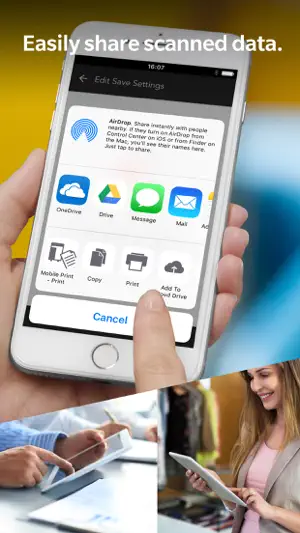
Konica Minolta Mobile Print is an app that allows you to connect your iOS device to a Konica Minolta MFP; the app integrates with the OS to enable trouble-free printing and importing scanned data. [Introduction of Main Functions of Application] Print Function: The OS integration function (Action button function) enables you to print directly from online storage, the browser and camera app on your mobile device. *Action buttons are an iOS function. Not all apps support action buttons. It is also available for printing data with My Documents. Prints images you have selected in the Photo Album function of the app via a connected MFP. Opens any file stored in an integrated app from the Storage function and prints it via a connected MFP. Prints emails and email attachments received when your email address is set up in the Konica Minolta Mobile Print app. Supports Authentication and Secure Print to provide you with a more Secure printing environment. Scan Function: Stores images you scanned via a remotely operated MFP using the Konica Minolta Mobile Print app on your mobile device into any OS-integrated app (a cloud storage app, etc.). It is also available for saving data with My Documents. Bluetooth LE Function: Bluetooth LE enables the following operations: - Registration of an MFP by touching - Print by touching - Scan by touching - Authentication by touching Please refer to Help for details on the features available. [FAQ] Please refer to the following page for FAQ. URL: https://www.btapac.konicaminolta.com/solutions/km_mobile_print/iOS/faq/top.html [Supported printing devices] Please refer to the following page for supported printing devices. URL: https://www.btapac.konicaminolta.com/solutions/km_mobile_print/spec_ios.html Please refer to the following page for additional operating requirements. URL: https://www.btapac.konicaminolta.com/solutions/km_mobile_print/spec_ios.html
Ratings & reviews
2.7
50 ratings
What’s new
Version 3.19 · Updated March 30, 2026
- Bug fix
App privacy
The developer, Konica Minolta, Inc., reported these privacy practices to Apple.
Data Not Linked to You
The following data, which may be collected but is not linked to your identity, may be used for the following purposes:
- Location: Coarse Location
- Usage Data: Product Interaction, Other Usage Data
- Diagnostics: Crash Data, Other Diagnostic Data
Used for: Analytics
Alternatives to Konica Minolta Mobile Print
Looking for apps like Konica Minolta Mobile Print? Here are 6 similar apps on the App Store. The highest rated is UniFi Design (5.0/5), and all 6 are free to download.
-
 KYOCERA Mobile Print
3.0
KYOCERA Mobile Print
3.0
-
 Xerox® Workplace
4.4
Xerox® Workplace
4.4
-
 Lexmark Print
2.2
Lexmark Print
2.2
-
 PrinterShare: WiFi & PDF
4.9
PrinterShare: WiFi & PDF
4.9
-
 UniFi Design
5.0
UniFi Design
5.0
-
 Epson iProjection
4.3
Epson iProjection
4.3
| App | Rating | Price | Last updated |
|---|---|---|---|
| Konica Minolta Mobile Print | 2.7 / 5 (50 ratings) | Free | March 30, 2026 |
| KYOCERA Mobile Print | 3.0 / 5 (30) | Free | Sep 2, 2026 |
| Xerox® Workplace | 4.4 / 5 (175) | Free | Aug 20, 2026 |
| Lexmark Print | 2.2 / 5 (28) | Free | Jul 29, 2026 |
| PrinterShare: WiFi & PDF | 4.9 / 5 (335) | Free | Sep 4, 2026 |
| UniFi Design | 5.0 / 5 (5) | Free | Sep 17, 2026 |
| Epson iProjection | 4.3 / 5 (3,503) | Free | Oct 31, 2025 |