

Thunderstorm Simulator
Scott Dodson Entertainment iPhoneiPadiPod touch
Thunderstorm Simulator is a paid Entertainment app for iPhone and iPad by Scott Dodson. Rated 4.5/5 from 2 ratings. Requires iOS 15.0.0.
- Rating
- 4.5
- 2 ratings
- Price
- 1.99 USD
- on the App Store
- Size
- 72 MB
- Age 12+
- Updated
- Oct 7
- 2026 · v3.6.6
Screenshots
About Thunderstorm Simulator
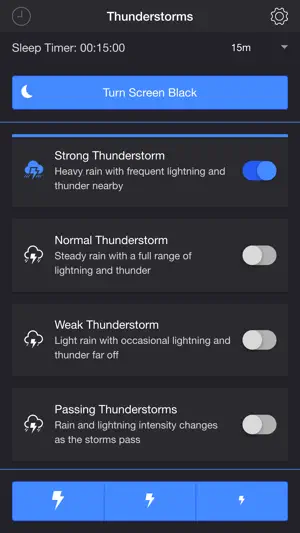
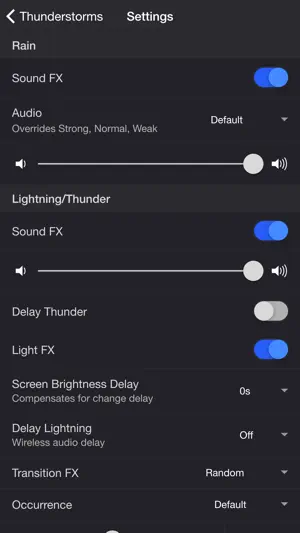
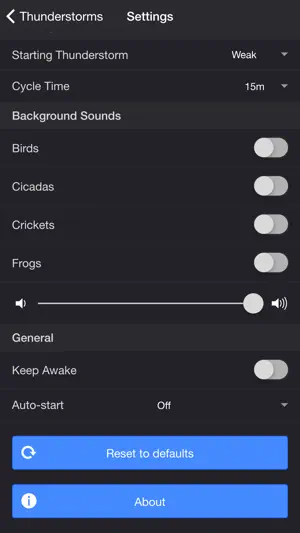
Summon a thunderstorm on your mobile device. Relax and fall fast asleep to the sounds of rain and thunder. The screen or camera flashes when lightning strikes.* *Defaults to screen for lightning light effects if camera flash is not available. THUNDERSTORMS • Strong Thunderstorm — Heavy rain with frequent lightning and thunder nearby • Normal Thunderstorm — Steady rain with a full range of lightning and thunder • Weak Thunderstorm — Light rain with occasional lightning and thunder far off • Passing Thunderstorms — Rain and lightning intensity changes as the storms pass SETTINGS Rain • Toggle rain sound effects • Change rain audio: Default, Heavy, Steady, Light, On Tin Roof • Change rain volume Lightning/Thunder • Toggle thunder sound effects • Change thunder volume • Change delay lightning (Wireless audio delay offset) • Toggle delay thunder • Toggle lightning light effects • Change lightning output: Camera Flash, Screen • Change lightning transition effects • Change lightning/thunder occurrence: Default, Occasional, Normal, Frequent • Change color and max brightness of lightning light effects (Screen only) Passing Thunderstorms • Change starting storm for Passing Thunderstorms: Weak, Normal, Strong • Change cycle time for Passing Thunderstorms: 15m, 30m, 60m Background Sounds • Toggle background sounds: Birds, Cicadas, Crickets, Frogs • Change background sounds volume General • Keep Awake to prevent your device from going to sleep so lightning effects remain visible • Select a mode to automatically start when the app opens • Choose a time to automatically stop the selected mode • Choose a time to automatically restart the selected mode when the sleep timer ends, enabling a recurring cycle ADDITIONAL FEATURES • Sleep Timer — Set a timer with a gradual audio fade-out. • Turn Screen Black — Adds a black overlay and sets the device to minimum brightness. Use the Screen Brightness Delay setting to compensate for brightness ramp-up on some devices. Set to 0.25–1 second if lightning effects do not reach peak brightness when thunder is loudest. • Lightning on Demand — Start a storm and use the lightning buttons at the bottom of the screen for manual control. • Bluetooth Support — Connect to Bluetooth speakers. Adjust the Delay Lightning setting to offset wireless audio delay. Please contact me at [email protected] if you experience any issues. I'd love to hear your thoughts and appreciate you taking the time to rate and review the app. I want to continue to improve Thunderstorm Simulator and create a great experience for you and future users. Thank you! —Scott Ad-supported version: https://apps.apple.com/us/app/thunderstorm-simulator-w-ads/id1482707561
What’s new
Version 3.6.6 · Updated October 7, 2026
Need help? Email [email protected] - fixed compatibility issue
App privacy
The developer, Scott Dodson, reported these privacy practices to Apple.
Data Not Collected
The developer does not collect any data from this app.
Alternatives to Thunderstorm Simulator
Looking for apps like Thunderstorm Simulator? Here are 6 similar apps on the App Store. The highest rated is Thunderstorm simulation (4.4/5), and 3 of the 6 are free to download.
-
 Engine Sounds & Revs
-
 Thunderstorm simulation
4.4
-
 Banner
3.0
-
 Space UI
3.0
-
 Stormy Ambience
-
 Pond Koi
3.1
| App | Rating | Price | Last updated | Compare |
|---|---|---|---|---|
| Thunderstorm Simulator | 4.5 / 5 (2 ratings) | 1.99 USD | October 7, 2026 | |
| Engine Sounds & Revs | – | 0.99 USD | Nov 29, 2024 | Compare |
| Thunderstorm simulation | 4.4 / 5 (28) | Free | Oct 1, 2025 | Compare |
| Banner | 3.0 / 5 (2) | 0.99 USD | Oct 21, 2026 | Compare |
| Space UI | 3.0 / 5 (2) | Free | Sep 15, 2025 | Compare |
| Stormy Ambience | – | Free | Nov 12, 2024 | Compare |
| Pond Koi | 3.1 / 5 (16) | 2.99 USD | Aug 19, 2026 | Compare |