

Smart Mouse & Keyboard for Mac
Sensonet Utilities iPhoneiPadiPod touch
Smart Mouse & Keyboard for Mac is a paid Utilities app for iPhone and iPad by Sensonet. Requires iOS 17.0. Updated October 22, 2026.
- Price
- 1.99 USD
- on the App Store
- Size
- 2 MB
- Age 4+
- Updated
- Oct 22
- 2026 · v2.0
Screenshots



About Smart Mouse & Keyboard for Mac
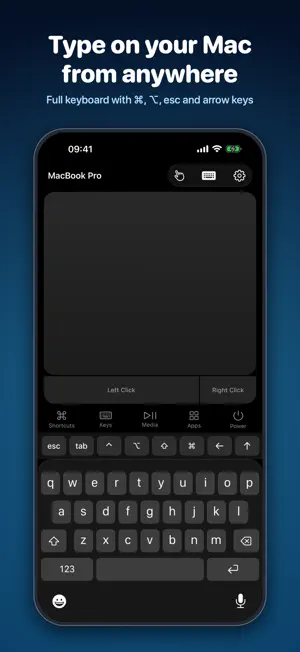
Turn your iPhone into a wireless trackpad, keyboard and remote for your Mac. Smart Mouse & Keyboard 2.0 is rebuilt from the ground up. Point, click, scroll, type and open apps from the couch, across the room or at the front of a classroom. TRACKPAD • Move the pointer with one finger, tap to click, tap twice to double-click • Tap with two fingers to right-click, scroll with two fingers and natural momentum • Touch and hold, then move, to drag files and windows • Swipe with three fingers to switch desktops or open Mission Control • Tablet mode: touch a spot and the pointer jumps exactly there KEYBOARD • Type in any language, with accents and emoji • Esc, Tab, arrow keys and sticky ⌘ ⌥ ⌃ ⇧ modifiers • Function keys F1–F12, Home, End, Page Up and Page Down • Works with a hardware keyboard connected to your iPhone or iPad SHORTCUTS AND APPS • One-tap shortcuts: copy, paste, undo, Spotlight, switch app, screenshot and more • Open any app on your Mac from its real icon MEDIA AND POWER • Play, pause, skip, volume, mute and brightness, with any music or video player • Lock, sleep, restart or shut down your Mac, protected by Face ID or Touch ID PRIVATE BY DESIGN • Pair once by checking that both screens show the same code • Everything between your iPhone and Mac is encrypted • No account, no ads MADE FOR EVERY SCREEN • iPhone, iPad and iPhone Duo, with trackpad and controls side by side on big screens SET UP IN A MINUTE 1. On your Mac, download the free Mouse app from sebaexhibits.com/apps/mouse 2. Open it. It lives in the menu bar. 3. Keep your iPhone and Mac on the same Wi-Fi network and choose your Mac in the app. Requires the free Mouse app for Mac (macOS 13 or later, Apple silicon and Intel).
What’s new
Version 2.0 · Updated October 22, 2026
Version 2.0 is a complete rebuild: • New design for iPhone, iPad and iPhone Duo • Encrypted pairing with a code you confirm on both devices • Smoother pointer, momentum scrolling and drag • Tablet mode, three-finger gestures and 27 shortcuts • Type in any language and emoji, with hardware keyboard support • Open Mac apps from their real icons • Media controls that work with any player Please update the Mac app too: sebaexhibits.com/apps/mouse
App privacy
The developer, Sensonet, reported these privacy practices to Apple.
Data Not Collected
The developer does not collect any data from this app.
Alternatives to Smart Mouse & Keyboard for Mac
Looking for apps like Smart Mouse & Keyboard for Mac? Here are 6 similar apps on the App Store. The highest rated is Bank Statement Converter □ (5.0/5), and 4 of the 6 are free to download.
-
 Pi Block
-
 Bank Statement Converter □
5.0
Bank Statement Converter □
5.0
-
 AI Wizard
5.0
AI Wizard
5.0
-
 Special Symbols: Keyboards
3.5
Special Symbols: Keyboards
3.5
-
 Septeo Solutions Notaires
-
 Gauss Tesla Meter
4.3
Gauss Tesla Meter
4.3
| App | Rating | Price | Last updated | Compare |
|---|---|---|---|---|
| Smart Mouse & Keyboard for Mac | – | 1.99 USD | October 22, 2026 | |
| Pi Block | – | Free | Jun 17, 2026 | Compare |
| Bank Statement Converter □ | 5.0 / 5 (1) | Free | Aug 24, 2026 | Compare |
| AI Wizard | 5.0 / 5 (3) | Free | May 11, 2026 | Compare |
| Special Symbols: Keyboards | 3.5 / 5 (8) | 0.99 USD | Nov 1, 2023 | Compare |
| Septeo Solutions Notaires | – | Free | Sep 18, 2025 | Compare |
| Gauss Tesla Meter | 4.3 / 5 (6) | 0.99 USD | Mar 18, 2026 | Compare |