

US EFB - Aviation Charts
Flygo-Aviation Ltd Weather iPhoneiPadiPod touch
US EFB - Aviation Charts is a free Weather app for iPhone and iPad by Flygo-Aviation Ltd. Rated 4.3/5 from 44 ratings. Requires iOS 26.0.
- Rating
- 4.3
- 44 ratings
- Price
- Free
- on the App Store
- Size
- 13 MB
- Age 4+
- Updated
- Oct 30
- 2026 · v4.2
Screenshots



About US EFB - Aviation Charts
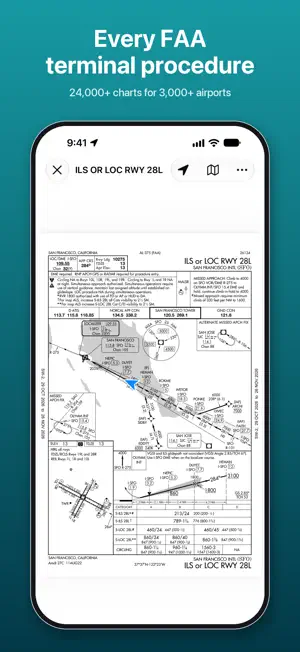
US EFB – Aviation Charts puts the FAA terminal procedures and VFR charts of the United States in your flight bag: more than 24,000 charts for over 3,000 airports, current every 28-day cycle. YOUR POSITION ON THE PLATE • About 9 in 10 approach charts are georeferenced: the app shows your aircraft on the plan view, with track and accuracy. • Lay an approach plate over the map, adjust its opacity, and switch to another runway's approach with one tap. PROCEDURES ON THE MAP • Departures, arrivals and approaches drawn to scale from the FAA CIFP: transitions, the final approach and a dashed missed approach. • Runway numbers and thresholds appear when you zoom in on an airport. VFR CHARTS • FAA sectional and terminal area charts over the map, seamless from one chart to the next, with your position and the airports' weather on top. • Download the charts you fly with and use them offline; each 56-day edition is installed when you choose. IN THE COCKPIT • Night charts: plates drawn white on black in Dark Mode, to protect your night vision. • Track-up moving map that turns with your GPS track; the screen stays on while a chart is open or the map follows you. WEATHER AT A GLANCE • Airports on the map are colored by flight category (VFR, MVFR, IFR, LIFR) from the latest METAR. • Decoded METAR and TAF in your units, sunrise and sunset in UTC. • The latest reports stay on the device, with their age, for a launch without a connection. AIRPORTS • Search by FAA, ICAO or IATA identifier, name or city; nearby airports with distance and bearing. • Charts sorted by category and runway: airport diagram, approaches, STARs, departures, minimums, hot spots. • FAA airport data: frequencies (ATIS, clearance, ground, tower, CTAF, approach and departure), runways with length, width and surface, elevation, magnetic variation, tower, owner and manager. READY BEFORE YOU FLY • Download an airport, a whole route with its alternates or a whole state; the download goes on in the background, and the charts open without a connection. • The next cycle is downloaded about three weeks ahead with your offline charts, and takes over at 0901Z on the effective date, even without a connection. • Routes with alternates, favorites and recent airports. Designed for iPhone and iPad, with a full-screen map and Liquid Glass controls. FREE AND PRO Free: the map with weather, airport information and airport diagrams. Aviation Charts Pro: every terminal procedure, VFR charts, offline charts, routes, and plates and procedures on the map. Annual or monthly subscription, each with a one-week free trial. Payment is charged to your Apple Account at confirmation of purchase. The subscription renews automatically unless it is turned off at least 24 hours before the end of the current period. Manage or cancel it in your Apple Account settings. The charts are the official FAA d-TPP and VFR raster chart publications. Always confirm with official sources and NOTAMs before flight; position display and procedure lines are for situational awareness, not primary navigation. Privacy policy: https://www.flygo-aviation.com/privacy-policy-flygo/ Terms of use: https://www.flygo-aviation.com/terms-of-use-flygo/
Ratings & reviews
4.3
44 ratings
What’s new
Version 4.2 · Updated October 30, 2026
Aviation Charts 4.2 is made for the cockpit. • Frequencies: ATIS, clearance, ground, tower, CTAF, approach and departure for every airport, in the order you use them. • Night charts: plates white on black in Dark Mode, to protect your night vision. • Track up: tap the location button again and the map turns with your GPS track. • The screen stays on while a chart is open or the map follows you. • Download a whole state for offline use (Pro). Airport, route and state downloads go on in the background. • The latest METAR and TAF stay available without a connection, with their age. • With Differentiate Without Color, the flight category is written under each airport on the map. • Faster map loading and cycle switch.
App privacy
The developer, Flygo-Aviation Ltd, reported these privacy practices to Apple.
Data Not Linked to You
The following data, which may be collected but is not linked to your identity, may be used for the following purposes:
- Diagnostics: Crash Data, Other Diagnostic Data
- Location: Precise Location, Coarse Location
Used for: Analytics, App Functionality
Alternatives to US EFB - Aviation Charts
Looking for apps like US EFB - Aviation Charts? Here are 6 similar apps on the App Store. The highest rated is WindCheck (4.9/5), and all 6 are free to download.
-
 WilCo - Pilot Aviation Weather
4.2
WilCo - Pilot Aviation Weather
4.2
-
 Aviator Assistant: Pilot EFB
4.5
Aviator Assistant: Pilot EFB
4.5
-
 Stratus Insight EFB
3.6
Stratus Insight EFB
3.6
-
 RunwayMap - #1 Pilot Community
4.3
RunwayMap - #1 Pilot Community
4.3
-
 Aviation Weather - METARs/TAFs
4.0
Aviation Weather - METARs/TAFs
4.0
-
 WindCheck
4.9
WindCheck
4.9
| App | Rating | Price | Last updated | Compare |
|---|---|---|---|---|
| US EFB - Aviation Charts | 4.3 / 5 (44 ratings) | Free | October 30, 2026 | |
| WilCo - Pilot Aviation Weather | 4.2 / 5 (14) | Free | Jan 24, 2026 | Compare |
| Aviator Assistant: Pilot EFB | 4.5 / 5 (75) | Free | Aug 11, 2026 | Compare |
| Stratus Insight EFB | 3.6 / 5 (9) | Free | Oct 14, 2026 | Compare |
| RunwayMap - #1 Pilot Community | 4.3 / 5 (29) | Free | Feb 18, 2026 | Compare |
| Aviation Weather - METARs/TAFs | 4.0 / 5 (9) | Free | Jun 5, 2026 | Compare |
| WindCheck | 4.9 / 5 (165) | Free | Oct 10, 2026 | Compare |