

RS-MS1I
ICOM INCORPORATED Utilities iPhoneiPadiPod touch
RS-MS1I is a free Utilities app for iPhone and iPad by ICOM INCORPORATED. Rated 1.9/5 from 76 ratings. Requires iOS 16.0. Updated July 17, 2026.
- Rating
- 1.9
- 76 ratings
- Price
- Free
- on the App Store
- Size
- 34 MB
- Age 4+
- Updated
- Jul 17
- 2026 · v1.40
Screenshots
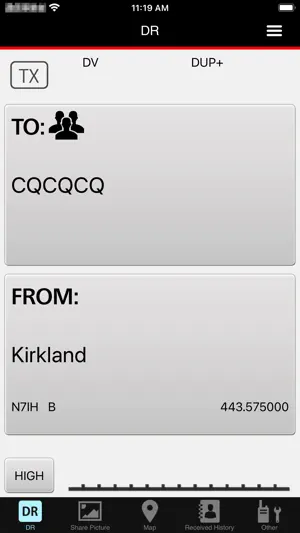


About RS-MS1I
Functional overview of the application DR functions You can use some transceiver’s DR functions. Share pictures Send and receive voice and pictures. Map See the location of repeater sites or other stations on a map using received position data, or your transceiver’s repeater list. Automatically set the transceiver’s “FROM” and “TO” fields by tapping a repeater site or a station on the map. Receive History In the DV mode, read and edit the received station’s information. Download additional information from an Internet database, such as QRZ.com or APRS.fi. Text messaging Send and receive text messages. Call Sign list Edit call signs and names used in the DR function. Also, you can add a call sign and a name in the Call Sign list. Repeater list See the detailed data entered in the Repeater list. Transceiver settings Change some of the transceiver’s function settings. Application settings Select application software settings. Import Import a Repeater list or a Call Sign list. Export Export a Repeater list, a Call Sign list, or Receive History. See the transceiver’s instruction manual for details. The instruction manual can be downloaded from the ICOM web site. Device requirements The RS-MS1I operating requirements are as follows: iOS16 or later Usable transceivers (As of May 2026) - ID-4100A/E + Bluetooth unit (UT-137) - ID-52A or ID-52E *1 - ID-52A PLUS or ID-52E PLUS *2 - ID-5200A or ID-5200E *3 - IC-705 *4 *1 Supported in RS-MS1I Ver.1.1.0 or later. *2 Supported in RS-MS1I Ver.1.3.0 or later. *3 Supported in RS-MS1I Ver.1.4.0 or later. *4 Supported in RS-MS1I Ver.1.2.0 or later. Preparation To use the RS-MS1I with a supported transceiver, you need an optional Bluetooth unit. See your transceiver’s instruction manual for details. Transceiver’s settings Set the following functions as shown below to use the RS-MS1I. [Function] > [CI-V] > [CI-V Transceive]: ON [Bluetooth Set] > [Data Device Set] > [Serial Port Function]: CI-V (Echo back OFF) Note: - The RS-MS1I may not work with all iPhones or iPads, even if they are one of the tested devices. This is because an application program on your device may conflict with the RS-MS1I. - The RS-MS1I may not be used, depending on the OS version, installed application, and so on. - Bluetooth LE is used for the connection with the transceiver, so there may be a time delay between the transceiver’s operation and the display on the iPhone or iPad. - When sending or receiving pictures using “FAST mode,” the headset audio will be temporarily interrupted because of the transceiver’s Bluetooth unit limitations. - You may need to connect to the Internet through a Wireless LAN, an LTE network or a 5G network for some functions. - The RS-MS1I supports only portrait orientation with the iPhone. It does not support Auto Rotate. However, landscape orientation and Auto Rotate are supported with the iPad.
Ratings & reviews
1.9
76 ratings
What’s new
Version 1.40 · Updated July 17, 2026
- Supported with ID-5200A/E. - Supported the display of 10 GHz band repeaters. - Fixed a bug where the app would crash when displaying the map screen on devices running iOS 26 or iPadOS 26.
App privacy
The developer, ICOM INCORPORATED, reported these privacy practices to Apple.
Data Not Collected
The developer does not collect any data from this app.
Alternatives to RS-MS1I
Looking for apps like RS-MS1I? Here are 6 similar apps on the App Store. The highest rated is SDR-Control Mobile (4.6/5), and 3 of the 6 are free to download.
-
 SDR-Control Mobile
4.6
SDR-Control Mobile
4.6
-
 SDR-Control for Icom
4.2
SDR-Control for Icom
4.2
-
 HamAlert
4.0
HamAlert
4.0
-
 iFTx
4.2
iFTx
4.2
-
 AntScope
2.3
AntScope
2.3
-
 B.B. Link Configurator
4.6
B.B. Link Configurator
4.6
| App | Rating | Price | Last updated | Compare |
|---|---|---|---|---|
| RS-MS1I | 1.9 / 5 (76 ratings) | Free | July 17, 2026 | |
| SDR-Control Mobile | 4.6 / 5 (69) | 44.99 USD | Oct 27, 2026 | Compare |
| SDR-Control for Icom | 4.2 / 5 (70) | 49.99 USD | Oct 27, 2026 | Compare |
| HamAlert | 4.0 / 5 (34) | Free | Oct 5, 2026 | Compare |
| iFTx | 4.2 / 5 (70) | 1.99 USD | Aug 29, 2025 | Compare |
| AntScope | 2.3 / 5 (59) | Free | Oct 15, 2026 | Compare |
| B.B. Link Configurator | 4.6 / 5 (8) | Free | Dec 27, 2025 | Compare |
Compare RS-MS1I with the top alternatives: ratings, updates, ASO score and keyword gaps →