

QR Scanner: Scan & Create
Do Tri Utilities iPhoneiPadiPod touch
QR Scanner: Scan & Create is a free Utilities app for iPhone and iPad by Do Tri. Rated 4.5/5 from 22 ratings. Requires iOS 17.6. Updated March 19, 2026.
- Rating
- 4.5
- 22 ratings
- Price
- Free
- on the App Store
- Size
- 34 MB
- Age 4+
- Updated
- Mar 19
- 2026 · v3.5
Screenshots


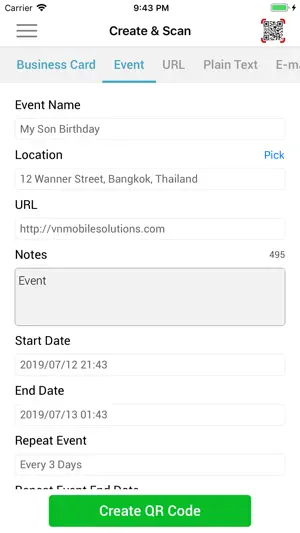

About QR Scanner: Scan & Create
Scan, create, and share QR codes instantly. Fast, accurate, and beautifully simple — everything you need in one powerful QR & barcode app. Turn your iPhone into an everyday tool for scanning payments, sharing WiFi, saving contacts, and more. FEATURES Scan QR & Barcodes • Instant scanning with your camera • Scan codes from photos or gallery • Works in low light with flashlight • Automatic scan history Smart Actions • Save contacts from vCard • Add events to Calendar • Pay quickly with VietQR • Open websites instantly Create QR Codes • WiFi, URL, contact, email, text, phone, events • Customize colors and size • Add logo to your QR code • Use photos as background Share Easily • Share via Messages, Mail, or social apps • Save to Photos • Access your codes anytime WHY YOU’LL LOVE IT • Fast and accurate scanning • Clean, easy-to-use design • Works whenever you need it • All-in-one QR solution
Ratings & reviews
4.5
22 ratings
What’s new
Version 3.5 · Updated March 19, 2026
• Added support for more languages • Improved performance and stability • Updated libraries for better reliability • Minor bug fixes and optimizations
App privacy
The developer, Do Tri, reported these privacy practices to Apple.
Data Used to Track You
The following data may be used to track you across apps and websites owned by other companies:
- Location: Coarse Location
- Identifiers: Device ID
- Diagnostics: Performance Data
Data Not Linked to You
The following data, which may be collected but is not linked to your identity, may be used for the following purposes:
- Location: Coarse Location
- Identifiers: Device ID
- Diagnostics: Performance Data
Used for: Third-Party Advertising, Analytics