

Onions for layout videos
REAFO CO., LTD. Photo & Video iPhoneiPadiPod touch
Onions for layout videos is a free Photo & Video app for iPhone and iPad by REAFO CO., LTD. Rated 3.8/5 from 6 ratings. Requires iOS 16.0.
- Rating
- 3.8
- 6 ratings
- Price
- Free
- on the App Store
- Size
- 54 MB
- Age 4+
- Updated
- Oct 5
- 2026 · v3.6
Screenshots



About Onions for layout videos
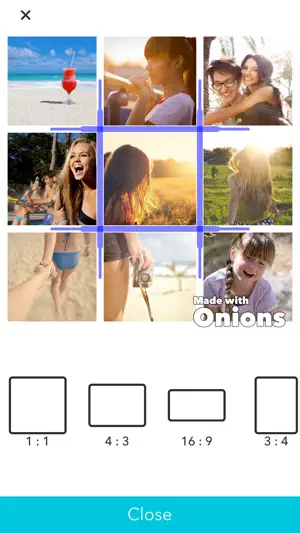
“Onions” is an application that allows you to layout, save, and play your images and videos. It’s extremely easy to use. Simply select your desired photos and videos from your camera roll and then select a layout. Potential uses are unlimited, and include wedding memories, collection of childhood memories, vacation photos and more! Videos and photos can be combined into a single video, so it’s convenient for documenting everyday life or creating birthday videos. From 1 to 9 videos can be arranged. *Editing videos After placing a video, simply tap it once to open the editing menu. Tap again to return to the normal menu. *Arranging videos Long-press on any video cell and you’ll be able to drag the video to your desired position. *Adjusting the frame size The size of the frames can be adjusted using the handles that appear between frames. [Other Functions] *Exported video size -You may change the size of the exported video. -During editing, you may select any size that you wish. -The choices are as follows: -Square: 1:1 -Long: 16:9 4:3 -Tall: 9:16 3:4 *Reading images You may select any image for inclusion in a video. The same image can be used multiple times. *Loading burst images - With burst images, you can select the range and the playback speed during loading. *Loading Videos - You may select a time range. - The same video can be used multiple times. - You may adjust the volume. - It is possible to reverse or rotate the video. - The playback speed can be adjusted. *Color Panel You may select a color and load it as an image. *Music – you can select background music from your iPod or from iTunes. - The music from a local video can be used as background music. - Multiple songs can be arranged in the order of your choosing. - You may adjust the volume. - You can select the start and end times. *Professional Version Purchasing the professional version will give you access to professional layouts and will remove the automatic watermark from videos.
Ratings & reviews
3.8
6 ratings
What’s new
Version 3.6 · Updated October 5, 2026
Thank you for using our service. - Fixed minor bugs.
App privacy
The developer, REAFO CO., LTD., reported these privacy practices to Apple.
Data Used to Track You
The following data may be used to track you across apps and websites owned by other companies:
- Identifiers: Device ID
- Usage Data: Advertising Data
Data Linked to You
The following data, which may be collected and linked to your identity, may be used for the following purposes:
- Identifiers: Device ID
Used for: Third-Party Advertising
Data Not Linked to You
The following data, which may be collected but is not linked to your identity, may be used for the following purposes:
- Usage Data: Advertising Data
- Diagnostics: Crash Data
Used for: Third-Party Advertising, Analytics
Alternatives to Onions for layout videos
Looking for apps like Onions for layout videos? Here are 6 similar apps on the App Store. The highest rated is Reverse Video Editor - Funny (5.0/5), and all 6 are free to download.
-
 Mosaic Photo & Video Collage
1.0
-
 Justified Photo Collage
3.4
-
 VideoGrid: Photo Collage Maker
3.8
-
 Reverse Video Editor - Funny
5.0
-
 Reverse Video - Play Backwards
4.6
-
 Video Collage Maker:Mix Videos
5.0
| App | Rating | Price | Last updated | Compare |
|---|---|---|---|---|
| Onions for layout videos | 3.8 / 5 (6 ratings) | Free | October 5, 2026 | |
| Mosaic Photo & Video Collage | 1.0 / 5 (1) | Free | Jun 14, 2026 | Compare |
| Justified Photo Collage | 3.4 / 5 (8) | Free | Jun 13, 2026 | Compare |
| VideoGrid: Photo Collage Maker | 3.8 / 5 (56) | Free | Apr 22, 2026 | Compare |
| Reverse Video Editor - Funny | 5.0 / 5 (2) | Free | Nov 28, 2023 | Compare |
| Reverse Video - Play Backwards | 4.6 / 5 (253) | Free | Oct 12, 2026 | Compare |
| Video Collage Maker:Mix Videos | 5.0 / 5 (6) | Free | Oct 5, 2026 | Compare |