

FreightTracer Mobile
Freight Exchange Network LLC Business iPhoneiPadiPod touch
FreightTracer Mobile is a free Business app for iPhone and iPad by Freight Exchange Network LLC. Rated 3.1/5 from 20 ratings. Requires iOS 14.0.
- Rating
- 3.1
- 20 ratings
- Price
- Free
- on the App Store
- Size
- 15 MB
- Age 4+
- Updated
- Jul 16
- 2024 · v2.0.89
Screenshots


About FreightTracer Mobile
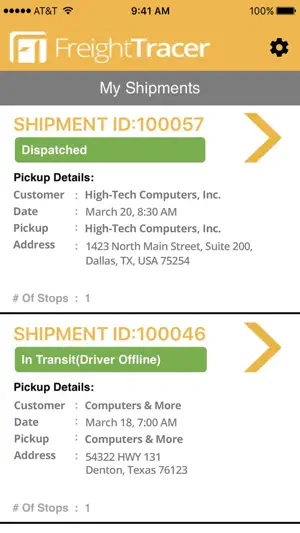
FreightTracer gives shippers the ability to track their freight in real time, whether they use company drivers, asset-based trucking companies, or third-party logistics (3PL) companies. No longer do they need to rely on phone calls or carrier truck GPS devices to determine exactly where their freight is at any given time. With FreightTracer Mobile, participating drivers are able to interact with the app to manage their loads from pickup to delivery, giving FreightTracer customers insight into the status of each load, every step of the way. IMPORTANT: The FreightTracer Mobile app is required for participating drivers within all associated FreightTracer accounts. Among other features, FreightTracer Mobile offers: * Real-Time FTL GPS Tracking * Automatic Actual Time In/Time Out * Delivery Route Tracing * Real-Time Pick-Up & Delivery Info * Immediate POD Upload * File Upload Storage * Driver Mobile Load Management REAL-TIME FTL GPS TRACKING FreightTracer Mobile offers truck-level insight into the location of shipments, giving drivers the ability to easily manage the shipping process, from dispatch to delivery. FreightTracer respects driver privacy. We will only track drivers during actual transportation of shipments. Drivers will not be tracked in between shipments and when on break. AUTOMATIC ACTUAL TIME IN/TIME OUT FreightTracer utilizes advanced geo-fencing technology, allowing the system to detect when the truck (via the GPS function of the driver's Internet-connected iOS device) has arrived at the pick-up location or any of the delivery destinations. This relieves the driver from having to note pickup and delivery times and compares actual times with those entered by the shipping manager to determine timeliness of the progress of the load. DELIVERY ROUTE TRACING FreightTracer is with your shipments every step of the way. When a load is created and dispatched to a driver, FreightTracer's advanced GPS and mapping technology will display shipment locations, and the route traveled, on maps within the app and FreightTracer web application dashboard. REAL-TIME PICK-UP & DELIVERY INFO From the moment a load is dispatched to a driver, the combination of FreightTracer's advanced GPS tracking functions with geo-fencing technology and minimal driver interaction allow our customers to see in real time when the load is picked up, the path it takes while en route, and when it is delivered. FreightTracer's advanced back-end technology tracks and records multiple data points about each shipment, which customers can access through the dashboard. IMMEDIATE POD UPLOAD As soon as the load is delivered, in addition to FreightTracer automatically updating the load status, the driver can use their iOS device to photograph and upload the POD document directly to the dashboard as a PDF, where it can be viewed, printed, emailed, etc. FILE UPLOAD STORAGE With FreightTracer, drivers have the ability to upload documents related to loads. Using their iOS devices, drivers can photograph and upload important documents associated with each load. DRIVER MOBILE LOAD MANAGEMENT Drivers are integral to tracking the status of their loads. Using their iOS devices along with the guidance of FreightTracer's GPS and geo-fencing technologies, drivers help manage the load process from pickup to delivery. And because driver privacy is very important to us, drivers will not be tracked when in between loads or on breaks. GET STARTED * Participating drivers must download and install the FreightTracer Mobile app * Drivers will receive notification by email and SMS when a load has been dispatched to them * Clicking the link from the SMS message or email will launch the app and pre-populate the Shipment ID field * Drivers must note the Shipment Authorization ID from the SMS message or email and manually enter it on the app login screen * Follow the prompts to view the load’s dashboard Note: Continued use of GPS running in the background can decrease battery life.
Ratings & reviews
3.1
20 ratings
What’s new
Version 2.0.89 · Updated July 16, 2024
We have improved the performance of document uploads and improved document upload capabilities of the application.
App privacy
The developer, Freight Exchange Network LLC, reported these privacy practices to Apple.
Data Used to Track You
The following data may be used to track you across apps and websites owned by other companies:
- Location: Precise Location
Data Not Linked to You
The following data, which may be collected but is not linked to your identity, may be used for the following purposes:
- Location: Precise Location
- Identifiers: Device ID
Used for: App Functionality
Alternatives to FreightTracer Mobile
Looking for apps like FreightTracer Mobile? Here are 6 similar apps on the App Store. The highest rated is LBOARD Carrier (5.0/5), and all 6 are free to download.
-
 LBOARD Carrier
5.0
-
 Load Market Tracking
3.5
-
 Transfix
4.8
-
 Chain Driver
4.6
-
 Strategy Live Carrier
2.3
-
 CarrierView Driver
2.4
| App | Rating | Price | Last updated | Compare |
|---|---|---|---|---|
| FreightTracer Mobile | 3.1 / 5 (20 ratings) | Free | July 16, 2024 | |
| LBOARD Carrier | 5.0 / 5 (6,895) | Free | Oct 2, 2026 | Compare |
| Load Market Tracking | 3.5 / 5 (39) | Free | Jul 18, 2026 | Compare |
| Transfix | 4.8 / 5 (4,608) | Free | Oct 21, 2025 | Compare |
| Chain Driver | 4.6 / 5 (2,754) | Free | Sep 21, 2026 | Compare |
| Strategy Live Carrier | 2.3 / 5 (6) | Free | Sep 2, 2026 | Compare |
| CarrierView Driver | 2.4 / 5 (10) | Free | Oct 21, 2026 | Compare |