

Whiteboard: just draw together
James Schultz Business iPhoneiPadiPod touchMac
Whiteboard: just draw together is a free Business app for iPhone and iPad by James Schultz. Rated 4.5/5 from 88,142 ratings. Requires iOS 17.5.
- Rating
- 4.5
- 88.1K ratings
- Price
- Free
- on the App Store
- Size
- 28 MB
- Age 4+
- Updated
- Aug 5
- 2026 · v2.8.2
Screenshots
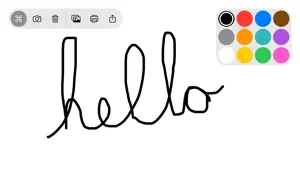

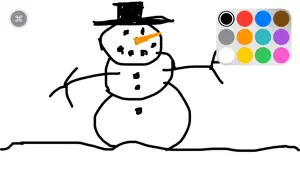
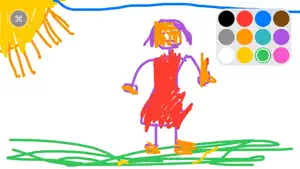
About Whiteboard: just draw together
A clean whiteboard and several basic colors, just draw together. Simple, easy, focused and fun. I made this app as a prototype for a larger app I was working on, to my delight my kids LOVED it. They use this whenever they want to draw instead of the other drawing apps we already had. I think they love it so much because there's no extra stuff to get in the way, they can just be totally immersed in drawing. So I decided to release it to the App Store and let others try it out too. I appreciate your support. Features: * Draw anything you want with the colors of the rainbow. * Draw together with friends and family using the Messages app. Just send a drawing to a friend and they can open it and draw on it too and then send it back. * 6 convenient preconfigured marker sizes * Undo, Redo, and Clear drawing actions * Special "Rainbow" marker lets you draw with a rainbow!!! you gotta try it! * Change the background color by long pressing on one of the colors * Remembers your last used marker color and size and your canvas color. * Import photos to trace, annotate, and have fun with * Shake to erase * Save your drawings to your Photos library * Print your drawings to AirPrint enabled printers * Share your drawings with Messages, Mail, and many more * Creator Kit allows you to provide financial support for development of Whiteboard. Whiteboard Labs Features (early stage features you can opt-in to try) * Draw with Knobs - draw pictures using knobs the old school way! * Screen Recording - record the screen and audio as you draw, save or send the recording to friends and family. * Draw with Motion - tilt your device to draw a picture My goal is to make the funnest and easiest to use drawing app for kids. I improve Whiteboard with your reviews, feedback, and financial support. If you or someone you know, enjoys using Whiteboard: • Please subscribe to CreatorKit to help support development • Please rate the app 5 stars so more people find it • Please share Whiteboard with a friend or family member to help get the word out. • Please email me [email protected] and let me know how you're using Whiteboard, send me drawings, questions, concerns and feedback. • Please subscribe to my Youtube channel https://www.youtube.com/channel/UCSr7ecHz6AnGvbGJNJSODbw • Please send me your Whiteboard drawings on Instagram @getwhiteboard. - Jim Privacy Policy: https://getwhiteboard.com/privacy EULA (Terms of Use): https://www.apple.com/legal/internet-services/itunes/dev/stdeula/
Ratings & reviews
4.5
88.1K ratings
What’s new
Version 2.8.2 · Updated August 5, 2026
Thanks everyone for using Whiteboard. Here's what's new in this version :) Please keep the feedback coming y'all! Enjoy. CHANGELOG * Smoother editing and faster saves for large drawings * Faster drawing library loading * Photo picker opens faster * Creator Kit unlocks more reliably after purchase * Fixes an issue with drawing on iOS 17 devices 2.0 Additions and Improvements * Introducing SharePlay drawing, draw with others over FaceTime or Messages. * Introducing Creator Kit, get the most out of Whiteboard and support Indie development * Now you can zoom in and out on drawings and images! * Scroll around in freedom on the all new, expansive, drawing board. * Autorotate from portrait to landscape and back, or you can choose to lock orientation. * Drawing library, open and continue working on your recent drawings. * Add new drawing button, create a new drawing anytime. * Significant performance and stability improvements * Adds lock for drawing board zoom/pan/scroll * Many more exciting things are coming * Stay tuned - Jim Issues, questions or suggestions? • [email protected] Like Whiteboard? • Please subscribe to Creator Kit to help support development • Please rate the app 5 stars so more people find it • Please share Whiteboard with a friend or family member to help get the word out. • Please email me [email protected] and let me know how you're using Whiteboard, send me drawings, questions, concerns and feedback. • Please subscribe to my YouTube channel https://www.youtube.com/channel/UCSr7ecHz6AnGvbGJNJSODbw • Please send me your Whiteboard drawings on Instagram @getwhiteboard
App privacy
The developer, James Schultz, reported these privacy practices to Apple.
Data Not Linked to You
The following data, which may be collected but is not linked to your identity, may be used for the following purposes:
- Identifiers: Device ID
- Usage Data: Product Interaction
Used for: Analytics
Alternatives to Whiteboard: just draw together
Looking for apps like Whiteboard: just draw together? Here are 6 similar apps on the App Store. The highest rated is Simple Whiteboard by Qrayon (4.6/5), and all 6 are free to download.
-
 Drawing Pad procreate Sketch
4.1
-
 Drawing ▫
4.1
-
 Simple Whiteboard by Qrayon
4.6
-
 Linea Sketch
3.7
-
 Microsoft Whiteboard
4.6
-
 Penbook: Paper Planner & Notes
4.6
| App | Rating | Price | Last updated | Compare |
|---|---|---|---|---|
| Whiteboard: just draw together | 4.5 / 5 (88,142 ratings) | Free | August 5, 2026 | |
| Drawing Pad procreate Sketch | 4.1 / 5 (67,092) | Free | May 1, 2024 | Compare |
| Drawing ▫ | 4.1 / 5 (15,175) | Free | Sep 28, 2026 | Compare |
| Simple Whiteboard by Qrayon | 4.6 / 5 (12,133) | Free | Oct 6, 2026 | Compare |
| Linea Sketch | 3.7 / 5 (802) | Free | May 6, 2026 | Compare |
| Microsoft Whiteboard | 4.6 / 5 (12,332) | Free | Dec 15, 2025 | Compare |
| Penbook: Paper Planner & Notes | 4.6 / 5 (45,468) | Free | Oct 7, 2026 | Compare |